Introduction
Payroll teams rarely work with one clean system. Employee records live in an HRIS, hours sit in a time-tracking tool, benefits elections sit somewhere else, and the general ledger waits for journal entries keyed in by hand.
Many HR and finance teams struggle with this exact problem: the same employee data gets re-entered three or four times, and each re-entry is a chance for an error.
For HR tech and payroll companies, the stakes are higher. Customers expect a product to "just work" with whatever payroll system they already use, whether that's ADP, Gusto, Workday, or a regional provider nobody's heard of.
This guide covers:
- What payroll integration actually is
- How data moves between systems
- The difference between API and file-based connections
- Common use cases and how to evaluate an integration approach
We'll also separate two different problems: connecting your own internal payroll stack versus building customer-facing connections that work across every payroll provider your customers might use.
Key Takeaways
- Payroll integration links payroll with HRIS, time tracking, benefits, accounting, and ATS platforms to cut duplicate data entry
- API connections support faster, more controlled data flow; file-based methods still serve legacy systems well
- Strong implementations depend on clear field ownership, secure authentication, and ongoing reconciliation
- A unified API lets HR tech companies support many payroll providers through one normalized connection layer
What Is Payroll Integration?
Payroll integration is the connection between a payroll system and another business application that lets agreed-upon data move automatically, or on a set schedule, instead of being typed in twice. That's it. No magic, just a defined data exchange between two systems that would otherwise operate in isolation.
The data categories typically exchanged include:
- Worker identity and employment status (active, terminated, on leave)
- Compensation, pay schedules, and tax-related fields
- Hours worked, overtime, and deductions
- Benefits elections, dependents, and coverage dates
- Payroll results and accounting entries for the general ledger
Integration vs. Automation
These terms get used interchangeably, but they're not the same thing. Integration moves data between systems. Automation uses that connected data to trigger a workflow, such as starting onboarding tasks, posting a payroll journal entry, or firing an alert when a termination date hits.
You need integration before automation can do anything useful.
Internal vs. Customer-Facing Integrations
There are two distinct problems hiding under the same term:
- Internal integrations connect systems used by one organization, like payroll talking to its own HRIS or time-and-attendance tool.
- Customer-facing integrations let an HR tech, benefits, or payroll product connect to whatever payroll provider each of its customers happens to use.
An internal integration is a one-time engineering project. A customer-facing one means supporting dozens of providers, each with different data formats, authentication rules, and quirks.
Bindbee's HR tech use cases cover exactly this second problem, with payroll data (earnings, deductions, tax withholdings, pay schedules) and time-and-attendance data standardized across more than 60 connected systems.
API payroll integration is one method for building either type of connection. It's not the only one; file-based and interface-based approaches still matter, and we'll cover those next.
How Payroll Integration Works
Most payroll integrations follow the same basic sequence, regardless of which provider sits on the other end:
- Authenticate the connection between source and destination system
- Retrieve or receive data, either by pulling it through an API or accepting a delivered file
- Map provider-specific fields to a common data model
- Validate records for completeness and accuracy
- Transform formats as needed
- Deliver the update and log the result

Who Owns Which Field
Before any of that works, someone has to decide which system is the source of truth for each field:
- Employee status usually belongs to the HRIS
- Worked hours belong to the time-tracking system
- Deductions belong to payroll
- Plan elections belong to the benefits platform
Skip this step and you'll end up with two systems disagreeing about whether someone still works there.
One-Way vs. Two-Way Sync
One-way sync pushes data in a single direction, which works fine when the destination only needs to consume payroll information. Two-way (bidirectional) sync lets approved changes travel back to the source system, but it demands conflict resolution, write permissions, and tighter validation rules. Writing data back is always riskier than reading it.
A Practical Example
Say a new hire gets added in an HRIS with a start date and an employment status. That change needs to reach the benefits platform so coverage can activate, and it needs to reach payroll so the first paycheck is accurate.
Bindbee's new-hire workflow detects that employee-data change and syncs the profile, dependents, and job title to the receiving platform. Coverage activates and deductions start from day one, without manual reformatting.
Sync timing varies by use case. Some integrations run on a scheduled pull; others use event-driven webhooks that fire the moment a record changes, like a termination date being entered.
Because payroll data touches bank details, tax IDs, and benefits information, every workflow should define minimum required fields, role-based access, and audit logging before it goes live.
Payroll Integration Types and Common Use Cases
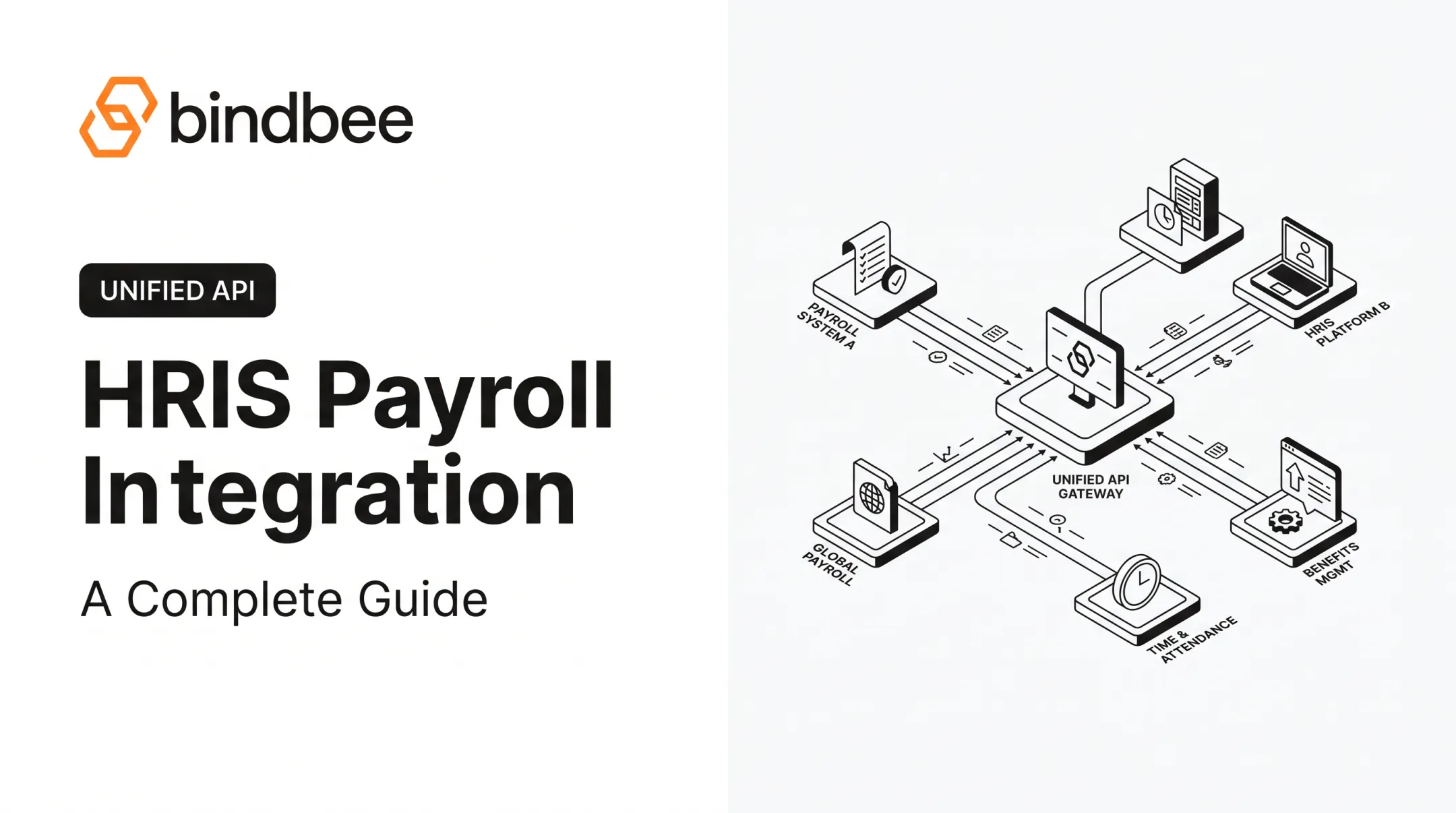
Payroll rarely connects to just one other system. Here's how the most common connections break down:
| Integration type | What moves | Business outcome |
|---|---|---|
| Time & attendance | Approved hours, overtime, leave | Prevents duplicate or unapproved entries in a pay run |
| HRIS / workforce management | Employment status, job changes, start/end dates | Keeps onboarding and workforce records accurate |
| Benefits & retirement | Elections, contributions, eligibility, dependents | Syncs deductions with coverage changes |
| Accounting / ERP / finance | Payroll journals, employer costs, taxes | Supports reconciliation and cost reporting |
In retirement-specific integrations, the terms "180-degree" and "360-degree" describe data direction rather than connection type. According to Ascensus's 401(k) integration guide, a 180-degree integration sends contributions from payroll to the recordkeeper only. A 360-degree integration also sends employee election changes back to payroll.
Customer-Facing Use Cases
Benefits administration, compensation, and TPA platforms use payroll data to:
- Verify eligibility
- Personalize enrollment
- Trigger life-event processes
Bindbee's deduction writeback, for example, supports medical, dental, vision, HSA, 401(k), and voluntary benefits, posting changes directly into Workday, ADP, or SAP SuccessFactors.
Direct Integrations vs. Unified API
Direct point-to-point integrations give you full control, but every provider needs its own authentication, field mapping, and ongoing maintenance. A unified API normalizes data across supported systems so your product team builds against one consistent model.
Clever Benefits found this out the hard way: each new payroll-system integration took two to three weeks to build directly, before moving to a single integration point through Bindbee.

Benefits and Challenges of Payroll Integration
Connected payroll data pays off in a few concrete ways:
- Less repetitive data entry and fewer transcription errors
- Faster onboarding and more consistent employee records
- Fewer requests asking employees to submit the same information twice
- Better audit trails and more reliable reporting for reconciliation
None of this guarantees compliance on its own. Connected data supports audit trails and eligibility checks, but organizations still need to review applicable US federal, state, and local requirements themselves.
The cost of getting it wrong is real. EY's 2022 survey found an average combined cost of $291 per payroll error across US-headquartered companies, split between direct costs and indirect labor, according to EY's payroll survey. That figure covers payroll errors broadly, not errors caused specifically by integration failures, but it shows how quickly small mistakes add up at scale.
Common challenges include:
- Provider fragmentation, where every payroll system structures data differently
- Legacy systems that lack modern APIs and still rely on SFTP file exchange
- Rate limits, outages, and incomplete records that can interrupt synchronization
- Sensitive employee data requiring stricter permissions than typical business integrations
How to Implement Payroll Integration
A solid implementation follows a predictable path:
- Run discovery. Define the business objective, connected systems, required workflows, supported providers, and acceptable failure conditions.
- Build a field-mapping plan. Document how provider-specific fields map to your schema, covering identifiers, compensation, dates, and deductions. Decide what's required versus optional.
- Choose your architecture. Direct API, unified API, SFTP bridge, or a hybrid, depending on provider capabilities.
- Build secure connection flows. Use least-privilege access, encryption, secrets management, and a customer-visible connection status.
- Test before production. Use sandbox accounts to validate authentication, field mapping, and duplicate prevention. Test new hires, terminations, rehires, compensation changes, and missing fields.
- Launch with operational controls. Reconciliation reports, retry policies, alerting, and a support process for connection issues.
- Measure what matters. Time to connect, sync success rate, data freshness, and exception volume.

When you need dozens of providers, a unified API usually beats building each connection from scratch. Bindbee provides one integration layer across 60+ HR systems, with normalized data, automatic incremental syncs, webhooks, custom fields, and an SFTP-to-API bridge for legacy file-based providers.
The time savings add up quickly. Newfront, for example, cut integration time from 12 weeks to 48 hours after consolidating payroll and HRIS connections through one unified integration point.
Security, Compliance, and Vendor Evaluation Checklist
Payroll integrations touch compensation, tax, bank, and dependent data, which means they need stronger controls than a typical business-data sync. Before trusting a vendor or building in-house, check for:
- Encryption in transit and at rest
- Scoped authentication and authorization, with least-privilege access
- Tenant isolation in multi-customer environments
- Audit logs and incident response procedures
- Documented data retention and access review practices
Don't take a feature list at face value. Ask for assurance reports and certifications, review data-processing terms, and confirm support procedures directly.
On the compliance side, the Department of Labor's FLSA rules require employers to keep accurate time and pay records. That obligation doesn't go away just because data moves automatically between systems.
Certifications are one piece of evidence, not the whole picture. Bindbee holds SOC 2 Type II and ISO 27001 credentials. Treat any certification as a starting point for your own review, not a substitute for it.
Decision rule: choose direct integrations when you have a small number of stable connections and need maximum control. Lean toward a unified API when provider breadth, faster onboarding, and lower ongoing maintenance matter more than owning every line of integration code yourself.
Frequently Asked Questions
What is payroll integration?
Payroll integration connects payroll with HR, time, benefits, accounting, or finance systems so approved data moves between them automatically. It replaces manual re-entry with a defined, repeatable data exchange.
What is API payroll integration?
API payroll integration uses authenticated software endpoints to request, send, or receive payroll data. It often supports scheduled, on-demand, or event-driven synchronization, depending on the provider.
What systems can be integrated with payroll?
Common connections include HRIS (employment status), time tracking (hours and overtime), benefits (elections and contributions), accounting/ERP (journal entries), and ATS (new hire data). Each serves a different data flow.
What is the difference between one-way and two-way payroll integration?
One-way integration sends data in a single direction, from source to destination. Two-way integration also writes approved changes back to the source, which requires stronger validation and clear field ownership.
Is an API better than a file-based payroll integration?
APIs generally support faster, more automated exchange with real-time or near-real-time updates. File-based methods like SFTP remain practical for legacy systems or providers without a suitable API.