
That definition sounds simple. The reality is more complicated. The average organization runs 130 SaaS applications, and 32% of enterprises cite integration challenges as their primary HR tech struggle. When each of those tools needs accurate employee data to function, the cost of disconnected systems adds up fast.
This guide covers HCM integration at an operational level: what it actually is, why it matters, how data moves between systems, what breaks, and how to approach it, whether you're an enterprise HR team unifying your own stack or a SaaS vendor that needs to connect your product to clients' HCM systems.
Key Takeaways
- HCM integration connects an HCM system to other applications so employee data syncs automatically rather than requiring manual entry across every tool.
- Two contexts matter: internal integration (your own HR stack) and product-level integration (a SaaS vendor connecting to clients' HCM systems).
- Connection methods include direct REST APIs, SFTP flat-file transfers, and unified API platforms that normalize data across dozens of HCM systems.
- Key challenges include data standardization, legacy system compatibility, compliance requirements, and ongoing engineering maintenance costs.
- Best practice: define data governance upfront, prioritize by business value, and evaluate unified API infrastructure before committing to point-to-point builds.
What Is HCM Integration?
HCM integration is the process of connecting a Human Capital Management system with one or more other platforms so that employee data syncs automatically, either in real time or on a schedule. That data spans records, compensation, benefits, time and attendance, hiring status, and more.
The goal is a single, accurate, continuously updated view of workforce data that every connected system can act on. That might mean triggering a payroll run when compensation changes, or provisioning a new hire in downstream SaaS tools the moment their record is created in the HCM.
HCM vs. HRIS Integration
These terms are often used interchangeably, but the scope differs in practice:
- HRIS (Human Resource Information System) typically covers core personnel records: employee demographics, job history, org structure.
- HCM is broader, encompassing talent management, workforce planning, benefits administration, compensation, and more.
HCM integration tends to involve richer, more complex data models than a basic HRIS sync. Benefits data alone carries three distinct layers (employee, employer, and dependent), and payroll data adds further structural complexity on top of that.
Why HCM Integration Matters in HR Tech
As organizations adopt specialized tools (benefits platforms, engagement apps, payroll engines, learning systems), each one needs employee data to function. Without integration, HR teams end up manually re-entering the same information across every system.
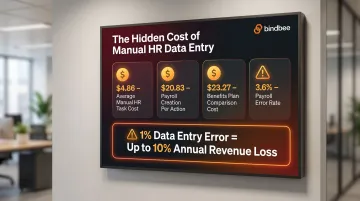
The cost is measurable. According to EY research cited by Paycom, the average manual HR data entry task costs $4.86, with creating payroll costing $20.83 per action and comparing benefit plans at $23.27. Manual payroll processing carries an error rate of roughly 3.6%, and a 1% data entry error rate can cost businesses up to 10% of annual revenue in downstream effects.
What Breaks Without Integration
In environments without proper HCM integration, specific and predictable failures occur:
- New hires missed in payroll because HR and payroll systems aren't connected
- Dependent data out of sync during benefits elections
- Terminated employees retaining access in downstream SaaS tools
- Compliance gaps caused by inconsistent data across systems for ACA reporting
Integration as a Buying Requirement
For SaaS vendors selling into HR and benefits markets, integration support is no longer a differentiator. It's a baseline expectation. G2's 2024 Buyer Behavior Report found that 84% of businesses consider integrations "very important" or a "key requirement," with integrations ranking as the #2 purchase criterion for HR software specifically. Buyers won't adopt a tool that requires them to manually maintain employee rosters.
For benefits administration specifically, that baseline has legal teeth. ACA reporting requires accurate data aggregated across payroll, HR, and timekeeping systems, and the penalties for gaps are steep:
- $310 per incorrect or missing ACA form (IRS)
- $4,460 per employee annually for coverage failures under IRC 4980H
- A single missed qualifying event can trigger a cascade of incorrect forms, each carrying its own penalty
Types of HCM Integration
HCM integration means different things depending on who's building it. Getting that distinction wrong wastes months of engineering time.
Internal HCM Integration
This is connecting different HR applications within your own organization's tech stack. Examples:
- Linking a standalone payroll system to an ATS so new hire records flow through automatically
- Syncing time and attendance data with a compensation management platform
- Feeding HCM data into a financial ERP for headcount and labor cost reporting
The goal is a single source of truth: one place where employee records are authoritative and every downstream system reads from it.
Product-Level HCM Integration (for SaaS Vendors)
This is an HR tech or benefits SaaS vendor integrating its product with the HCM systems already in use by its customers. A benefits administration platform pulling employee enrollment data from a client's Workday instance, or a compensation tool reading job titles and salaries from a client's BambooHR. These are product-level integrations.
The challenge here is scale. A SaaS vendor must support whichever HCM systems their customers happen to use, which can mean dozens of different platforms with incompatible APIs, different data models, and independent versioning schedules.
Key Integration Types by Data Domain
| Data Domain | Key Data Objects | Complexity |
|---|---|---|
| Core HR / Employee Records | Name, department, employment status, hire/termination dates | Moderate |
| Payroll | Compensation, tax details, pay schedules, GL postings | High |
| Benefits | Plan elections, dependent data, coverage dates, carrier feeds | Very High |
| Time & Attendance | Hours worked, leave balances, shift data | Moderate |
| ATS / Onboarding | New hire handoff, document signing, training enrollment | Moderate |
Benefits data integration sits at the top of the complexity scale because it involves three distinct data layers, not one:
- Employee-level enrollment: plan selections, effective dates, and election history per individual
- Employer-level plan configurations: plan types, contribution structures, and benefit class rules
- Dependent-level coverage: dependent relationships, coverage elections, and carrier-specific format requirements
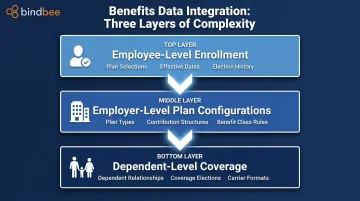
Each layer carries its own eligibility rules and versioning, which is why a standard employee sync is nowhere near sufficient.
How HCM Integration Works
The process follows a consistent pattern: a source HCM system holds authoritative employee records, an integration layer reads and transforms those records, and the target system receives and acts on the result. What varies, and where most projects stall, is the implementation detail inside each step.
Step 1: Identify Data Sources and Map Fields
Integration starts with an audit of which systems hold which data, followed by field mapping: determining how a "Department" field in Workday corresponds to a "Cost Center" field in a downstream tool.
Inconsistent field naming, date formats, and ID schemes across HCM vendors are the most common early friction point. One system may use a numeric Worker ID; another uses a UUID. Unresolved mismatches at this stage surface as data corruption or sync failures after go-live. Fix them before writing integration code.
Step 2: Establish the Connection Method
Three primary mechanisms exist:
- Native REST/SOAP API: direct API calls to the HCM system's endpoints, requiring authentication (OAuth 2.0 or API keys), pagination handling, and rate limit management. Workday alone uses a mix of SOAP, REST, and RaaS endpoints with bi-annual release cycles, each a potential breaking change.
- SFTP / Flat-File Transfer: common for legacy or carrier-facing systems that export CSVs, fixed-width files, or EDI 834 files on a schedule. The EDI 834 transaction set is mandated by HIPAA 5010 standards for electronic exchange of benefits enrollment data.
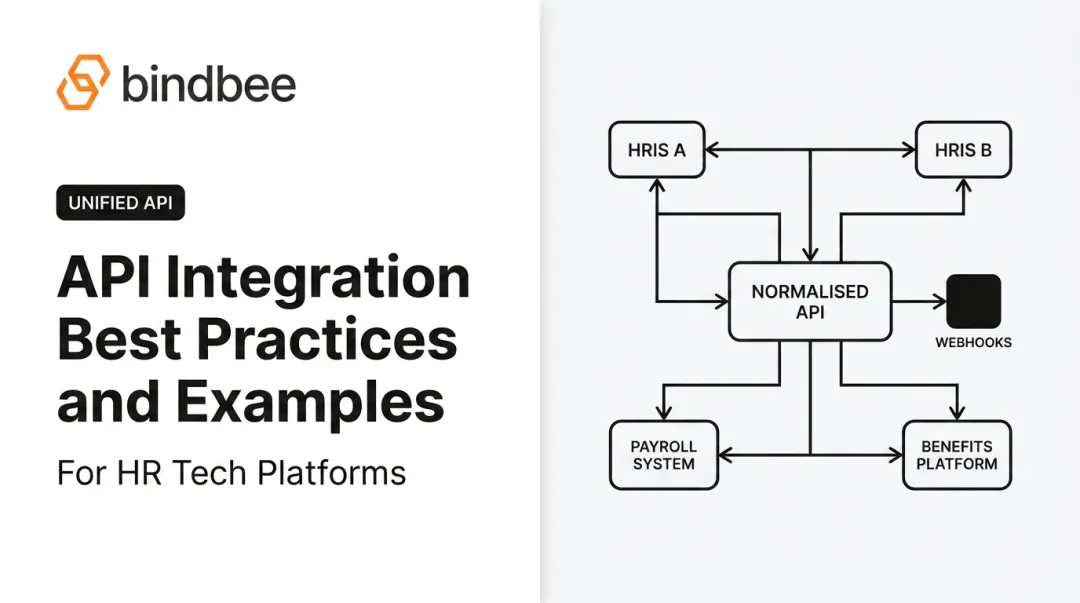
- Unified / Abstracted API: a middleware layer that normalizes data from multiple HCM systems into a single schema. Build the integration once; it works across all supported systems. Platforms like Bindbee provide a single normalized API across 60+ HRIS, payroll, and benefits systems, including both REST API connections and an SFTP-to-API bridge for legacy systems that only export files.
Step 3: Normalize and Transform Data
Raw data from different HCM systems uses different formats, enumerations, and structures. A normalized data model must be applied so the receiving system can interpret data correctly regardless of its source. This includes:
- Data type coercion (date format standardization, string-to-integer conversions)
- Enum mapping (employment status codes that vary by vendor)
- Null and missing field handling for incomplete records
Once the data model is consistent, the next decision is how often, and under what conditions, data moves between systems.
Step 4: Configure Sync Frequency and Event Triggers
The choice between batch syncs and event-driven webhooks depends on the use case:
- Batch/scheduled syncs (nightly pulls, 12-24 hour intervals) are simpler to implement but introduce data lag
- Webhooks fire on specific events (new hire created, termination recorded, dependent added), enabling immediate downstream action
For benefits and eligibility use cases, near-real-time updates are required. COBRA administration has a federal 14-day notice window from a qualifying event; a nightly batch sync may not be sufficient.
Step 5: Test, Monitor, and Maintain
Integration must be tested against real-world edge cases before go-live: employees with multiple jobs, dependents with overlapping coverage dates, retroactive terminations, mid-cycle payroll changes.
Ongoing monitoring requires logging failed syncs, alerting on data anomalies, and updating integration logic when HCM vendors release API version changes. This maintenance burden is a cost teams consistently underestimate. More on that below.
Common HCM Integration Challenges
HCM integration projects run over time and budget not because the concept is hard, but because teams encounter predictable operational challenges that aren't visible until mid-project.
Data Standardization Across Systems
Different HCM vendors use incompatible schemas, field names, enumerations, and identifier formats. Without a standardized canonical data model, every integration requires custom transformation logic that's brittle and hard to maintain.
Compport, before adopting Bindbee, had to "handle multiple scenarios and multiple mappings" across HRIS platforms, with some clients requiring unique compensation data fields that forced manual data manipulation. That manual handling introduced error risk directly into sensitive compensation data.
Fix: Establish a canonical data model before writing any integration code. Define how every field maps and what constitutes a valid record.
Legacy System and File-Based Compatibility
Many enterprise HCM environments still include legacy on-premises systems or carrier platforms that cannot expose a modern REST API. They output periodic flat files (CSV, EDI 834) via SFTP.
Clever Benefits, before moving to a unified API approach, relied entirely on SFTP-based CSV transfers. Each transfer required manual intervention for credentials, security configurations, and monitoring. Benefits decisions were made on data that could be hours or days old.
These SFTP pipelines are harder to make real-time and more prone to breaking when source system formats change.
Security, Privacy, and Compliance Requirements
HCM data includes some of the most sensitive information in an organization: SSNs, salary data, health enrollment details, dependent relationships. Integration layers must enforce:
- Encryption in transit and at rest
- Role-based access controls
- HIPAA compliance for health data
- GDPR compliance for EU employee data
- SOC 2 Type II certification for SaaS vendors handling customer data
Choosing integration partners with recognized security certifications (SOC 2 Type II, ISO 27001, HIPAA compliance) cuts risk considerably compared to building security infrastructure from scratch.
The Engineering Cost of Maintaining Native Integrations at Scale
For SaaS vendors, supporting the full range of HCM systems their customers use is where integration costs compound fast. According to industry research, the numbers add up quickly:
- ~240 hours to build each integration initially
- $10,000–$20,000 per integration in annual maintenance
- 30%–50% of engineering resources typically spent on integration development and upkeep
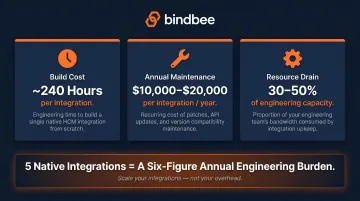
For a vendor supporting five HCM systems natively, that's a six-figure annual engineering burden, and it grows with every new customer HCM request.
The results from teams that shifted away from native integrations tell a consistent story. Newfront calculated $800,000+ in annual development savings after switching to Bindbee. Phin cut integration deployment time from two months per HRIS to days, a 76% reduction in customer onboarding time. In both cases, engineering time previously consumed by maintenance returned to core product work.
HCM Integration Best Practices
Involve Cross-Functional Stakeholders Before Writing Any Code
HCM integration decisions affect HR, IT, finance, compliance, and, for SaaS vendors, engineering and customer success. Establish clear ownership of data fields, define who can write to which fields, and document how conflicts are resolved. Decisions made late in a project are expensive to reverse.
Prioritize Integrations by Business Impact
For SaaS vendors, building every HCM integration at once isn't realistic. Score integration requests by customer volume, revenue opportunity, and technical complexity. For internal HR stacks, start with the connections that eliminate the highest-volume manual data transfers, typically payroll and benefits eligibility.
Document Everything and Test Against Real-World Complexity
Document every field mapping decision, error handling rule, and API version dependency. This institutional knowledge matters most when team members change or when an HCM vendor pushes an API update. Test with edge cases that reflect actual workforce complexity:
- Employees with multiple job codes or part-time/variable hour classifications
- Dependents with mid-year enrollment changes or overlapping coverage dates
- Retroactive terminations and reinstatements
- Mid-cycle payroll corrections
Production environments surface failures that clean, idealized test data never will. That's why testing against real edge cases isn't optional.
Frequently Asked Questions
What is HCM integration?
HCM integration connects a Human Capital Management system with other software so that employee data flows automatically between them. No manual entry required. It spans syncing employee records, triggering payroll runs, and managing benefits eligibility.
How do you implement an HCM system?
HCM implementation covers assessing current HR processes, selecting a platform, configuring it, migrating data, connecting integrated systems, and training users before go-live. Integration planning should start early. Waiting until the end of implementation is one of the most common and costly mistakes.
What are HCM services?
HCM services are the HR functions managed through an HCM platform: recruiting, onboarding, payroll, benefits administration, performance management, and workforce planning. Scope varies significantly. Enterprise platforms like Workday cover nearly all domains, while SMB tools typically focus on a few core areas.
What are examples of HCM software?
Well-known HCM platforms include Workday, ADP Workforce Now, SAP SuccessFactors, Oracle HCM Cloud, UKG, BambooHR, Rippling, and Gusto. They vary significantly in scope. Workday holds 33.8% market share in core HR and targets enterprises, while BambooHR and Gusto focus on SMBs under 500 employees.
Is HCM the same as ERP?
No. HCM focuses on managing the employee lifecycle: core HR, payroll, benefits, and talent management. ERP is a broader system covering finance, supply chain, operations, and HR. HCM data is commonly integrated into ERP systems for financial reporting, headcount analysis, and labor cost visibility.
Is HCM available as a SaaS product?
Yes. The majority of modern HCM platforms are cloud-based SaaS products, which makes API-based integration more straightforward than legacy on-premises systems. Some enterprises still run hybrid environments that require both API and file-based integration approaches simultaneously.