
Introduction
Oracle HCM API integration demands OAuth 2.0 setup, familiarity with Oracle's REST resource model, pagination handling, and precise permission scoping. Teams without enterprise HCM experience routinely spend weeks before a single data call succeeds.
The most common failure points teams hit:
- Token mismanagement causes silent authentication failures with no obvious error
- Missing pagination logic returns incomplete employee datasets
- Insufficient permissions trigger 403 errors that persist even on valid requests; Oracle community reports confirm these can take days to trace back to missing security role assignments
This guide walks through the complete Oracle HCM API integration process: from authentication setup to reading and writing employee data, with code-level guidance and fixes for common errors.
Key Takeaways
- Oracle HCM uses OAuth 2.0 Client Credentials flow; obtain Client ID and Client Secret from your Oracle Cloud admin before starting
- Base endpoint structure:
https://{your-instance}.oraclecloud.com/hcmRestApi/resources/latest/ - Pagination is mandatory: Oracle HCM uses offset-based pagination and silently truncates responses without it
- Read-only integration takes a few days; production-grade bidirectional integration takes 2–4 weeks
- Bindbee's unified API normalizes Oracle HCM and 60+ other HR platforms through a single connection
Oracle HCM API Integration Guide
The integration process follows a defined sequence: obtain credentials → configure OAuth → authenticate → call endpoints → handle responses → validate data accuracy. Missing the auth setup phase alone (such as skipping role assignment) accounts for the majority of failed integrations before a single API call is made.
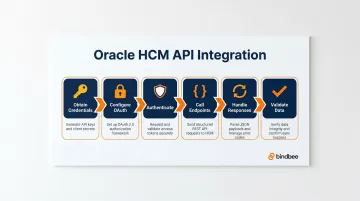
A functional read-only integration can be achieved in 1–3 days. Full bidirectional integration with write operations and event handling typically takes 2–4 weeks, depending on Oracle environment configuration and internal access approval timelines.
Start here. Each prerequisite directly maps to a step in the sequence above; skipping setup means hitting permission errors or token failures mid-build.
Prerequisites and Access Setup
Before starting, confirm:
- Active Oracle Cloud HCM subscription with REST API access enabled (not on by default in all configurations; confirm with your Oracle Cloud admin)
- Registered OAuth 2.0 client application in Oracle Identity Cloud Service (IDCS) or Oracle Cloud Infrastructure (OCI) Identity Domain, with appropriate HCM REST API scope granted
- Oracle Cloud HCM instance URL (found in Oracle Cloud dashboard, typically formatted as
https://{company-name}.fa.{datacenter}.oraclecloud.com)
Confirm your OAuth client has the correct HCM role before going further. Oracle's security model requires function and aggregate privileges delivered through predefined job roles plus data roles. Missing or overly broad role assignments are the #1 cause of failed integrations at the auth stage.
Required Credentials and Tools
Checklist:
- Client ID
- Client Secret
- Oracle Cloud instance URL
- Token endpoint URL
- Python with
requestslibrary (or equivalent HTTP client) - Access to Oracle's HCM REST API documentation
Request sandbox environment access before testing. Oracle provides isolated test environments specifically to validate integrations without touching production employee data.
How to Authenticate with Oracle HCM API (Step-by-Step)
All Oracle HCM REST API calls require a valid Bearer token obtained via OAuth 2.0 Client Credentials grant. Tokens expire after 3,600 seconds by default. Hardcoding tokens causes production failures.
Step 1: Token Request
Make a POST call to the token endpoint (https://{instance}/oauth2/v1/token):
import requests
import base64

def get_access_token(client_id, client_secret, token_url):
    # Base64-encode credentials
    credentials = f"{client_id}:{client_secret}"
    encoded_credentials = base64.b64encode(credentials.encode()).decode()

    headers = {
        "Authorization": f"Basic {encoded_credentials}",
        "Content-Type": "application/x-www-form-urlencoded"
    }

    data = {"grant_type": "client_credentials"}

    response = requests.post(token_url, headers=headers, data=data)
    response.raise_for_status()

    return response.json()
Step 2: Parse and Store the Token
Extract access_token from the JSON response and store it with its expires_in timestamp. Build token refresh logic that pre-emptively requests a new token before expiry rather than reacting to 401 errors:
import time

class OracleHCMClient:
    def __init__(self, client_id, client_secret, token_url):
        self.client_id = client_id
        self.client_secret = client_secret
        self.token_url = token_url
        self.access_token = None
        self.token_expiry = 0

    def _refresh_token_if_needed(self):
        # Refresh if token expires in <60 seconds
        if time.time() >= (self.token_expiry - 60):
            token_data = get_access_token(
                self.client_id,
                self.client_secret,
                self.token_url
            )
            self.access_token = token_data["access_token"]
            self.token_expiry = time.time() + token_data["expires_in"]
Step 3: Use the Token in API Calls
Pass the token as Authorization: Bearer {access_token} in every request:
def get_employees(self, base_url):
    self._refresh_token_if_needed()

    headers = {"Authorization": f"Bearer {self.access_token}"}

    response = requests.get(
        f"{base_url}/hcmRestApi/resources/latest/emps",
        headers=headers
    )
    response.raise_for_status()

    return response.json()
IDCS vs. OCI Identity Domains: Oracle is migrating environments from IDCS to OCI Identity Domains, and the token endpoint URL structure differs between them. Oracle IDCS is no longer offered as a separate service, but its functionality continues as part of OCI IAM. Check which identity provider is active before configuring your token endpoint.
Key Oracle HCM API Endpoints: Read and Write Employee Data
Base URL Structure
Oracle HCM endpoints follow: GET /hcmRestApi/resources/<version>/{resource}. Version 11.13.18.05 is documented, though many environments support a latest alias.
Read Operations: Fetch All Employees
GET /hcmRestApi/resources/latest/emps returns a paginated list. Add ?limit=100&offset=0 parameters and follow the hasMore flag:
def get_all_employees(self, base_url):
    self._refresh_token_if_needed()
    headers = {"Authorization": f"Bearer {self.access_token}"}

    all_employees = []
    offset = 0
    limit = 100
    has_more = True

    while has_more:
        response = requests.get(
            f"{base_url}/hcmRestApi/resources/latest/emps",
            headers=headers,
            params={"limit": limit, "offset": offset}
        )
        response.raise_for_status()
        data = response.json()

        all_employees.extend(data.get("items", []))
        has_more = data.get("hasMore", False)
        offset += limit

    return all_employees
Critical: Omitting pagination handling silently returns only the first page (~25 records by default).
Read Operations: Fetch a Single Employee
GET /hcmRestApi/resources/latest/emps/{PersonId} returns detailed data for one employee. PersonId is Oracle's internal identifier. If you only have an employee number, use a query filter: ?q=PersonNumber=12345.
Filtering and Querying
Oracle HCM supports SCIM-like query parameters:
- Filter by field:
?q=DepartmentName=Engineering - Field selection:
?fields=PersonId,FirstName,LastName - Expand child resources:
?expand=assignments
Practical examples:
# Filter by hire date
params = {"q": "HireDate>='2024-01-01'"}

# Filter by employment status
params = {"q": "AssignmentStatus='ACTIVE'"}

# Expand assignments and select specific fields
params = {
    "fields": "PersonId,FirstName,LastName",
    "expand": "assignments"
}
Write Operations Overview
POST (create), PATCH (update), and DELETE (remove) are supported on many Oracle HCM resources. Resources that support REST write operations include:
- Workers
- Absences
- Salaries
- Element entries
Some business objects, particularly certain recruiting objects and complex hierarchical structures, require file-based HCM Data Loader (HDL) instead of REST.
Complete Flow Reference
# Full integration flow
client = OracleHCMClient(
    client_id="your_client_id",
    client_secret="your_client_secret",
    token_url="https://{instance}/oauth2/v1/token"
)

# Get all employees with pagination
employees = client.get_all_employees("https://{instance}.oraclecloud.com")

# Get single employee by PersonId
single_employee = client.get_employees_by_id(
    "https://{instance}.oraclecloud.com",
    person_id="300000001234567"
)
Testing and Validating Your Oracle HCM API Integration
Before connecting to production data, run structured validation across authentication, data retrieval, and write operations. The checks below cover the most common failure points.
Initial Validation
- Use Oracle's sandbox/test environment
- Verify authentication returns a valid token with a 200 response
- Confirm employee GET requests return correctly structured JSON with expected fields populated
Functional Validation Checklist
- Compare returned record count against known headcount; the final response must show
hasMore: falseto confirm complete pagination - Test filtered queries (e.g.,
?q=DepartmentName=Engineering) and verify only the expected subset is returned - Submit a write operation and confirm the change appears in the Oracle HCM UI within the expected window; some updates require background processing
Indicators of Incorrect Integration
- Truncated data without
hasMore: falsein the final response → pagination is broken - Only top-level employee fields returned, with no assignment or benefits data → expand parameters are missing
- 403 errors after successful auth → the OAuth client lacks the correct HCM role
Common Oracle HCM API Integration Errors and Fixes
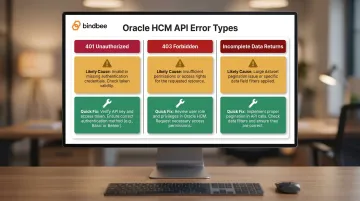
Here's a quick reference for the three most common errors, followed by detailed fixes for each.
| Error | Likely Cause | Quick Fix |
|---|---|---|
| 401 Unauthorized | Expired token or missing "Bearer" prefix | Proactive token refresh with expires_in check |
| 403 Forbidden | Insufficient HCM role assignment | Work with Oracle Cloud admin to assign correct roles |
| Incomplete data returns | Pagination not handled | Use limit/offset parameters; loop on hasMore |
401 Unauthorized on API Calls
Problem: API calls return 401 even after token is successfully obtained.
Likely cause: Access token expired mid-session, or token passed incorrectly in Authorization header (missing "Bearer" prefix).
Fix: Implement proactive token refresh using expires_in value. Add wrapper function that checks token age before every API call and refreshes if within 60 seconds of expiry.
403 Forbidden on Specific Resources
Problem: Authentication succeeds but certain endpoints return 403.
Likely cause: OAuth client's assigned HCM roles don't include access to the specific resource. Payroll data requires additional roles beyond basic HR read access.
Fix: Work with Oracle Cloud admin to identify correct role assignment for required resource. Consult Oracle's REST API documentation for "Required Roles" field listed on each endpoint.
Incomplete or Truncated Data Returns
Problem: GET requests for all employees return far fewer records than expected with no error message, typically because Oracle HCM silently defaults to a limited page size when pagination parameters are missing.
Fix: Always include explicit limit and offset parameters. Implement a loop that checks hasMore in the response and increments the offset until hasMore is false.
Best Practices for Oracle HCM API Integration
Token Lifecycle Management
Never hardcode tokens. Build centralized token management with refresh logic. Log token request failures separately from API call failures; debugging is faster when you know whether auth or data retrieval failed.
Rate Limit Awareness
Oracle HCM enforces API rate limits, though specific limits are not publicly documented. Implement exponential backoff and retry logic for 429 responses. Avoid bulk operations during peak usage windows.
Recommended retry logic:
import time

def api_call_with_retry(url, headers, max_retries=3):
    for attempt in range(max_retries):
        response = requests.get(url, headers=headers)

        if response.status_code == 429:
            wait_time = (2 ** attempt) + (random.randint(0, 1000) / 1000)
            time.sleep(wait_time)
            continue

        response.raise_for_status()
        return response.json()

    raise Exception("Max retries exceeded")
Data Normalization and Field Mapping
Oracle HCM returns verbose JSON with Oracle-specific field names and nested resource structures. Build a mapping layer early that translates Oracle's data model to your internal schema; this prevents schema drift issues as Oracle updates its API.
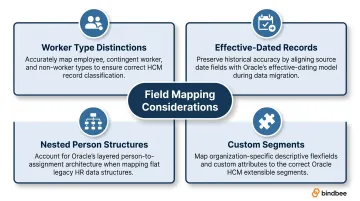
Common field mapping considerations to plan for upfront:
- Worker type distinctions: Oracle separates employees, contingent workers, and pending workers as distinct resource types
- Effective-dated records: Most HCM fields carry effective start/end dates, requiring date-aware reads rather than simple value lookups
- Nested person structures: Name, address, and contact data live under
PersonInformation, not the root worker object - Custom segments: Oracle allows tenant-level custom fields that may not appear in standard API documentation
HR Tech and Benefits Tech teams managing Oracle HCM alongside other HRIS systems can use Bindbee's unified API, which maps Oracle HCM data to a single consistent schema shared across 60+ HR systems, cutting per-system mapping work to zero.
Conclusion
Oracle HCM API integration quality directly affects downstream data reliability. Incomplete pagination, poor token management, or missing role permissions create data accuracy problems that are costly to diagnose once you're in production.
Before going live, cover these three fundamentals:
- Validate in sandbox first: catch pagination gaps, token expiry edge cases, and permission mismatches before they surface in production
- Document credential and role setup: role configurations change with personnel; written records cut troubleshooting time significantly
- Track Oracle's quarterly release notes: the API evolves on a predictable cadence, and skipping a cycle can break existing calls silently
Teams looking to sidestep this maintenance overhead entirely can also explore a unified API layer like Bindbee, which normalizes Oracle HCM data alongside 60+ other HRIS systems through a single connection, typically live in under a day.
Frequently Asked Questions
Is Oracle HCM a SaaS product?
Yes, Oracle HCM Cloud is a SaaS product delivered entirely in Oracle's cloud infrastructure. API access is provided through Oracle's REST endpoints without requiring any on-premise installation.
What authentication method does Oracle HCM API use?
Oracle HCM REST APIs use OAuth 2.0 with the Client Credentials grant type, requiring a Client ID and Client Secret obtained from an Oracle IDCS or OCI Identity Domain registered application.
How do I handle pagination in the Oracle HCM REST API?
Use offset-based pagination with limit and offset query parameters. Check the hasMore flag in the response to determine whether more pages exist, and increment the offset until hasMore is false.
What are the rate limits for Oracle HCM Cloud APIs?
Oracle does not publicly document rate limits for HCM REST APIs. Implement retry logic with exponential backoff to handle 429 responses gracefully, and confirm tenant-specific limits with your Oracle Cloud administrator.
Can I use the Oracle HCM API to update or create employee data, not just read it?
Yes, POST and PATCH are supported on many Oracle HCM REST resources. Some business objects require file-based HCM Data Loader (HDL) for write operations. The REST API documentation specifies which method applies to each resource.
How long does it take to build an Oracle HCM API integration?
A basic read integration can be functional in a few days. A production-grade bidirectional integration typically takes 2–4 weeks, depending on environment access, permission provisioning, and data mapping scope.