
For HR Tech builders, benefits administration platforms, TPAs, and insurtech teams, it's the unavoidable backbone of any enrollment data workflow. Yet despite its ubiquity, the internal structure (loops, segments, delimiters, and the implementation logic that makes it actually work) trips up even experienced engineering teams.
This guide breaks it down end-to-end: what the file contains, how it's structured, how to implement it correctly, and where implementations most commonly fail.
Key Takeaways
- EDI 834 is the HIPAA-mandated standard (45 CFR 162.1502) for benefits enrollment and maintenance between plan sponsors and health insurance payers
- File structure is hierarchical: ISA/IEA (interchange) → GS/GE (functional group) → ST/SE (transaction set) → member loops
- The INS segment is the most critical member-level element. It encodes add, change, or terminate actions per subscriber or dependent
- A 999 "Accepted" acknowledgment confirms syntactic validity only, not successful downstream enrollment
- Common failure points: mismatched delimiters, missing mandatory segments, and incorrect maintenance type codes. Each can create silent eligibility gaps
What Is an EDI 834 File?
EDI 834 is officially called the "Benefit Enrollment and Maintenance Transaction Set", governed by the ASC X12N Insurance Subcommittee and required under 45 CFR 162.1502 as the standard electronic format for enrollment data exchange in U.S. healthcare.
The current required version is ASC X12N/005010X220, effective for all transactions since January 1, 2012.
Four Core Functions
The 834 handles four distinct enrollment actions:
| Action | Description |
|---|---|
| Add | New member enrollment into a health plan |
| Change | Modification to existing coverage (plan, tier, dependents) |
| Terminate | Ending coverage for a subscriber or dependent |
| Reinstate | Restoring previously terminated coverage |
How EDI 834 Differs from Adjacent Transaction Sets
The 834 is often confused with other X12 healthcare transactions. Here's the distinction:
- EDI 834: who is enrolled and eligible (sponsor → payer)
- EDI 837: healthcare claim submitted after services are rendered (provider → payer)
- EDI 835: claim payment and remittance advice (payer → provider)
The 834 establishes eligibility. The 837 bills for services rendered against that eligibility. Different workflows, different directions, different data.
Why EDI 834 Is Used in Benefits Administration
Under 45 CFR 162.1502, all covered entities exchanging enrollment data electronically must use the ASC X12N 005010X220 standard. There's no opt-out for health plans, employers, or clearinghouses that conduct these transactions.
The compliance requirement also has a measurable cost story behind it. The 2023 CAQH Index estimated $9.3 billion in potential savings from greater electronic eligibility and benefit verification, a figure that reflects how much manual, error-prone processing still runs across the industry.
That savings potential hinges on 834 files being generated correctly in the first place, which means knowing exactly which employment events require one.
What Triggers an 834 Transaction
Every one of these scenarios requires a correctly coded 834 file:
- New hire onboarding
- Open enrollment plan changes
- Qualifying life events (marriage, childbirth, divorce)
- COBRA initiation
- Plan year rollovers
- Employment terminations
- Dependent additions or removals
Each scenario maps to a specific maintenance type code in the INS segment. Getting that code wrong is one of the most common sources of silent eligibility failures: coverage lapses that neither the employer nor the member catches until a claim is denied.
EDI 834 File Layout: Loops, Segments, and Structure
Every 834 file follows a strict hierarchical envelope structure. From outermost to innermost:
- ISA/IEA (Interchange Control Header/Trailer): declares delimiters, sender/receiver identity
- GS/GE (Functional Group Header/Trailer): groups transaction sets using functional identifier code "BE" for benefit enrollment
- ST/SE (Transaction Set Header/Trailer): bounds each individual 834, carries a segment count for integrity validation
Loops: Organizing the Data Hierarchy
Loops group related segments hierarchically, numbered sequentially to reflect their role:
| Loop | Name | Key Segments |
|---|---|---|
| 1000A | Sponsor Name | N1*P5 (plan sponsor identification) |
| 1000B | Payer Name | N1*IN (payer/insurer identification) |
| 2000 | Member Level Detail | INS (member benefit detail), REF |
| 2100A–C | Member Name/Demographics | NM1, DMG, N3/N4 (address) |
| 2300 | Health Coverage | HD (coverage line), DTP (effective dates) |
| 2310 | Provider Information | LX, NM1 |
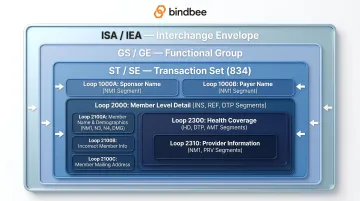
Dependents appear as nested INS records under the subscriber's 2000 loop, not as separate top-level entries. The segments inside each loop determine what actually gets transmitted to the carrier.
Key Segments and Their Functions
BGN (Beginning Segment) opens each 834 transaction set. It carries the transaction purpose code (for example, "00" for original submission), a unique reference number, date, and time.
INS (Member Level Detail) is the operationally critical segment. It encodes:
- Relationship code (subscriber vs. dependent)
- Maintenance type code (add/change/terminate/reinstate)
- Benefit status
- Employment status
A wrong maintenance type code here won't trigger a file rejection. The file transmits cleanly, but the carrier applies the wrong action to the member record.
Coverage-related segments:
- HD (Health Coverage): specifies coverage line (medical, dental, vision) and plan identifiers
- DTP (Date/Time Period): carries effective start (qualifier 348) and end dates (qualifier 349)
- REF: provides subscriber IDs and group numbers that enable payers to apply updates to the right member record
All of these segments operate within the formatting constraints the ISA envelope establishes. That's where delimiters come in.
Delimiters and Formatting Rules
The ISA segment declares three delimiters that govern the entire file:
| Delimiter | Character | Function |
|---|---|---|
| Element separator | * |
Separates data elements within a segment |
| Component separator | : |
Separates sub-elements within a composite |
| Segment terminator | ~ |
Marks the end of each segment |
The ISA segment uses fixed field lengths, and all values must be space-padded to length. Trimming spaces, swapping delimiter characters, or inheriting delimiters from a different trading partner's config will corrupt parsing or cause immediate file rejection.
How EDI 834 Implementation Works
The end-to-end flow: a sponsor system exports member enrollment data → maps it to 834 segment structure → validates format and content → transmits the file → receives a 999 acknowledgment.
Each step has specific failure modes worth understanding before you build.
Step 1: Data Mapping
Data mapping translates source system fields from your HRIS, payroll, or benefits platform into corresponding 834 segments and data elements.
Examples:
- Employee hire date → DTP segment with qualifier 336
- Relationship codes → INS02
- Plan identifiers → HD segment
Most payers also publish companion guides that define their specific required and optional field combinations. These are not optional reading. A field that's optional in the base X12 spec may be mandatory for a specific carrier. Skipping companion guide review is the fastest way to build an integration that passes generic validation but fails at the carrier level.
Step 2: File Validation
Validation covers three distinct layers:
- Structural: correct segment order, mandatory segments present, loops properly opened and closed
- Syntax: correct data types, field lengths, delimiter consistency
- Business rules: valid maintenance type codes in INS, valid plan identifiers in HD, non-overlapping coverage dates in DTP
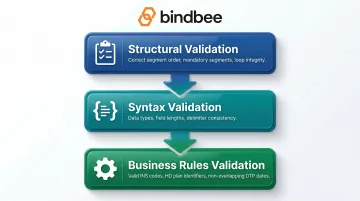
EDI validation software generates error reports identifying which segments failed and why, including specific 999 error codes (for example, IK304 code "3" for missing required segment, or IK403 code "7" for invalid code value).
Step 3: Transmission and Acknowledgment
Files are sent to the trading partner via SFTP, AS2, or a VAN. The recipient responds with:
- TA1: validates the interchange envelope (ISA/IEA), catches issues like duplicate control numbers or unrecognized sender IDs
- 999: confirms functional groups passed syntax and structure editing per the X12 implementation guide
The 999 returns one of three statuses: Accepted (A), Rejected (R), or Accepted with Errors (E). Under CAQH CORE rules, the 999 must be available by 7:00 AM Eastern on the third business day following submission.
A 999 "Accepted" does not mean enrollment succeeded. It means the file was syntactically valid. Downstream processing failures (wrong plan codes, invalid member IDs, mismatched effective dates) can surface days later with no file-level error flag.
That silent failure gap is where most engineering overhead accumulates: monitoring file drops, chasing carrier confirmations, and maintaining per-carrier SFTP pipelines. For benefits platforms managing multiple carrier connections, Bindbee's SFTP-to-API Bridge addresses this directly: it converts legacy EDI 834 SFTP file flows into normalized API calls, automatically processing file drops from legacy HRIS systems and removing the need for custom parsing logic per carrier.
Newfront reduced integration deployment time from 8–12 weeks to 48 hours using this approach. That translated to a 90% reduction in engineering time and over $800,000 in annual development savings.
Common Challenges and Misconceptions with EDI 834
The 999 Acknowledgment Trap
The most common implementation mistake is treating a 999 "Accepted" as confirmation that enrollment is done. It isn't. Downstream processing rejections (wrong plan codes, invalid member IDs, mismatched effective dates) often surface days later through separate payer reports or portal checks, with no connection back to the original file acknowledgment.
Closing the loop requires more than a 999 check. Confirm actual enrollment status through:
- Payer portal verification after file submission
- Secondary acknowledgment reports from the carrier
- Periodic reconciliation against expected enrollment records
The Silent Eligibility Gap
Incorrect maintenance type codes in the INS segment are particularly dangerous because they produce no file-level errors. Sending a "change" transaction when a "terminate and re-enroll" is required can leave a member on incorrect coverage indefinitely. No rejection, no alert.
Wrong eligibility data flows downstream undetected until a claims denial surfaces the problem. That failure creates both compliance exposure and direct member harm, traced back to stale records that were never flagged during transmission.
Each Carrier Companion Guide Requires Its Own Mapping
Teams that build a single 834 mapping and deploy it across carriers will hit walls fast. Payer companion guides introduce significant variation in required qualifiers, REF segment combinations, and HD coverage codes that the base X12 specification simply doesn't resolve.
Common documented failure modes across 834 implementations:
| Failure Mode | Root Cause |
|---|---|
| Delimiter mismatches | Multi-system generation pipelines |
| Missing mandatory segments | Mapping errors or incomplete source data |
| Incorrect INS maintenance type codes | Companion guide variation |
| Duplicate interchange control numbers | File generation system issues |
| Unrecognized sender ID | Trading partner onboarding gaps |
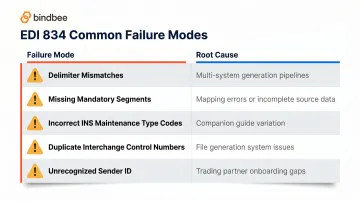
Every carrier integration is its own project. Budget for per-carrier mapping, companion guide review, and testing cycles. Typical timelines run 3 to 12 weeks from kickoff to go-live, depending on carrier responsiveness and the complexity of the companion guide requirements.
Frequently Asked Questions
What is an EDI 834 file?
EDI 834 is the X12 transaction set for Benefit Enrollment and Maintenance. It electronically transfers health plan enrollment data between plan sponsors (employers, unions, government agencies) and payers (insurance carriers, HMOs), covering new enrollments, changes, reinstatements, and terminations.
What is an EDI 834 enrollment and maintenance file?
The "enrollment and maintenance" designation reflects a dual purpose: the file handles both initial enrollment of new members and ongoing maintenance actions (coverage changes, dependent additions, disenrollments) triggered by life events or employment changes throughout the member lifecycle.
What is the difference between EDI 834 and EDI 837?
EDI 834 establishes who is enrolled and eligible for coverage, transmitted from a plan sponsor to a payer. EDI 837 is a healthcare claim submitted by a provider to a payer after services are rendered. One governs eligibility; the other bills for services.
What is the difference between EDI 835 and EDI 837?
EDI 837 is the claim submission sent from a provider to a payer detailing services rendered. EDI 835 is the payer's response containing payment and remittance advice. Together, they complete the claim payment cycle: 837 initiates the claim, 835 closes it with payment details.
What is an EDI 820 transaction?
EDI 820 is the Payment Order and Remittance Advice transaction set. In benefits administration, it transmits premium payment instructions from a plan sponsor to a financial institution or payer. It is often paired with an 834 to ensure funds are allocated to the correct members and plans.
What is the difference between EDI 820 and EDI 823?
EDI 820 initiates payment and transmits remittance information outbound from a payer or plan sponsor. EDI 823 (Lockbox) is the inbound counterpart. It reports incoming payments as confirmed by a bank or lockbox provider back to the company. EDI 823 is a banking transaction set and rarely appears in standard benefits enrollment workflows.