
Introduction
HR teams running payroll and benefits across disconnected systems know the problem well: a new hire gets added to the HRIS, someone manually updates the benefits platform, and payroll still has the wrong deduction amounts three pay cycles later. That fragmentation isn't a process failure. It's a structural one.
According to research by Immedis and the Global Payroll Association, fewer than 15% of organizations have achieved truly integrated HCM and payroll systems, while 36% have no integration at all. Meanwhile, approximately 20% of all payrolls contain errors, with the average correction costing $291 per incident.
HCM software with payroll and benefits integration closes that gap by connecting employee records, enrollment data, and payroll calculations into a single data flow. No manual re-entry required.
This guide covers what that integration actually means, how it works technically, what features matter most, and how to evaluate your options, whether you're an HR practitioner selecting a platform or an engineering team building one.
Key Takeaways
- HCM integration centralizes employee data, payroll, and benefits administration to eliminate manual reconciliation and data silos
- True integration means real-time eligibility updates, enrollment data flow with dependent and coverage details, and automated payroll deductions, not just basic record sync
- Fewer than 15% of organizations have achieved fully integrated HCM and payroll systems, leaving most exposed to errors, compliance gaps, and administrative overhead
- For HR tech builders, connecting 60+ HCM, payroll, and benefits systems through a unified API layer (like Bindbee) takes less than a day versus 4–8 weeks per native integration
What Is HCM Software with Payroll and Benefits Integration?
HCM (Human Capital Management) software manages the full employee lifecycle: hiring, onboarding, payroll, benefits, performance, and offboarding. "Integrated" specifically means data flows automatically between HR records, payroll calculations, and benefits administration without manual re-entry at each step.
HRIS vs. HRMS vs. HCM: Which Do You Have?
These three terms describe meaningfully different systems:
| System | Core Capabilities |
|---|---|
| HRIS | Employee recordkeeping, basic workflows, org data storage |
| HRMS | HRIS + payroll processing + talent management |
| HCM | HRMS + strategic workforce planning, benefits administration, advanced analytics, compliance |
Most enterprise platforms today market themselves as HCM suites. If your system handles payroll and benefits but lacks analytics or compliance automation, you're likely working with an HRMS.
Payroll Integration vs. Benefits Integration
These solve different problems and both are required for a truly unified HCM:
- Payroll integration keeps compensation, tax withholdings, and time-and-attendance data accurate across systems
- Benefits integration synchronizes enrollment elections, dependent data, eligibility windows, and carrier connections
- Full HCM integration connects both layers so deduction schedules update automatically when enrollment changes. No manual reconciliation each pay cycle
Without both in place, HR teams are left manually matching open enrollment changes to deduction schedules every pay period, a problem that compounds during high-volume events like annual open enrollment.
Why Payroll and Benefits Integration Is Non-Negotiable
The cost of disconnected systems shows up in three places: operational time, compliance exposure, and employee trust.
The Administrative Drain
A full-time payroll employee spends an estimated 29 weeks per year correcting payroll errors, and it takes 3 to 5 days to fix a single mistake. When benefits and payroll live in separate tools, HR teams must manually reconcile every employee change (new hires, terminations, salary adjustments, life events) across each system independently.
According to Yomly's 2026 payroll research, 38% of organizations still manage payroll via spreadsheets, and 57% operate with fragmented data across multiple disconnected systems.
Compliance Risk Is Real
That operational drag becomes a compliance problem fast. Wrong contribution amounts, missed enrollment windows, or outdated dependent records flow directly into payroll miscalculations, creating exposure under:
- ACA: Applicable Large Employers must file Forms 1094-C and 1095-C with month-by-month coverage data drawn from benefits enrollment systems
- COBRA: Employers have 30 days to notify the plan administrator of a qualifying event, then 14 days to reach the employee. That clock starts when the termination hits HR
- Section 125/FSA/HSA: The 2026 FSA limit is $3,300; HSA limits are $4,300 (self-only) and $8,550 (family). Pre-tax deduction errors trigger retroactive tax liability for both parties
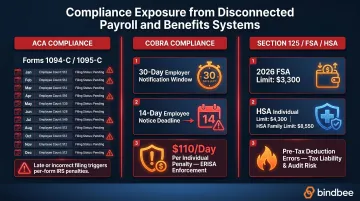
COBRA noncompliance alone carries penalties of up to $110 per day per affected individual under ERISA. A direct consequence of benefits and payroll data living in separate systems.
The Employee Experience Cost
49% of employees begin a job search after just two payroll errors, and 1 in 4 would consider leaving after a single mistake. Employees increasingly expect self-service access to pay history, benefits elections, and dependent coverage in one place. Fragmented systems make that impossible, and the damage is worst during high-stakes moments like open enrollment, a new dependent, or a life event that changes coverage.
Automated, cloud-based payroll systems can reduce errors by up to 80% compared to manual methods. For HR teams spending weeks each year on error correction, that's a meaningful recovery of time and credibility.
How Payroll and Benefits Integration Works Inside HCM
The Integration Maturity Spectrum
UKG's six-level integration maturity framework provides a useful self-assessment tool:
| Level | Description |
|---|---|
| 0 | Manual data entry. Fully disconnected systems |
| 1 | Flat file exchange. CSV exports uploaded manually |
| 2 | Automated SFTP transfers. Scheduled, no human intervention |
| 3 | Real-time API integration. Instantaneous data sync |
| 4 | Unified platform. Shared database, single source of truth |
| 5 | Strategic optimization. Advanced analytics on unified data |
Most organizations operate at Levels 0–2. Level 3 is where meaningful automation begins; Levels 4 and 5 are the target state for enterprise HCM.
APIs as the Core Technical Building Block
Getting from Level 2 to Level 3 is primarily an API problem. Modern HCM integrations rely on APIs to handle errors, process high volumes, and trigger workflows based on business events, so a new hire or a health plan election fires an automated chain of updates, not a manual to-do list.
Legacy flat file and CSV approaches create rigid, error-prone structures. A "termination date" field in one system maps differently in another, and batch exports mean data is always hours or days stale. API-driven integration eliminates both problems.
Benefits-Specific Data Models
Benefits integration requires more than syncing an employee record. There are three distinct data models, each with different fields and downstream consumers:
- Employee Benefits: Plan selections, coverage tiers (EE, EE+SP, FAM), contribution amounts, effective dates
- Employer Benefits: Plan configurations, available offerings, employer contribution rates
- Dependent Benefits: Relationship type, date of birth, SSN, coverage elections, effective dates
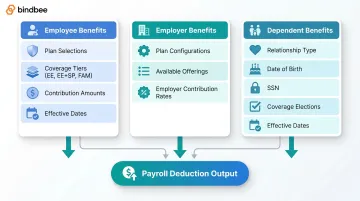
Generic employee records don't capture this structure. When a benefits platform receives an employee object without dependent coverage data or coverage tier information, it can't accurately calculate premiums, generate carrier feeds, or process COBRA elections.
Life Event Triggers and Webhook Notifications
Integrated HCM systems should automatically trigger enrollment windows or payroll updates when qualifying life events occur: new hires, terminations, marriages, births, or dependent changes. Webhook-based notifications let downstream platforms act on these events in real time rather than waiting for the next scheduled sync.
For COBRA specifically, the timing gap is a compliance risk, not just an inconvenience:
- Same-day termination webhook → COBRA administrator receives the event immediately; 14-day notice window is fully manageable
- 30-day batch file delay → Notice deadline arrives before the administrator even knows the event occurred
The Unified API Approach for HR Tech Builders
For companies building benefits administration platforms, payroll tools, or HR tech products, the choice between native integrations and a unified API layer is fundamentally an economics question.
The per-integration cost is manageable at first:
- Build cost: $10,000–$15,000 per integration, 4–8 weeks of engineering time
- Annual maintenance: $5,000–$10,000 per integration
- At 10 integrations: $50,000–$100,000/year in maintenance alone, before counting the engineering time pulled from core product work
The problem compounds at scale. Point-to-point integration costs grow linearly with every system added; a unified API layer doesn't.
Bindbee's unified API connects to 60+ HRIS, payroll, and benefits systems through a single integration, with benefits-first data models (Employee Benefits, Employer Benefits, Dependent Benefits) built in. Setup takes less than a day. Newfront cut integration deployment from 8–12 weeks to 48 hours, saving over $800,000 annually in development resources. Healthee achieved similar results: 24–48 hour deployments and $150,000+ in annual savings, without rebuilding any existing integrations.
Must-Have Features in an HCM with Payroll and Benefits Integration
Automated Payroll Deduction Syncing
When an employee switches health plans during open enrollment, adds a dependent, or opts into an FSA, payroll deductions should update automatically. Look specifically for:
- Deduction calculation accuracy for pre-tax benefits (Section 125, HSA, FSA contribution limits)
- Retroactive pay handling for mid-cycle changes
- Automatic sync triggered by enrollment elections, not manual HR action
Real-Time Benefits Eligibility and Enrollment Data Flow
"Real-time" means incremental syncs, not batch exports. Stale eligibility data causes wrong premiums, coverage gaps, and failed carrier feeds, problems that land directly on carriers and TPAs to fix. The HCM should push eligibility updates reflecting employment status, hours worked, waiting periods, and enrollment elections automatically.
Dependent and Beneficiary Data Management
Many HCM systems handle employee data well but fall short on dependents. Complete dependent data coverage requires:
- Relationship type (spouse, child, domestic partner)
- Date of birth, SSN, qualifying status
- Coverage elections per plan and effective dates
- Real-time detection of qualifying events (birth, marriage, dependent age-out)
This data is essential for accurate carrier feeds, ACA reporting, and COBRA administration. Data gaps in any of these fields translate directly to compliance exposure.
Compliance and Reporting Automation
Integrated systems should automate:
- ACA 1094-C/1095-C filings: Requires month-by-month enrollment data from benefits systems fed into the reporting engine
- COBRA notifications: Qualifying event detection must trigger the 30/14/60-day notification cascade automatically
- FSA/HSA contribution tracking: Pre-tax deduction limits must be enforced each pay period
Fragmented systems require manual reconciliation for all of these, creating IRS penalty exposure and missed COBRA notification windows.
Security and Data Privacy Standards
HCM systems handling payroll and benefits data contain PII, SSNs, health plan information, and financial records. Prioritize platforms and integration layers with:
- SOC 2 Type II certification
- ISO 27001 compliance
- HIPAA compliance for health plan data
- GDPR readiness for international operations
- Encryption of data in transit and at rest
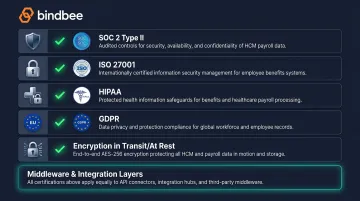
For integration middleware like Bindbee, these certifications must extend to the full data pipeline, covering every API call, sync job, and data transformation between the HCM and downstream systems.
Common Integration Challenges and How to Address Them
Data Inconsistency and Schema Fragmentation
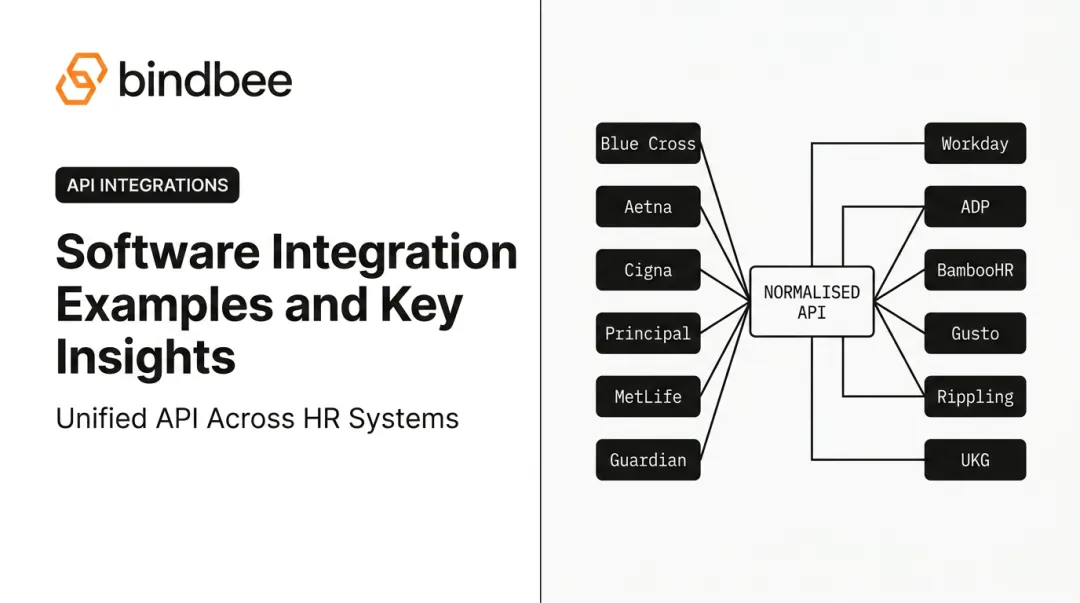
Different HCM systems use different field names, data structures, and coding conventions. A "termination date" in Workday maps differently than in ADP or BambooHR. Without a normalized data layer, every integration requires custom mapping, and every vendor update breaks those mappings.
Solution: Unified data models that translate system-specific schemas into a consistent format. The output should look identical whether the source is Workday, Gusto, or a regional payroll provider.
Integration Maintenance Burden
Point-to-point integrations require ongoing maintenance whenever a vendor updates their API or changes a data schema. 77% of payroll teams cite lack of integration between software platforms as a top challenge. Custom integration suites can cost $50,000–$150,000 per year to maintain.
The fix: a zero-maintenance integration layer that absorbs all API changes. When Workday releases a new API version, Bindbee's engineering team handles the migration internally, so customer integrations keep working without code changes.
Legacy System Connectivity
Many mid-market and enterprise employers still rely on HCM or payroll systems that only export data via SFTP or flat files. Benefits platforms and carriers that need real-time eligibility data can't wait for daily or weekly file drops.
An SFTP-to-API bridge solves this by converting file-based exports into API-accessible data. Bindbee's SFTP connectivity covers systems including ADP Workforce Now, Paylocity, Rippling, isolved, bswift, and Plansource, with support for:
- CSV, XML, and fixed-width file formats
- Normalized JSON output through the same endpoints as direct API integrations
How to Choose the Right HCM Integration Approach
Define Your Data Requirements First
Before evaluating platforms, map your specific data flows:
- Which systems send data (HCM, payroll, benefits carriers)?
- Which systems receive it?
- What fields are required, especially dependent info, enrollment elections, and effective dates?
- How frequently must data update?
This mapping exercise often reveals that "benefits integration" means something different to your carrier connections than it does to your payroll deduction workflows.
Evaluate Integration Depth, Not Just Breadth
That clarity on data requirements makes the next step more concrete: testing whether a platform's integration actually covers your use case. Many HCM systems advertise "payroll and benefits integration" but deliver only basic employee record syncing. Probe specifically for:
- Benefits enrollment sync (not just employee status)
- Dependent data coverage (relationships, SSNs, coverage elections)
- Real-time eligibility updates vs. batch exports
- Life event webhook support
For HR tech builders, verify whether the integration layer provides benefits-specific data models or forces you to map generic employee objects to benefits use cases yourself.
The Build-vs-Buy Decision
| Scenario | Recommendation |
|---|---|
| 1–2 critical HCM partners | Native integration may be viable |
| 5–10 systems needed | Evaluate unified API vs. build costs carefully |
| 20+ systems required | Unified API layer is more economical by a wide margin |
| Benefits-specific data models needed | Unified API with benefits-first architecture |
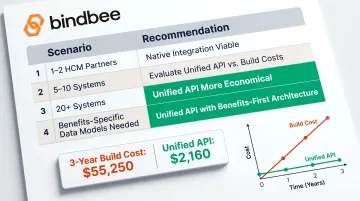
The numbers bear this out. Bindbee's ROI calculator shows one scenario where three-year build costs reach $55,250 compared to $2,160 with a unified API. Each integration added to a native build widens that gap further.
Frequently Asked Questions
Which HCM software is best for payroll?
The best option depends on organization size. Enterprise teams typically choose Workday, ADP Workforce Now, or UKG Pro, all recognized in the 2025 Gartner Magic Quadrant for HCM Suites. Mid-market and SMB teams often find Rippling, BambooHR, or Gusto more suitable. Key criteria are automated tax compliance, time-and-attendance integration, and employee self-service.
Does HCM software include payroll?
Most modern HCM platforms include payroll either natively or through direct integration, but depth varies. Some offer full-service payroll processing with tax filing; others provide a payroll hub that syncs to a third-party processor. Verify whether payroll is built-in or integration-dependent before selecting a platform.
What are the benefits of payroll integration?
Payroll integration with an HCM system typically delivers:
- Eliminates duplicate data entry across HR and payroll systems
- Improves deduction accuracy with real-time record sync
- Automates tax compliance and filing
- Reduces error risk from manual handoffs between HR and payroll teams
What are HCM integrations?
HCM integrations are technical connections that let an HCM system exchange data with payroll processors, benefits carriers, time-and-attendance tools, and ATS systems. They can be built natively (point-to-point), via middleware, or through a unified API layer that normalizes data across multiple systems at once.
How does benefits administration integrate with payroll in HCM?
When benefits elections change during open enrollment or a qualifying life event, an integrated HCM system automatically updates payroll deductions (health premiums, FSA contributions, retirement withholdings) without manual intervention. This sync depends on plan configuration, enrollment elections, and dependent coverage data staying current across both systems.
What is the difference between HRIS, HRMS, and HCM?
HRIS covers core HR recordkeeping and basic workflows. HRMS adds payroll and talent management. HCM is the broadest category, encompassing all HRMS functions plus workforce planning, benefits administration, analytics, and compliance. Most enterprise HR platforms today market themselves as HCM suites.