Introduction
HR teams managing 401(k) contributions manually face a quiet but serious risk. Missed deferrals, late remittances, and reconciliation backlogs aren't just administrative headaches — they're compliance triggers. The IRS treats late deferral deposits as prohibited transactions. Excise taxes start at 15% of the amount involved, and correction costs include restoring the full deposit plus lost earnings.
ADP 401(k) payroll integration exists to close that gap — automating the data flow between payroll and retirement systems so contribution data moves accurately and on time, without manual intervention.
This post covers how ADP's integration works, the meaningful differences between one-way and bidirectional connections, what plan designs can and can't be integrated, and what HR Tech platforms need to understand when building on top of ADP payroll data for 401(k) workflows.
Key Takeaways
- ADP 401(k) payroll integration automates contribution data sync, cutting manual effort and compliance exposure
- Two integration types exist — 180-degree (one-way) and 360-degree (bidirectional) — with significant differences in accuracy and automation
- ADP plan and product eligibility varies; confirming it before setup avoids delays and failed configurations
- HR Tech platforms building 401(k) features need normalized, reliable ADP data access that native APIs rarely provide out of the box
What Is ADP 401(k) Payroll Integration?
ADP 401(k) payroll integration is the automated connection between an employer's ADP payroll system and a 401(k) recordkeeper. Instead of manually exporting payroll files and uploading them to the retirement platform, the integration syncs data directly — no spreadsheets, no re-entry.
What Data Gets Synced
Three categories of data flow through this connection:
- Census data — employee name, hire date, date of birth, SSN, email address
- Payroll data — wages, hours worked, retirement deductions by pay period
- Plan activity data — deferral elections, Roth contributions, employer match, loan repayments, eligibility status changes
Who's Involved
The integration ecosystem includes four parties:
- The employer — owns the payroll account and the retirement plan
- ADP — processes payroll and serves as the data source
- The 401(k) recordkeeper — either ADP Retirement Services or a third party like Vestwell
- The data transfer layer — typically an ADP Marketplace partner (such as Payroll Integrations) that manages the technical connection and field mapping between ADP and the recordkeeper
Knowing which party controls each data handoff is what determines where to look when a contribution amount doesn't reconcile or an eligibility update fails to sync.
180-Degree vs. 360-Degree ADP 401(k) Integration
The type of integration determines how much manual work your HR team still carries after setup.
180-Degree Integration: One-Way Data Flow
A 180-degree integration sends data in one direction: from ADP payroll to the 401(k) recordkeeper. Each pay cycle, census and payroll data moves forward automatically.
The problem: employee-initiated changes don't travel the same path. When a participant updates their deferral rate in the retirement portal, that change doesn't automatically reach ADP. HR must manually enter the updated rate in payroll before the next cycle.
During open enrollment, when dozens or hundreds of employees make changes simultaneously, this creates real lag and error exposure.
180-degree data flow:
- Employee makes deferral change in retirement portal
- Recordkeeper receives the change
- HR manually enters the updated rate in ADP payroll
- Update takes effect on next payroll cycle (if entered in time)
360-Degree Integration: Fully Bidirectional
360-degree integration closes the loop. The retirement platform pushes data back to ADP automatically, so when an employee updates their contribution rate in the retirement portal, that change reaches the payroll system within a defined window (typically two business days) without HR involvement.
360-degree data flow:
- Employee updates deferral in retirement portal
- Recordkeeper pushes change to middleware connector
- Connector updates ADP payroll automatically
- Change reflects in next paycheck — no HR action required
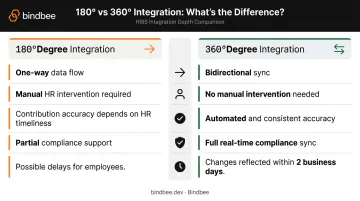
Side-by-Side Comparison
| Dimension | 180-Degree | 360-Degree |
|---|---|---|
| Data sync direction | Payroll → Recordkeeper only | Bidirectional |
| Manual intervention | Required for participant changes | None for standard changes |
| Contribution accuracy | Dependent on HR timeliness | Automated and consistent |
| Compliance support | Partial | Full real-time sync |
| Employee experience | Delays possible | Changes reflected within 2 business days |
EY's 2022 HR Processing Risk and Cost Survey found that one in five U.S. payrolls contains errors, averaging $291 per error to remediate. For 401(k) data, those errors don't stop at a corrected paycheck — they can escalate into IRS correction procedures. That risk profile is what makes the integration architecture choice consequential, not just operational.
Key Benefits of Integrating ADP Payroll with a 401(k) Plan
Administrative Efficiency
Full payroll-to-recordkeeper integration eliminates the repetitive manual tasks that consume HR bandwidth: uploading payroll files, re-entering deferral changes, reconciling discrepancies between systems. HR teams feel the difference most during open enrollment, when contribution changes spike across the entire employee base.
According to Payroll Integrations, automated 401(k) connectors can save employers 50 to 100 hours per year in administrative work.
Compliance Risk Reduction
Accurate, timely contributions directly reduce IRS and DOL scrutiny. Real-time data sync supports:
- On-time deferral deposits (critical for the 7-business-day safe harbor for small plans)
- Accurate Form 5500 data
- Clean nondiscrimination testing inputs
- SECURE 2.0 compliance, including Roth matching contribution tracking and updated catch-up contribution limits
Error Reduction and Cost Avoidance
Every manual handoff is a potential mistake. EY's survey estimated that an organization with 1,000 employees can spend 29 workweeks per year correcting common payroll errors. For 401(k) data, mistakes in deferral amounts or loan repayments create reconciliation work and can trigger participant complaints and correction filings.
Employee Experience
When deferral changes flow automatically from payroll to the plan recordkeeper, employees see accurate contribution rates reflected in their paychecks within two business days. That feedback loop builds trust in the retirement plan and reduces calls to HR about "my deduction doesn't look right."
Data Security
Integrated systems keep sensitive employee data — SSNs, compensation, deferral elections — within a single trusted data channel rather than in exported spreadsheets or emailed files. Integration providers should hold certifications such as SOC 2 Type II and ISO 27001 to protect data in transit and at rest.
How to Set Up ADP 401(k) Payroll Integration
Setup varies slightly by ADP platform, but the core steps are consistent across ADP RUN, Workforce Now, and TotalSource. Follow this sequence to get the integration live without errors.
Step-by-Step Setup Sequence
- Obtain an onboarding code from your 401(k) recordkeeper — this unique code ties your retirement plan to the integration
- Install the connector via ADP Marketplace — for RUN users, this is typically the Payroll Integrations connector; for Workforce Now or TotalSource users, you'll paste a Division Onboarding Code during registration
- Complete ADP Consent Manager authorization — this grants the integration app system-to-system access to your ADP data
- Configure deduction codes in ADP — set up codes for 401(k) %, Roth 401(k) %, employer contribution %, and loan repayment (if applicable)
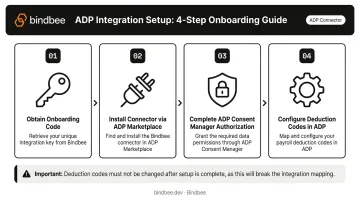
Critical: Deduction codes must not change after setup. If they do, the integration breaks and manual intervention is required to restore the connection.
Ongoing Employer Responsibilities
Once the integration is live, day-to-day management still falls on the employer's payroll admin. Responsibilities include:
- Keeping employee census data current (DOB, SSN, email)
- Reporting pay frequency changes to the recordkeeper
- Managing loan setups directly in ADP (these cannot flow through integration)
- Handling off-cycle uploads for non-mandatory employer contributions and corrections
- Updating payroll codes if plan terms change
Plan Eligibility: When ADP Integration May Not Apply
Not every plan qualifies for integration. Confirm eligibility before starting setup to avoid investing time in a configuration that won't work.
Common Disqualifying Conditions
- Multiple pay groups running on different payroll providers
- No consistent recurring pay schedule established in both systems
- Eligibility rules that exclude certain employee classes, compensation types, or hours thresholds
- Per-pay-period non-mandatory employer contributions
- After-tax contributions outside a third-party administrator (TPA) arrangement
- Dollar-amount deferrals (ADP RUN integration supports percentage-based deferrals only)
Unsupported ADP Products
Some ADP products don't support third-party integration connectors at all. ADP Payroll Plus is explicitly unsupported. Verify your specific ADP platform's connector support with your recordkeeper before any configuration work begins.
When Full Integration Isn't Possible
If your plan design doesn't qualify, establish clear manual upload protocols and regular reconciliation routines. After each payroll cycle, audit deferral data across both systems — discrepancies caught early stay correctable; ones that accumulate across multiple cycles can trigger plan corrections.
What HR Tech Platforms Need to Know About ADP 401(k) Payroll Data
For HR Tech and Benefits Administration platforms building 401(k) features, the challenge isn't just connecting to ADP — it's doing so reliably, across its multiple product lines, without rebuilding the integration every time something changes.
The Multi-Product Problem
ADP runs several distinct product lines (RUN, Workforce Now, TotalSource, Lyric), each with its own API schema, authentication method, and data format. A platform that builds a native integration with Workforce Now often needs to rebuild it from scratch for RUN. And because ADP periodically updates its APIs, any schema change requires downstream re-engineering.
The data relevant to 401(k) workflows (contribution elections, plan enrollment dates, plan terms, matching rules, and dependent records) may live in different parts of ADP's data structure and require separate API calls or file parsing for legacy products.
The SFTP Gap
Some ADP environments still export data via flat file over SFTP rather than through modern APIs. Platforms supporting these environments must build file-parsing pipelines alongside API-based connections, adding significant engineering overhead for teams expecting real-time payroll data.
The Maintenance Burden
Building native integrations means owning ongoing maintenance across every ADP product you support:
- Monitoring for API deprecations and version changes
- Rebuilding authentication flows when ADP updates credentials
- Re-mapping data models after schema changes
- Managing rate limits across multiple product environments
For a platform covering multiple payroll providers, this burden compounds quickly.
A Different Approach: Unified API
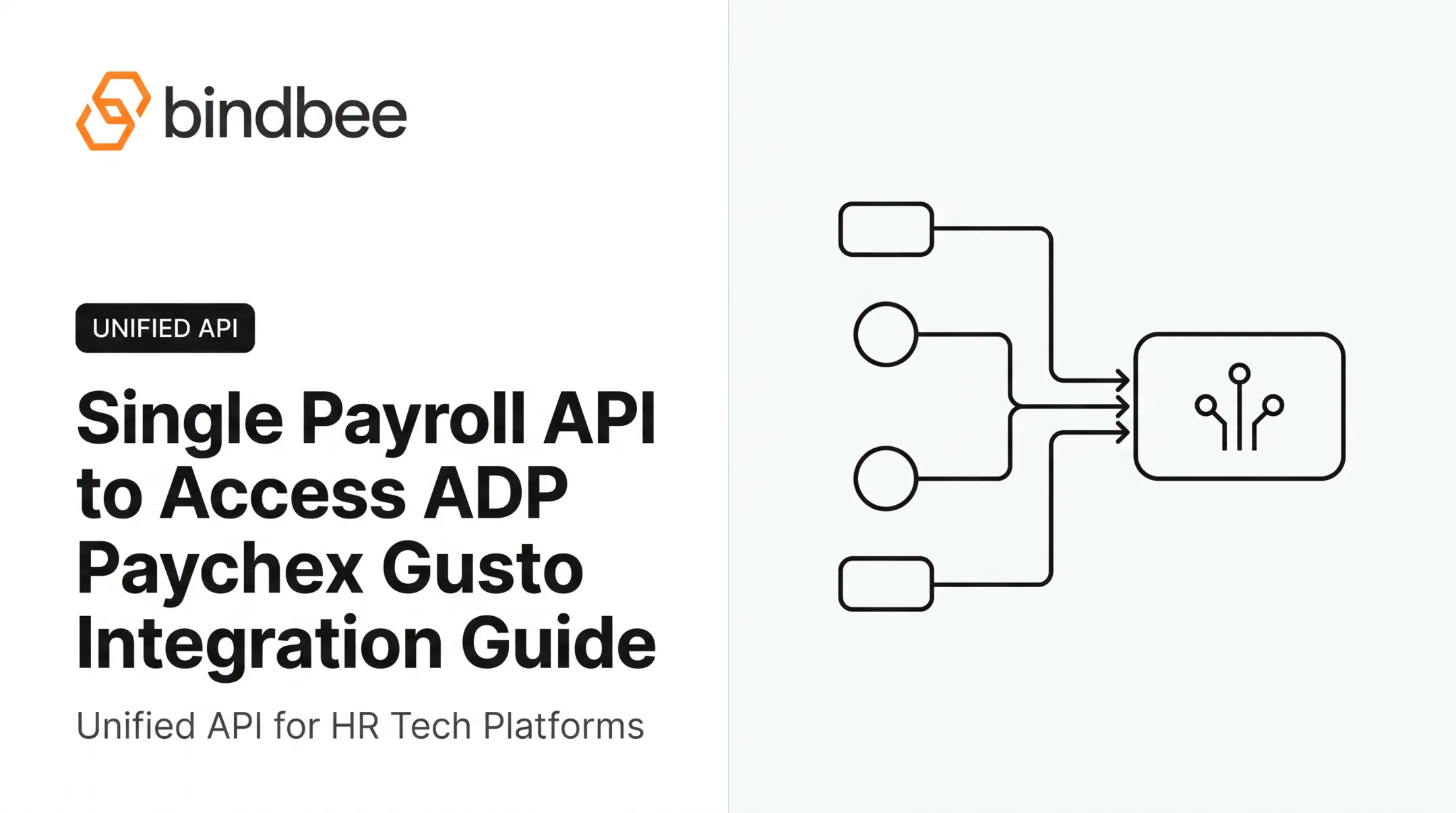
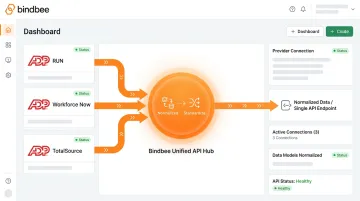
Platforms that need normalized access to ADP payroll and benefits data without the build-and-maintain overhead have a direct alternative. Bindbee's unified API provides a single connection point that surfaces normalized employment, payroll, and benefits data across 60+ HRIS and payroll providers, including ADP.
Rather than building and maintaining separate native integrations for ADP RUN, Workforce Now, and TotalSource, platforms connect once to Bindbee's API and receive consistent, normalized data regardless of which ADP product a given employer uses. When ADP updates its schema or authentication methods, Bindbee absorbs those changes, with no action required from the platform.
For compliance-sensitive 401(k) workflows, Bindbee is SOC 2 Type II and ISO 27001 certified. Platforms can go live in under a day, versus the weeks a native ADP build typically requires.
Frequently Asked Questions
Can you access your 401(k) through ADP?
Yes. ADP offers its own retirement plan recordkeeping through ADP Retirement Services, and employers and employees can view balances, update contribution rates, and manage plan details through ADP's self-service portals. Third-party recordkeepers are also available through the ADP Marketplace.
Who does ADP work with for a 401(k)?
ADP Retirement Services handles recordkeeping natively. For third-party recordkeepers — such as Vestwell — ADP connects via the ADP Marketplace, with integration partners like Payroll Integrations managing the data sync between ADP payroll and the external plan administrator.
What data is synced in an ADP 401(k) payroll integration?
Synced data falls into three categories:
- Census data: employee name, SSN, date of birth, hire and termination dates
- Payroll data: compensation and hours worked
- Plan activity data: deferral elections, Roth contributions, employer match, loan repayments, and eligibility status changes
What ADP products support 401(k) payroll integration?
ADP RUN, ADP Workforce Now, and ADP TotalSource all support 401(k) payroll integration via the ADP Marketplace. Some products — including ADP Payroll Plus — are not currently supported. Confirm with your recordkeeper before beginning setup.
What are common reasons a plan might not qualify for ADP payroll integration?
Disqualifying conditions include: multiple pay groups on different payroll providers, no established recurring pay schedule, eligibility rules that exclude certain employee classes, per-pay-period non-mandatory employer contributions, and after-tax contributions outside a TPA structure.
How long does it take to set up ADP 401(k) payroll integration?
The employer-side steps — entering the onboarding code, completing Consent Manager authorization, configuring deduction codes — typically take a few business days. The recordkeeper's review and testing process usually adds one to two weeks before full activation.