Introduction
Most HR Tech and Benefits platforms don't have a data problem — they have a fragmentation problem. A mid-sized employer might run Workday for HR, ADP for payroll, a separate benefits administration platform, and another tool for ATS. Each holds critical employee data. None of them talk to each other.
The result: HR teams manually re-enter the same employee record across multiple systems, work from outdated information, and make enrollment or compliance decisions without a complete picture.
Software integration connects separate applications so they share data automatically, eliminating manual transfers and the errors that come with them. For HR Tech and Benefits companies building on or connecting to third-party platforms, that connectivity is now table stakes — not a nice-to-have.
This guide covers what software integration is, the key types and implementation methods, why it matters operationally, and what makes it particularly complex for HR Tech and Benefits companies.
Key Takeaways
- Software integration connects separate applications to share data automatically, eliminating manual re-entry and data silos
- Main types include legacy system integration, data integration, EAI, EDI, and API-based integration
- 81% of IT leaders say data silos block digital transformation, yet only 28% of enterprise apps are connected today
- Unified APIs collapse dozens of HRIS and payroll connections into a single integration, freeing engineering teams for core product work
- SOC 2 Type II, HIPAA compliance, and GDPR readiness are required baselines for any integration handling employee or benefits data
What Is Software Integration?
Software integration is the process of connecting separate applications so they can share data, trigger actions across systems, and operate as a unified whole — no manual exports or re-entry required.
At a technical level, applications communicate via APIs (Application Programming Interfaces) or middleware layers that translate and route data between them. When a trigger event occurs in one system — say, a new employee record is created — the integrated system receives and processes that data automatically.
Software Integration vs. System Integration
People often use these terms interchangeably — but they mean different things:
- Software integration connects software applications specifically — focused on data exchange and workflows between platforms
- System integration is broader, covering hardware, networks, physical infrastructure, and software
Software integration is a subset of the larger systems integration discipline.
The Integration Layer
Whether it's a direct API connection, middleware hub, or unified API platform, the integration layer handles:
- Data translation and normalization between systems
- Routing data to the correct destination
- Error handling and retry logic
- Authentication and security
When a new hire is added in Workday or BambooHR, a properly built integration automatically pushes that employee record to payroll, benefits enrollment, IT provisioning, and every other connected system — in real time, with no manual intervention.
Types of Software Integration
Legacy System Integration
Older, on-premise systems built before APIs were standard communicate through file-based methods — SFTP transfers, database connectors, or adapter layers. Many enterprises still depend on these systems for critical data, and legacy integration connects that older infrastructure to modern applications through translation and adapter layers.
Data Integration
Data integration consolidates data from multiple sources into a unified view, typically for analytics, reporting, or data warehousing. The core technique is ETL (Extract, Transform, Load) — moving data from source systems, cleaning it, restructuring it, and loading it into a destination where it can be analyzed. The goal is reliable datasets for analytics and decision-making, not real-time operational data flow.
Enterprise Application Integration (EAI)
EAI connects multiple business applications — CRM, ERP, HRIS, benefits platforms — so they share data and workflows across an organization. IBM defines EAI as a framework of technologies and services for integrating systems and applications across an enterprise. It's particularly relevant for large organizations managing complex, multi-system environments where cross-functional data flow is constant.
Electronic Data Interchange (EDI)
EDI is a standardized method for exchanging structured business documents electronically between organizations. In benefits administration, the ANSI X12 834 transaction set (Benefit Enrollment and Maintenance) is the dominant standard — used by health carriers and the CMS Federal Facilitated Exchange to transmit enrollment data. EDI is rule-bound and format-specific, which makes it reliable for high-volume, regulated data exchange but less flexible than API-based approaches.
API-Based Integration
REST APIs have become the default modern integration mechanism. According to Postman's 2025 State of the API report, REST is used by 93% of organizations, far ahead of GraphQL (33%) and WebSockets (35%).
Two distinct approaches exist:
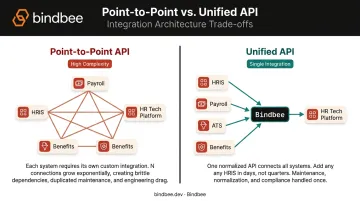
| Approach | How It Works | Best For |
|---|---|---|
| Point-to-point API | Custom connection between two specific systems | Small number of integrations |
| Unified/normalized API | Single API layer abstracting many underlying systems | Connecting to many systems in the same category |
For HR Tech, the unified API model delivers practical scale: one connection covers dozens of HRIS and payroll platforms simultaneously, with normalized data across all of them.
Why Software Integration Matters for Business
Breaks Down Data Silos
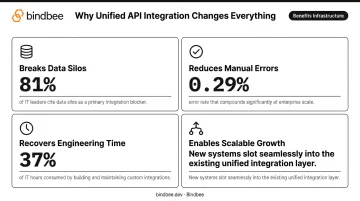
Unintegrated systems trap data inside individual applications, making it invisible to the rest of the organization. The scale of this problem is significant: 81% of IT leaders say data silos hinder digital transformation, yet only 28% of enterprise applications are actually connected.
Integration creates a single source of truth. When every system reflects the same employee data — same compensation, same benefits elections, same employment status — cross-functional decisions become faster and more reliable.
Reduces Errors from Manual Entry
Manual data entry introduces inconsistencies at every step. A 2023 peer-reviewed meta-analysis found single data entry error rates around 0.29% — which sounds small until you're processing tens of thousands of employee records. Automated data sync removes the human-error variable entirely, improving data quality across every downstream system.
Recovers Engineering and Operational Time
The productivity cost of maintaining custom integrations is frequently underestimated. MuleSoft's 2024 Connectivity Benchmark Report found that IT teams spend 37% of their time designing, building, and testing custom integrations — time that isn't going toward product development, customer experience, or revenue-generating work.
Integration reclaims that time. Engineers stop maintaining brittle point-to-point connections and ship product features instead.
Enables Scalable Growth
Without solid integration infrastructure, every new software tool or business partner requires a new custom-built connection — a bottleneck that compounds as the stack grows. With integration architecture in place, new systems slot into the existing layer far more efficiently.
For SaaS companies specifically, the ability to rapidly expand an integrations catalog — without a proportional increase in engineering headcount — is a direct competitive advantage when selling into enterprise accounts.
Common Methods for Implementing Software Integration
Point-to-Point Integration
Point-to-point connects two specific applications through custom code. It's straightforward to build for a single connection, but it doesn't scale. Each new integration requires another custom build, and each existing connection needs independent maintenance. Organizations with 10, 20, or 50 integrations end up with a tangled mesh of dependencies that's difficult to troubleshoot and expensive to update.
When it makes sense: Two systems with a stable, long-term relationship and no plans to add others. When to avoid it: Any environment where the integration count is likely to grow.
Middleware and Enterprise Service Bus (ESB)
An ESB is a centralized middleware layer where applications connect to a shared communication hub rather than directly to each other. This reduces the total number of individual connections required. ESBs carry well-documented limitations, though:
- Can become bottlenecks as traffic increases
- Changes to one integration can destabilize others
- Scaling for high availability adds significant cost and complexity
ESBs made sense in an era of on-premise software but are increasingly difficult to justify for modern, cloud-native environments.
iPaaS and Unified APIs
iPaaS (Integration Platform as a Service) is a cloud-based solution with pre-built connectors, visual workflow builders, and centralized management. The vendor manages the infrastructure, so it's best for organizations without dedicated integration engineering teams.
Unified APIs go further in specific domains. Rather than building general-purpose connectivity, a unified API creates a single normalized layer for a specific software category — for example, all HRIS and payroll systems. Connect once to the unified API, and you get access to dozens of underlying platforms through a consistent data model.
The two approaches serve different needs:
- iPaaS: Broad coverage across many software categories, lower depth per category
- Unified API: Narrow focus on one category (such as HRIS and payroll), with field-level normalization, compliance handling, and domain-specific data models
For HR Tech companies, that depth is often what matters. A general-purpose iPaaS can move data between systems; a purpose-built unified API for HRIS and payroll understands what that data means — and handles the specificity that HR workflows actually require.
Software Integration in HR and Benefits Tech
The Scale of the Problem
The HR technology landscape is genuinely fragmented. Sapient Insights' 2024–2025 HR Systems Survey — covering 3,318 organizations and 25M+ workers — tracks over 600 HR vendors annually and identifies more than 2,750 non-HR applications that require connections to the HR environment. Every one of those connection points is a potential integration challenge.
For companies building HR Tech or Benefits platforms, the problem compounds fast. They must connect to dozens of HRIS, payroll, ATS, and benefits platforms, each with different data schemas, authentication methods, field naming conventions, and update cadences. Building and maintaining all those connections natively can consume months of engineering time per year.
How a Unified API Changes the Math
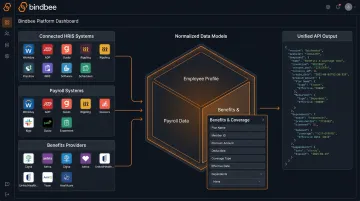
Rather than building individual integrations with each HRIS or payroll system, HR Tech companies can connect once to a unified API layer that normalizes data from 60+ systems into a consistent data model.
Bindbee is built specifically for this use case. Its unified API covers:
- Enterprise HRIS platforms (Workday, Dayforce)
- Payroll systems (ADP)
- Benefits administration platforms (bswift, Rippling, Paylocity)
- ATS systems
All return consistent, normalized data through the same endpoints. The benefits-first data models are a notable differentiator: Employee Benefits, Employer Benefits, and Dependent Benefits are distinct normalized models covering plan type, coverage tier, contribution amounts, enrollment dates, and dependent linkage — fields that generic integration platforms often handle inconsistently or skip entirely.
Setup via Bindbee's Magic Link authentication component takes most customers under 10 minutes. That speed compounds at scale: Newfront, a modern InsurTech platform, cut their HRIS integration timeline from 8–12 weeks per integration down to 48 hours after adopting Bindbee's unified API.
Security and Compliance at the Infrastructure Layer
Benefits data often constitutes protected health information under HIPAA. For any HR Tech company handling this data, the compliance posture of their integration infrastructure is not a secondary concern.
Key certifications to require from any integration platform:
- SOC 2 Type II — audited security controls maintained over time, not just at a point in time
- HIPAA compliance — required when handling protected health information in benefits contexts
- GDPR readiness — necessary when processing employee data for EU data subjects
- ISO 27001 — internationally recognized information security management standard
Building these into the integration layer means HR Tech companies don't have to build and maintain those compliance controls independently.
Key Challenges and Best Practices
Common Integration Challenges
Data schema inconsistencies: Different systems use different field names, data types, and structures for the same information. What one system calls employee_id, another calls staff_number. Normalization logic — mapping fields across systems into a consistent model — is often more time-consuming than the integration itself.
Security and compliance requirements: Employee and benefits data falls under HIPAA, GDPR, and SOC 2 scope depending on context. These requirements apply to the integration layer, not just the endpoint applications. Verify certifications before selecting any platform.
Ongoing maintenance burden: APIs change. Systems update. Fields get deprecated. An integration that works today can silently break when an upstream provider updates their API. This is a hidden cost that teams consistently underestimate in build-vs-buy evaluations.
Actionable Best Practices
- Define integration goals before selecting a method — understand what data needs to flow, in which direction, and at what frequency
- Map data fields across systems first — identify normalization requirements before writing a line of code
- Build for scalability — choose infrastructure where adding new systems doesn't require rebuilding existing connections
- Implement monitoring and alerting — integration failures should be caught immediately, not discovered through downstream errors
- Factor total cost of ownership into build-vs-buy decisions — include maintenance, monitoring, and re-work when upstream APIs change
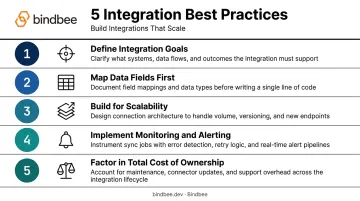
That last point — total cost of ownership — is where most build-vs-buy decisions tip.
The Build vs. Buy Reality
For most SaaS companies connecting to 40+ HRIS providers, buying pre-built integration infrastructure is faster and more cost-effective than building custom connectors. The engineering cost of maintaining 40 native API integrations typically far exceeds the subscription cost of a dedicated integration platform. Every upstream API change adds to that gap.
Frequently Asked Questions
What is the meaning of software integration?
Software integration is the process of connecting separate software applications so they can share data and trigger actions in each other automatically. It eliminates manual data re-entry between systems and creates a more unified operational environment.
What are the different types of software integration?
The main types include:
- Legacy system integration — connecting older file-based systems to modern platforms
- Data integration — consolidating data for analytics and reporting
- Enterprise application integration (EAI)
- Electronic Data Interchange (EDI)
- API-based integration — REST or unified APIs
What are some examples of software integration?
An HRIS automatically syncing new employee records to payroll and benefits platforms; a CRM triggering onboarding emails through a connected marketing tool; an e-commerce platform pushing orders to an ERP system in real time. In HR Tech, Bindbee's unified API connects platforms like Healthee and Clever Benefits to 60+ HRIS systems through a single integration.
What is the difference between software integration and system integration?
Software integration connects software applications specifically. System integration is broader: it encompasses all IT components, including hardware, networks, and physical infrastructure, unified into a single operational environment. Software integration is a subset of systems integration.
What are the main challenges of software integration?
The three most common challenges are: data schema and format inconsistencies between systems (requiring normalization logic), security and compliance requirements (especially for sensitive HR and benefits data), and the ongoing maintenance burden as APIs and platforms update over time.
What is an API and how does it enable software integration?
An API (Application Programming Interface) is a set of rules that allows two software applications to communicate. APIs are the dominant modern integration mechanism: they enable real-time data exchange between platforms without requiring custom database connections, making integrations faster to build and maintain than older file-based methods.