Introduction
When payroll data lives in one system, employee records in another, and QuickBooks handles the books, someone on your team is manually reconciling the gaps. That someone is making errors — an Ernst & Young survey found that 1 in 5 U.S. payrolls contains mistakes, with each error costing an average of $291.
The fix is HR software that connects directly to QuickBooks, keeping both systems on the same data without manual hand-offs.
This guide covers the 8 best HR platforms with verified QuickBooks integration in 2026 — evaluated on integration depth, HR feature set, workforce type fit, and QuickBooks App Store status. Company size ranges from 10-person retail shops to 500-person distributed teams, so each pick includes who it's best suited for.
TL;DR
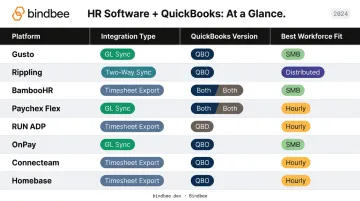
- QuickBooks integrations typically sync payroll journal entries, employee records, benefits deductions, and time tracking data — into either QuickBooks Online or Desktop
- Best for payroll + basic HR: Gusto, OnPay, RUN Powered by ADP
- Best for deeper HRIS + QBO sync: BambooHR, Rippling, Paychex Flex
- Best for hourly/deskless teams: Homebase, Connecteam
- Critical check: Confirm whether your chosen platform supports QBO, QBD, or both — and whether it offers full GL sync or just timesheet export
What HR-QuickBooks Integration Actually Covers
Not all HR-QuickBooks integrations are equal. Understanding what data actually moves — and how — saves you from a painful post-purchase surprise.
What a Production-Grade Integration Moves
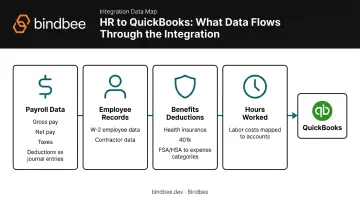
A real HR-QuickBooks integration handles four data categories:
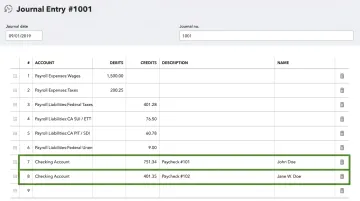
- Payroll data: Gross pay, net pay, tax withholdings, and deductions flow as journal entries into QuickBooks
- Employee records: W-2 and contractor data sync for accurate headcount and cost tracking
- Benefits deductions — health insurance, 401(k), FSA/HSA contributions — update expense categories automatically
- Hours worked map to labor cost accounts, enabling accurate project or department reporting
QBO vs. QBD: A Critical Distinction
QuickBooks Online and QuickBooks Desktop use entirely different technical architectures. QBO runs on a REST/JSON cloud API, enabling real-time sync. QBD relies on a locally installed SDK and the QuickBooks Web Connector — a Windows app running scheduled exchanges tied to wherever the company file is stored.
Most modern HR software focuses on QBO as a result. QBD support, where it exists, typically works through data export rather than live API sync. Confirm which version your business runs before committing to any platform.
If You're Building on Top of These Systems
HR tech companies and benefits platforms building on top of these HRIS systems face a compounding problem: maintaining separate connectors to every payroll or HRIS vendor just to normalize employment data for downstream logic.
A unified API layer like Bindbee solves this by normalizing payroll and employment data from 60+ HRIS systems through a single connection — covering gross pay, net pay, deductions, tax withholdings, and employee records in a consistent format regardless of which system the employer uses.
8 Best HR Software That Integrates With QuickBooks
These eight platforms were evaluated on integration depth, HR feature completeness, workforce type fit, and current QuickBooks App Store or certified partnership status.
Gusto
Gusto is a full-service payroll and HR platform built for small and growing businesses. It covers payroll, benefits, onboarding, time tools, and contractor payments — and it's one of the most widely adopted QBO-integrated HR platforms among SMBs.
Its QuickBooks integration is among the most detailed available: Gusto automatically generates payroll journal entries after each pay run, pulls your chart of accounts from QBO for mapping, and supports QBO Classes for cost-center reporting by employee, department, or project. QuickBooks Desktop users can export financial data for manual import.
| Feature | Detail |
|---|---|
| Key Features | Payroll, benefits administration, onboarding, contractor payments, time tracking |
| Integration Type | Native QBO (journal entry sync + chart of accounts mapping) + QBD export |
| Best For | Small businesses needing payroll-to-accounting automation |
| Pricing | Simple: $49/mo + $6/person; Plus: $80/mo + $12/person; Premium: $180/mo + $22/person |
Gusto is listed in the QuickBooks App Store.
Rippling
Built around a single employee data model, Rippling connects HR, payroll, IT, benefits, and compliance so every system references the same record — cutting reconciliation work across departments.
Its QuickBooks Online integration connects payroll and workforce data to accounting, removing the manual journal entry step. Rippling is particularly strong for distributed or remote companies and businesses managing multiple departments with distinct cost centers.
| Feature | Detail |
|---|---|
| Key Features | HR, payroll, IT device management, benefits, compliance automation, global payroll |
| Integration Type | QuickBooks Online (payroll and workforce data sync) |
| Best For | Scaling businesses needing full workforce automation with accounting sync |
| Pricing | Custom quote; starting around $8/user/month per Rippling's comparison pages |
BambooHR
BambooHR is an HRIS-first platform focused on employee records, onboarding, time-off tracking, performance, and HR workflows. It suits businesses that want HR data well-organized before it touches payroll or accounting.
The QuickBooks Online integration (powered by Merge) has expanded steadily:
- March 2025 launch: Automates payroll journal entries; syncs pay dates, debit/credit accounts, and payroll amounts
- August 2025 update: Added QBO Classes support for department-level cost allocation
- Desktop note: QBO only — no QuickBooks Desktop support has been verified
| Feature | Detail |
|---|---|
| Key Features | Employee records, onboarding workflows, PTO tracking, performance management, e-signatures |
| Integration Type | QuickBooks Online only (payroll journal entry sync, launched 2025; QBO Classes added Aug 2025) |
| Best For | Businesses wanting a complete HRIS with structured payroll-to-accounting handoff |
| Pricing | Core: $10/employee/month; Pro: $17/employee/month; Elite: $25/employee/month (25-employee minimum: $250/month flat) |
Paychex Flex
Paychex Flex is an established payroll and HR platform for small to mid-sized businesses, differentiating through a service-backed model — software paired with access to HR specialists and compliance advisors. This makes it a strong fit for businesses with multi-state workforces or complex compliance requirements.
Its QuickBooks Online General Ledger integration automatically posts payroll data from Paychex Flex directly into QBO across Accounts, Employees, Organizations, and Classes — no manual journal entry work required.
| Feature | Detail |
|---|---|
| Key Features | Payroll processing, HR advisory services, benefits, compliance support, time and attendance |
| Integration Type | QuickBooks Online General Ledger (automatic payroll posting across accounts, employees, orgs, and classes) |
| Best For | Businesses needing payroll, multi-state compliance support, and HR advisory alongside QBO sync |
| Pricing | Quote-based (Select, Pro, and Enterprise packages) |
RUN Powered by ADP
RUN is ADP's small-business payroll and HR solution — guided payroll, automated tax filing, HR resources, and compliance support, backed by one of the most recognized payroll brands in the country.
Its QuickBooks Online integration is verified in the QBO App Store as a verified two-way sync: it imports account lists from QuickBooks into RUN for mapping, then pushes completed payroll transactions back into QBO. The General Ledger interface is listed as free for RUN clients. ADP also handles agency inquiries and fines if errors occur in the tax filing process.
| Feature | Detail |
|---|---|
| Key Features | Payroll, automated tax filing, HR resource library, employee self-service, new hire reporting |
| Integration Type | Two-way QuickBooks Online sync (listed in QBO App Store; GL interface free for RUN clients) |
| Best For | Small businesses wanting reliable payroll + compliance with QBO accounting sync |
| Pricing | Quote-based (Essential, Enhanced, Complete, and HR Pro tiers) |
OnPay
For small businesses that want everything in one plan, OnPay delivers payroll, tax filing, benefits, and basic HR tools at a flat rate — no per-feature add-on charges.
Every time payroll runs, OnPay automatically syncs General Ledger data to QuickBooks Online. The integration supports customizable line-item mapping, employee-level detail, and pay type/class mapping to your chart of accounts — no manual export required. Unlimited pay runs are included at no extra cost.
| Feature | Detail |
|---|---|
| Key Features | Payroll, tax filing, benefits, HR tools, employee and contractor support |
| Integration Type | Native QuickBooks Online sync (automatic GL sync on each payroll run) |
| Best For | Small businesses wanting affordable, all-inclusive payroll + HR with clean QBO sync |
| Pricing | $49 base/month + $6/person/month (all features included, unlimited pay runs) |
Connecteam
Deskless, mobile, and field-based teams have different operational needs than office workers — Connecteam is built around those needs, covering time tracking, scheduling, communication, forms, training, and task management in one app.
Its QuickBooks integration lets managers review and export timesheet data into QuickBooks Online for payroll processing. It supports QBO Essentials, Plus, and Advanced plans, and also provides a QuickBooks Desktop export template. Worth clarifying: Connecteam is a workforce management tool with QBO payroll sync, not a full HRIS — PTO export is not currently supported in the QBO integration.
| Feature | Detail |
|---|---|
| Key Features | Time tracking, employee scheduling, team chat, forms, training, task management |
| Integration Type | QuickBooks Online (timesheet export for payroll processing; QBD export template available) |
| Best For | Deskless, mobile, or multi-site teams needing time tracking and workforce ops with QBO sync |
| Pricing | Free for up to 10 users; paid plans from $35/month (11–30 users) |
Homebase
Homebase is designed for hourly and shift-based workforces — scheduling, clock-in/out, team communication, hiring tools, and payroll, all in one place. It's widely used in retail, food service, and small service businesses.
Its QuickBooks integration connects to QuickBooks Online Plus specifically, syncing employee data, hours worked, and timesheet information for payroll preparation. No QuickBooks Desktop support has been verified through official Homebase documentation. The platform is listed in the QuickBooks App Store.
| Feature | Detail |
|---|---|
| Key Features | Employee scheduling, time clocks, payroll, hiring tools, team messaging |
| Integration Type | QuickBooks Online Plus (employee data, hours, and timesheet sync) |
| Best For | Hourly teams, retail, food service, and shift-based small businesses |
| Pricing | Free for one location; paid plans available (see Homebase pricing page) |
How We Chose These Tools
Evaluation Criteria
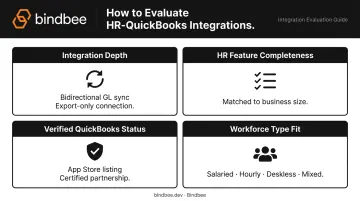
Every platform on this list was assessed against four factors:
- Integration depth — Native bidirectional GL sync scores higher than export-only or one-way timesheet push
- HR feature completeness — Matched against target business size and workforce type
- Verified QuickBooks status — QBO App Store listing or certified partnership confirmed where possible
- Workforce type fit — Salaried, hourly, deskless, or mixed workforces each have different needs
The Most Common Buying Mistake
Buyers routinely choose based on brand recognition, then discover the integration doesn't fit their setup. Two failure points come up again and again: the platform doesn't support their QuickBooks version, or it only syncs timesheets instead of full general ledger entries. The QBO vs. QBD distinction is a common source of post-purchase regret — and nearly every modern HR software tool targets QBO only.
Confirm Integration Tier Before Buying
Integration access isn't always included at every plan tier. Several platforms gate their QuickBooks sync behind mid-tier or premium subscriptions. Before committing, confirm the integration you need is available at your chosen plan level — not locked behind an upgrade.
Conclusion
The right HR-QuickBooks integration depends on three things: your workforce type, payroll complexity, and whether you need a full HRIS or just a clean payroll-to-accounting sync.
- Gusto and OnPay are strong defaults for simplicity and price
- BambooHR and Rippling suit businesses that need deeper HR lifecycle management
- Paychex Flex and RUN Powered by ADP fit compliance-heavy environments with multi-state complexity
- Homebase and Connecteam are purpose-built for hourly and deskless workforces
For HR tech companies and benefits platforms that need to connect across multiple HRIS systems, Bindbee's unified API normalizes data from 60+ HRIS and payroll systems through a single integration. The Newfront team cut HRIS integration timelines from 8–12 weeks down to 48 hours using it.
That difference — days instead of quarters — is what makes integration a competitive advantage rather than an ongoing maintenance problem. Explore how Bindbee helps teams go live in hours, not weeks.
Frequently Asked Questions
What HR software integrates with QuickBooks?
Gusto, Rippling, BambooHR, Paychex Flex, RUN Powered by ADP, OnPay, Connecteam, and Homebase all integrate with QuickBooks. Each offers a different level of integration depth — from full GL sync with chart of accounts mapping (Gusto, RUN ADP) to timesheet export for payroll processing (Connecteam, Homebase).
What's the best payroll software that integrates with QuickBooks?
Gusto and OnPay are the most popular choices for small businesses, offering native QuickBooks Online sync that automatically posts journal entries after each payroll run. RUN Powered by ADP and Paychex Flex are preferred by businesses that also need automated tax compliance and access to HR advisory services.
Does QuickBooks have HR services?
Yes. QuickBooks Workforce (formerly QuickBooks Payroll) includes HR Support Center services powered by Mineral Inc. on Premium and Elite tiers — covering an Employee Handbook Wizard, Job Description Library, and Federal/State Law Databases. The Elite plan adds unlimited secure chat with live HR advisors.
What is the difference between QuickBooks Online and QuickBooks Desktop integrations?
QBO uses a cloud-based REST/JSON API that enables real-time sync. QBD uses a locally installed SDK and Web Connector that runs scheduled data exchanges — not a live cloud connection. Most modern HR platforms focus on QBO; where QBD support exists at all, it works through data export rather than real-time sync.
Can HR software sync benefits deduction data to QuickBooks?
Platforms including Gusto, Rippling, and Paychex Flex can sync benefits deductions (health insurance, 401(k), FSA/HSA) alongside payroll into QuickBooks as part of the general ledger entry. The level of deduction detail and mapping flexibility varies by platform and plan tier.
How does a unified HR API help with QuickBooks integrations?
HR tech platforms building QuickBooks integrations need clean, normalized payroll data from multiple HRIS sources — and maintaining separate connectors for each one is costly. A unified API like Bindbee normalizes data from 60+ HRIS and payroll platforms (gross pay, net pay, deductions, employee records) through a single connection, giving teams a consistent data layer to feed QuickBooks workflows without ongoing connector maintenance.