Introduction
When the handoff between onboarding and payroll breaks, new hires miss first paychecks, benefits deductions are misconfigured, and HR teams burn their first week correcting data errors instead of supporting employees. For HR Tech builders, this isn't a process problem — it's an architecture problem.
Payroll-onboarding integration is the automated transfer of new hire data — personal details, tax elections, benefits selections, and direct deposit information — from an onboarding workflow directly into the payroll system, eliminating manual re-entry between the two.
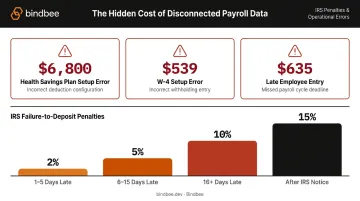
The cost of getting this wrong is well-documented. According to EY's 2022 HR Processing Risk and Cost Survey, the average payroll accuracy rate is only 80%, with each error costing $291 to remediate. At setup specifically:
- Failing to enter an employee into the system on time: $635 per occurrence
- A W-4 setup error: $539 per occurrence
This article covers:
- What payroll-onboarding integration actually involves
- How data flows end-to-end across systems
- Where and why the handoff fails
- How HR Tech platforms operating across multiple employer payroll environments should think about the architecture
Key Takeaways
- Payroll-onboarding integration automates the new hire data handoff so employees are paid correctly on the first run — no manual re-entry required.
- Critical data fields: employment type, pay rate, start date, W-4 elections, direct deposit details, and benefits deductions.
- Late or missing setup data causes compounding failures — wrong paychecks, compliance gaps, and IRS penalties.
- HR Tech platforms serving multiple employers face a separate integration challenge for each payroll system's data model and API behavior.
- A unified API layer normalizes this complexity behind a single connection point.
What Is Payroll-Onboarding Integration?
Payroll-onboarding integration is the technical connection between an employee onboarding system and a payroll platform. It automatically transfers the data a payroll system needs to pay a new employee correctly — including hire records, compensation, tax withholding elections, and deduction instructions — before the first pay cycle runs.
The intended outcome is specific: a new employee exists in the payroll system with all required data populated correctly by the time the first payroll run is processed — without any manual intervention from HR or payroll administrators.
How It Differs from Adjacent Processes
This integration is often confused with two distinct workflows:
- HRIS-to-payroll sync maintains ongoing employee record accuracy after initial setup — it keeps data current, not initial.
- Benefits administration manages plan enrollment and ongoing coverage — it operates after the employee is established.
Payroll-onboarding integration is specifically the initial data transfer event that creates the payroll record for a net-new employee. It happens once per hire — and if the data is wrong or missing, the employee may not be paid correctly on their first check, triggering compliance exposure and a poor day-one experience.
Why Payroll and Onboarding Integration Are Inseparable in HR Tech
The onboarding workflow is where payroll data originates — employment type, compensation structure, start date, tax withholding preferences, and direct deposit details all flow from here. Each one directly determines whether the first paycheck is correct, on time, and compliant.
When onboarding platforms and payroll systems operate as separate tools with separate data models, that gap is exactly where errors enter.
The Cost of Disconnection
EY's research found that health savings plan setup input errors average $6,800 per incident — what happens when benefits enrollment data doesn't transfer cleanly into payroll. Beyond direct costs, IRS failure-to-deposit penalties start at 2% for deposits 1–5 days late, escalate to 10% beyond 15 days, and reach 15% after notice conditions — making payroll timing errors a compliance liability, not just an operational inconvenience.
What Goes Wrong Without Integration
Manual data re-entry creates predictable failure patterns:
- Incorrect pay rates, wrong tax elections, and misrouted direct deposits from manual re-entry
- Missed first paychecks when HR backlogs delay data entry
- Tax election gaps that create compliance exposure before the first payroll run
- Failure rates that compound as hiring volume grows
At hiring scale, each of these failure points compounds. The question for HR Tech products isn't whether to integrate payroll and onboarding data — it's how cleanly that data transfers and how early errors get caught.
How the Integration Works: From Offer Acceptance to First Paycheck
The integration triggers when a new hire completes all required onboarding forms. At that point, the onboarding system pushes a structured data payload to the payroll system, which uses it to construct the employee's payroll record. Here's exactly what moves across that connection — and how.
What Enters the Integration
| Data Category | Specific Fields |
|---|---|
| Personal identifiers | Legal name, SSN, address |
| Job and compensation | Title, department, employment type, pay rate, pay frequency |
| Tax withholding | Federal W-4 elections, applicable state forms |
| Banking | Direct deposit routing and account numbers |
| Benefits | Deduction instructions from enrollment selections |
Nacha reports that 93% of American workers receive pay via direct deposit — making bank account data one of the most consequential fields in the onboarding payload.
Step 1: New Hire Completes Onboarding Forms
The employee submits personal, tax, and banking information through the onboarding portal. The system validates required fields for completeness and triggers a completion event or webhook to initiate the data transfer.
Step 2: Data Is Mapped and Transmitted to Payroll
The onboarding platform transforms submitted data into the payroll system's expected format and pushes it via API call, deduction file, or middleware layer. Field mapping must account for differences in how payroll systems label and structure data — pay frequency codes, employment type classifications, and compensation field formats all vary by vendor.
Step 3: Benefits Deductions Are Configured
Benefits elections made during onboarding must be translated into payroll deduction instructions before the first pay cycle. This happens via a direct API write-back to the payroll system, or through a handoff to the benefits administrator who pushes a deduction file.
Any lag here has a direct consequence: the first paycheck won't reflect the employee's intended coverage.
Step 4: Payroll Record Is Validated and Activated
The payroll system confirms the new hire record is complete, then activates it for the next scheduled run. Missing or rejected fields require HR intervention — and that can delay first payment. Deadlines are unforgiving: ADP RUN requires payroll approval by 5:00 PM EST on the business day before check date. Gusto sets a 4 PM PT cutoff two business days before payday. Miss either window and the employee waits another full cycle.
Integration Architecture Options
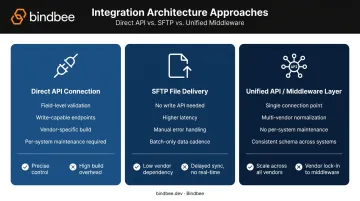
Three approaches exist, each with different trade-offs:
- Direct API connection: Cleanest implementation with field-level mapping validated at submission. Requires the payroll system to expose write-capable endpoints. Gusto, ADP Workforce Now, Paylocity, and several regional vendors each provide official APIs for employee and worker record creation.
- SFTP file delivery: Used when payroll systems don't expose write-capable APIs. Workday Cloud Connect, for instance, uses XML and Excel output formats for payroll data exchange. Higher latency and more manual error handling.
- Unified API / middleware layer: A single integration point that normalizes data across multiple payroll vendors. This is where platforms like Bindbee operate — abstracting the differences between payroll systems behind one consistent API so HR Tech platforms don't need to build and maintain separate connectors per system.
Key Failure Points That Affect Integration Quality
Even well-designed integrations break at predictable points. Here's where to focus:
- Data timing: Payroll systems have hard cutoffs before each run. If the onboarding completion event fires after the cutoff, the employee misses the cycle. A nightly batch won't help an employee who finished onboarding the morning of cutoff day — real-time sync is what matters here.
- Field mapping mismatches: Different payroll vendors use different data models. A pay rate labeled "salary" in the onboarding system may need to transmit as an hourly equivalent or annual figure in the target system. These are silent failures — they produce wrong paychecks rather than error messages.
- Incomplete onboarding submissions: If a new hire skips their W-4 or banking details before the workflow is marked complete, the integration transmits an incomplete record. The payroll system may apply default withholding (per IRS Publication 15 guidance) or reject the record — neither outcome is what the employee intended.
- Benefits deduction lag: Benefits enrollment and payroll deduction setup are often owned by different systems and different teams. When administrators prepare deduction files manually instead of pushing them programmatically, delays follow — and the first paycheck reflects none of the employee's coverage elections.
- Multi-employer complexity: Platforms serving multiple employer clients must handle each employer's different payroll system, field requirements, authentication method, and update cadence. This compounds integration maintenance fast. ADP's 2025 Global Payroll Survey found IT teams spend an average of 25 hours and 13 minutes per week managing payroll data flows — with 32% spending more than 30 hours weekly.
When a Direct or Native Integration Is Not Enough
Building a native integration with one payroll system is an engineering project. Building native integrations with ten or fifteen different payroll systems — to serve employer clients running different platforms — is an engineering department.
Each native integration requires:
- Its own build and testing cycle
- Vendor-specific authentication and rate limit handling
- Ongoing maintenance as the payroll vendor updates their API
- A separate support path when something breaks
Some payroll systems compound this further by not exposing write-capable REST APIs at all. Workday Cloud Connect uses XML and file-based exchange patterns. IFS CloudPay uses SFTP for payroll data delivery. Forcing a uniform integration approach across these systems without an abstraction layer isn't realistic.
Signals the Current Architecture Needs Rethinking
- HR teams manually correcting payroll data after each onboarding cycle
- Employer clients reporting first-paycheck errors repeatedly
- Engineering spending more time on integration maintenance than core product
- Inability to onboard new employer clients quickly because each requires a custom connector
When these patterns appear, the problem isn't any single integration — it's the architecture.
The Unified API Approach
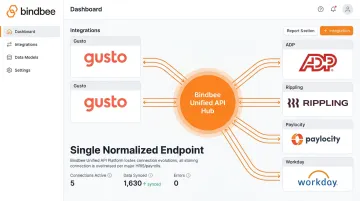
A unified API layer connects to all target payroll systems through a single normalized interface. The HR Tech platform builds once and supports every payroll system the layer covers, without managing separate connectors, separate authentication flows, or separate error handling per vendor.
Bindbee is built for this use case. Its unified API covers 60+ HRIS and payroll systems — including Gusto, ADP, Rippling, Paylocity, Workday, and BambooHR — behind a single normalized endpoint. For payroll systems that don't expose write-capable APIs, Bindbee's SFTP-to-API bridge handles the gap, accepting file-based payroll data and normalizing it into the same unified model.
The results are measurable. Newfront reduced integration deployment time from 8–12 weeks to 48 hours using this approach, cutting engineering time on integration development by 90%. Bindbee's published benchmarks show that connecting via its unified API takes under one day, versus 4–8 weeks for a native direct integration — with zero ongoing maintenance versus indefinite upkeep.
Conclusion
Payroll-onboarding integration closes the data gap between when an employee is hired and when they are paid. When built correctly, it means the payroll system receives everything it needs — correctly formatted, before cutoff — without anyone manually intervening to process that first paycheck accurately.
The catch for HR Tech builders: failure modes rarely surface in the onboarding UI. They appear in wrong paychecks, missed deductions, and tax corrections. And for platforms supporting multiple employer clients across different payroll vendors, the architecture decision matters from the start: native connectors built per system become a maintenance liability at scale. A unified API approach eliminates that compounding burden and makes adding new employer payroll environments a configuration step rather than an engineering project. If you're designing this architecture now, that distinction — configuration vs. engineering — is the one worth getting right before you scale.
Frequently Asked Questions
What is the payroll onboarding process?
The payroll onboarding process is the sequence of steps that collects and transfers a new hire's employment, tax, banking, and benefits data into the payroll system before the first pay cycle. The goal: employees paid correctly from day one, with no manual re-entry of data between systems.
What data must transfer from onboarding to payroll for a new hire?
The core fields are legal name and personal identifiers, employment type and pay rate, start date, federal W-4 and applicable state tax withholding elections, direct deposit routing and account numbers, and benefits deduction instructions from enrollment selections. Missing any of these creates downstream payroll errors.
What happens if onboarding and payroll systems are not integrated?
Without integration, HR teams must manually re-enter new hire data into the payroll system — a process that introduces errors and delays. If tax elections aren't entered before the first payroll run, the employee may be withheld incorrectly, creating a compliance issue that requires a correction and potentially triggers IRS penalties.
How does benefits enrollment connect to payroll deductions?
Benefits elections made during onboarding must be translated into deduction instructions and pushed to the payroll system before the first pay cycle, either via a direct API write-back or a deduction file from the benefits administrator. Any lag between enrollment and deduction setup means the first paycheck won't reflect the employee's coverage elections.
What are the 5 C's of employee onboarding?
The 5 C's are typically Compliance, Clarification, Culture, Connection, and Check-in (frameworks vary by source). Payroll integration primarily supports the Compliance dimension, ensuring tax, banking, and benefits data is correctly captured and transferred to the payroll system.
What software is used for onboarding?
Common onboarding platforms include BambooHR, Rippling, Gusto, Workday, Paycor, Paylocity, and UKG. The key evaluation criterion in an HR Tech context is how reliably and quickly the platform pushes new hire data to the payroll system — either natively or through an integration layer like Bindbee.