
Introduction
Most product teams underestimate payroll integration, until something breaks in production. Connecting to dozens of HRIS and payroll systems means normalizing disparate data schemas, managing authentication at scale, and maintaining sync reliability long after the initial setup. It demands continuous monitoring, version management, and error handling.
This guide is for product teams and engineering leads at HR tech companies, benefits administration platforms, insurtechs, and TPAs that need to integrate with payroll and HRIS systems to power their core product functionality. Getting this right matters more than most teams plan for.
When integration is rushed or poorly planned, data mismatches trigger benefits enrollment errors and incorrect deductions, payroll discrepancies erode employee trust, and unplanned API changes create compounding engineering debt. The cost of getting it wrong is concrete: building a native integration with a single system typically takes 8–12 weeks per provider and can run $800K+ annually in engineering resources. Data breaches exposing payroll information carry an average cost of $4.44M globally and $10.22M in the US.
Key Takeaways
- Scope system coverage, data requirements, and security compliance before building any API connections
- The process follows five phases, from system discovery through employer onboarding
- Post-integration validation must confirm data accuracy, sync reliability, and error alerting; skipping it causes silent failures
- Common failure points: inconsistent data formats, expired tokens without alerts, and legacy systems with no API access
- A unified API approach can reduce build time from weeks to hours and eliminate ongoing maintenance
Pre-Integration Requirements Checklist
Decisions made in the foundation phase determine how much rework happens later. Integration failures are most often traced back to requirements that were undefined or assumed before build began.
Define Your System Scope
Map all payroll and HRIS systems your target customers use, including both dominant platforms and long-tail providers in your specific market segment. The global payroll applications market was valued at $8.4B in 2024, with the top 10 vendors accounting for just 60.4% of the market, meaning 40% is fragmented across hundreds of regional and niche providers.
Key scoping activities:
- Identify which systems are in scope for launch versus future phases
- Document known gaps (e.g., systems that only support SFTP export)
- Define fallback strategies so they don't become blockers post-launch
- Prioritize coverage by customer concentration, not just market share
Define Your Data Requirements
Document which data objects and fields your platform needs from payroll systems: employee records, pay groups, compensation details, benefits elections, deductions, dependent data, and effective dates. Specify whether you need read-only sync, bidirectional write-back, or both.
Map downstream dependencies by identifying which product workflows are triggered by payroll data:
- Benefits enrollment based on new hire events
- Carrier feed generation based on deduction changes
- Eligibility verification triggered by employment status updates
- Compensation analysis dependent on pay data
Teams that skip this mapping step typically discover missing fields during QA, when fixing them costs significantly more time than defining them upfront.
Confirm Security and Compliance Requirements
Verify which security certifications apply to your use case:
- SOC 2 Type II for general data security covering Security, Availability, Processing Integrity, Confidentiality, and Privacy
- ISO 27001 for information security management systems
- HIPAA if handling health benefit data (requires business associate agreements when processing PHI on behalf of covered entities)
- GDPR if serving international employees, requiring lawful processing under Article 6 bases such as consent, contract, or legitimate interests
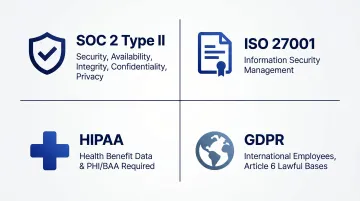
Bindbee holds SOC 2 Type II and ISO 27001 certifications and is HIPAA compliant, providing a pre-certified infrastructure layer that eliminates the need to build compliance controls from scratch.
Document authentication requirements per target system and establish credential management procedures for each:
- OAuth 2.0: most common for modern HRIS APIs
- API key: simple but requires secure storage and regular rotation
- SFTP credential: necessary for legacy systems with file-based exports; revocation handling must be defined upfront
The Payroll Integration Checklist: Step-by-Step
Payroll integration follows a defined sequence. Skip normalization or testing, and you accumulate technical debt that compounds with every employer you onboard.
Phase 1: API Discovery and System Mapping
Audit the API documentation for each target payroll system and document:
- Supported API versions and deprecation timelines
- Rate limits and quota constraints
- Data freshness guarantees and sync latency
- Available objects and endpoints
- Webhook support versus polling-only architecture
Create a system capability matrix to inform architecture decisions. For example:
- ADP uses REST APIs with OAuth 2.0 and event notifications
- Gusto supports REST APIs with webhooks for embedded payroll
- BambooHR uses RESTful API over HTTPS with API key authentication
- Paychex provides REST APIs with OAuth 2.0 and Bearer tokens
- Rippling supports OAuth 2.0 for partners and webhook events for employee lifecycle changes
- Workday exposes SOAP-based web services and Reports-as-a-Service (RaaS) for HCM data
Payroll providers routinely deprecate features and endpoints. Build version tracking into your roadmap from day one.
Phase 2: Data Normalization and Field Mapping
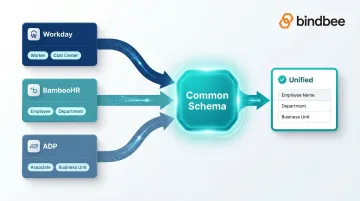
Create a master field mapping document that translates system-specific field names and data structures into a common normalized schema across all connected payroll platforms.
The specific risk: Assuming fields map 1:1. For example, "department" in one system may be "cost center" or "business unit" in another. Workday refers to people as Workers and uses SOAP/XML payloads, while BambooHR refers to Employees and uses REST/JSON.
Best practices:
- Explicitly flag fields that appear in some systems but not others
- Define fallback behavior when expected fields are missing
- Reference standards like HR Open Standards Consortium schemas for global HR data vocabularies
- Document how custom fields will be handled across integrations
Skip this normalization layer and every downstream workflow inherits the full complexity of vendor-specific data structures, multiplied across every system you support.
Phase 3: Authentication and Connection Setup
Implement the appropriate authentication flow for each system:
- OAuth 2.0 authorization code flow for most modern cloud platforms
- API key injection for systems using token-based auth
- SFTP credential handshake for legacy file-based systems
Build and test token refresh logic with proactive expiry detection. OAuth tokens expire, and silent failures are the most dangerous kind, they don't trigger alerts until data goes stale and downstream workflows fail.
Validate that employers can complete connection setup without requiring engineering involvement on each onboarding. Embedded authentication components and pre-scoped permission flows reduce setup friction and improve activation rates.
Phase 4: Sync Configuration
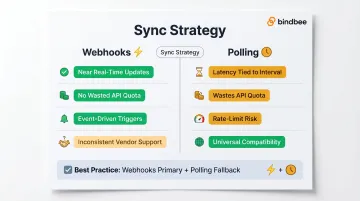
Define sync strategy based on use case urgency:
- Configure webhook subscriptions for time-sensitive life events: new hires, terminations, dependent additions, benefits election changes
- Set incremental sync schedules for bulk data refreshes (daily, weekly)
- Implement polling fallbacks for systems that don't support webhooks
Polling generates latency tied to interval, wastes API quota on no-change responses, and introduces rate-limit contention. Native webhooks provide near real-time updates but are inconsistent across vendors.
Test that webhook payloads are correctly parsed and that incremental syncs don't overwrite manual overrides or create duplicate records. This matters most during open enrollment windows, where stale eligibility data directly causes downstream enrollment failures.
Phase 5: Employer Onboarding Flow
Design and test the end-to-end employer connection experience. The fewer manual steps required to authorize and connect a payroll system, the higher your employer activation rate.
Key success criteria:
- Employers with different system types (cloud API, legacy SFTP) can complete onboarding through a consistent interface
- Authentication flows complete in minutes, not hours or days
- Initial data sync begins immediately after connection
- Error messages are actionable and employer-facing
Before launch, run the full flow with representative employer accounts across system types. Time-to-first-successful-sync is the clearest signal of onboarding quality, optimize for it.
Post-Integration Validation Checklist
Silent data errors don't trigger alerts. They accumulate quietly and surface later as benefits discrepancies, incorrect deductions, or compliance audit failures, often at the worst possible moment.
Verify Data Accuracy
Cross-reference at least 10–20 employee records per connected system. Sample across employment types (full-time, part-time, contractor) and pay structures. Confirm that:
- Compensation figures match the source system exactly
- Deduction amounts are correct
- Effective dates align with payroll cycles
- Dependent relationships are accurate
Test Sync Reliability End-to-End
Once data accuracy is confirmed, test how the integration handles real-world events. Trigger each of the following and verify the outcome:
- New hire added to payroll system
- Termination processed
- Benefits election changed
- Dependent added or removed
Confirm data syncs correctly within your expected time windows. Document those sync times as benchmarks for ongoing monitoring.
Validate Error Handling Behavior
Reliable sync behavior matters, but so does how the integration fails. Verify that:
- Failed API calls trigger actionable alerts
- Partial sync failures do not silently corrupt existing records
- Retry logic re-processes failed events without creating duplicate entries
- Employer-facing notifications fire when a connection becomes invalid
Common Payroll Integration Problems and How to Fix Them
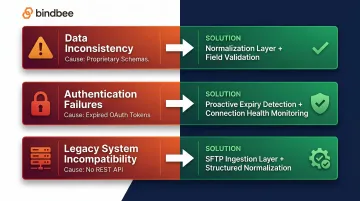
Data Inconsistency Across Systems
Employee records from the payroll system don't match what your platform expects, mismatched identifiers, missing fields, or incompatible date formats all cause downstream mapping failures. The root issue: each payroll provider uses a proprietary schema, so without a normalization layer, raw data arrives fragmented.
Fix:
- Map all system-specific fields to a consistent internal schema during ingestion
- Enforce field validation rules that flag missing or malformed data before it reaches your core product logic
Authentication Failures and Silent Sync Gaps
The integration goes offline without alerting anyone. Syncs stop running, data goes stale, and the issue surfaces only when an employer or end user reports an error. OAuth tokens expire and the refresh logic either isn't implemented or fails silently, or the employer revokes API access without any notification firing.
Fix:
- Build proactive token expiry detection with automated re-authentication prompts
- Implement connection health monitoring that alerts your team and the employer when a sync has not run within the expected window
- Set up webhook-driven status notifications rather than relying solely on polling
Legacy System Incompatibility
Older and regional payroll providers often don't expose REST APIs at all, they rely on flat file exports (CSV, EDI) via SFTP. That makes them incompatible with standard API-based integration architecture out of the box.
Fix: Implement an SFTP ingestion layer that parses, validates, and normalizes file exports into structured API-compatible data. This lets you support legacy systems through the same downstream data model without writing custom product logic per provider. Benefits and payroll integrations frequently rely on CSV or EDI 834 via SFTP.
Best Practices for Smooth Payroll Integration
Build for Maintainability, Not Just Go-Live
Payroll providers deprecate endpoints, release breaking API changes, and update authentication requirements, often without much warning. Build version management and regression testing into your integration roadmap from day one.
A useful starting point: track which API version each employer connection uses and automate alerts when a provider announces deprecations. That single step prevents a cascade of silent failures.
Use Webhooks Instead of Polling
Real-time event notifications for life events, new hires, terminations, benefits changes, reduce data latency and eliminate unnecessary API calls. This matters most during open enrollment, when stale eligibility data causes downstream enrollment failures.
Key events worth wiring up as webhooks:
- New hire records created
- Employee terminations and rehires
- Dependent additions and relationship changes
- Benefits election updates and effective date changes
Bindbee's built-in sync notifications and webhooks for life events make event-driven architecture straightforward to implement without building notification infrastructure from scratch.
Design Onboarding for Activation, Not Just Connection
A technically successful integration that requires 15 manual steps will see low employer adoption. Use embedded authentication components and pre-scoped permission flows to reduce setup friction. Track time-to-first-successful-sync, it's the clearest proxy for onboarding quality and where most adoption drop-off happens.
Frequently Asked Questions
What is the payroll integration process?
Payroll integration connects a payroll or HRIS system to an external platform, such as a benefits admin tool or HR tech product, so that employee data, pay information, and enrollment details flow automatically between systems. Setup typically involves connection configuration, field mapping, sync scheduling, and validation testing.
What are the 5 essential components of payroll?
The five core components are:
- Employee information and classification
- Gross pay calculation (wages, overtime, bonuses)
- Statutory deductions (federal, state, and local taxes)
- Voluntary deductions (benefits, retirement contributions)
- Net pay disbursement
Any payroll integration must account for all five to deliver complete data to downstream systems.
What are the 4 types of payroll systems?
The four types are in-house manual payroll, payroll software (cloud-based or on-premise), outsourced payroll services, and professional employer organization (PEO) managed payroll. Each type has different API availability and integration complexity implications. Approximately 500 PEOs operate in the US, serving 200,000+ businesses.
How long does payroll integration typically take?
Building a native integration with a single payroll provider typically takes 4–8 weeks per system when building from scratch. Using a unified API layer can reduce this to less than one day per connection by eliminating per-system development and normalization work.
What data is needed for payroll integration?
Core data typically includes:
- Employee identifiers and demographic details
- Employment status and classification
- Compensation and pay schedule
- Benefits elections and deduction amounts
- Dependent information
The exact fields depend on the downstream use case, benefits admin, carrier feeds, time and attendance, and similar downstream use cases.