
Introduction
Integrating a single time tracking API is manageable. Integrating time tracking data across multiple HRIS and payroll platforms, each with different schemas, auth flows, and timestamp conventions, is a different problem entirely.
According to a 2022 Ernst & Young survey, one in five payrolls contains errors, each costing an average of $291 to correct. Time and attendance errors are the most frequent category, occurring at 1,139 errors per 1,000 employees annually. An organization with 1,000 employees spends 29 workweeks per year fixing the most common payroll error types, many of which trace back to integration gaps.
This guide is written for engineering teams and product managers at HR Tech platforms, payroll tools, and workforce management applications who need to programmatically pull or push time entry data. It covers the prerequisites, endpoints, step-by-step integration sequence, and the three failure patterns responsible for most payroll data corruption in live integrations.
When those failure patterns hit production, the consequences are specific:
- Payroll miscalculations from stale time data
- Auth token failures causing silent sync gaps
- Compliance failures from mismatched timecard records
Key Takeaways
- A time tracking API lets applications programmatically create, read, update, and delete employee time entries, including shift start/end times, breaks, wages, and pay periods.
- Prerequisites: confirmed auth method (OAuth 2.0 or API key), a data model mapped between source and destination, and a defined timezone strategy.
- Integration sequence: authenticate → fetch employee context → create/sync timecards → validate entries → handle webhooks for real-time updates.
- Top failure points (token expiry, timezone offset mismatches, and field-level schema differences) each silently corrupt payroll data if unhandled.
Prerequisites and Setup Requirements
Before writing a single line of integration code, confirm four things:
- Which platforms you're connecting, and whether each exposes a REST API or only file exports
- Auth method per platform: OAuth 2.0 or static API key (these are not interchangeable)
- Required permission scopes: read vs. write, and which resources each scope covers
- Webhook support: whether the environment can receive real-time event payloads
Environment and Compatibility Checks
Not every HR or payroll system exposes a REST API for time tracking data. Some platforms, particularly legacy HRIS systems, only export flat files via CSV or SFTP. This is a hard decision point: a direct REST integration is not possible without an intermediary layer.
Check the following before proceeding:
- Does the target platform expose time tracking data via REST API, or only file exports?
- What API version is currently supported, and is your integration targeting a stable version?
- Does the platform enforce rate limits or pagination? Square, for example, does not publish fixed rate limits but returns HTTP 429 on throttling. Build retry logic regardless.
- Does the platform support cursor- or page-based pagination on list endpoints? Missing this causes incomplete bulk data pulls.
For teams connecting to systems that only expose SFTP file drops, a bridge layer that normalizes CSV/XML into structured JSON, then serves it through consistent API endpoints, is required. Bindbee's SFTP-to-API Bridge handles this case, making legacy system data available through the same normalized endpoints as modern REST integrations.
Authentication and Permissions Setup
Two auth patterns dominate time tracking APIs, and they serve different use cases:
| Pattern | When to Use | Example Platforms |
|---|---|---|
| OAuth 2.0 (Authorization Code) | Multi-tenant apps where users authorize access to their own accounts | Square (30-day tokens), Gusto |
| OAuth 2.0 (Client Credentials) | Server-to-server integrations with a single account | ADP (1-hour tokens), UKG Pro |
| Static API Key | Simple server-to-server with no user consent flow | BambooHR |
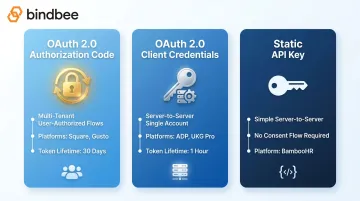
Token lifetimes vary across platforms. ADP access tokens expire after 3,600 seconds (one hour). Square tokens last up to 30 days. Your token refresh logic must account for the shortest expiry window in your system.
On scopes: request only what you need. Each platform uses its own scope syntax. Square uses TIMECARDS_READ and TIMECARDS_WRITE, ADP uses URI-style scopes like /time/timeLaborManagement/timeEntryManagement/timeSheetManagement/timeSheet.read, and Gusto requires a dedicated Time Tracking application type.
Requesting excessive permissions creates both security exposure and compliance risk under GDPR data minimization principles.
Key Endpoints and Data Objects in Time Tracking APIs
Core CRUD Endpoints
Time tracking APIs follow a consistent CRUD pattern, even when endpoint names differ across platforms:
| Operation | Square | ADP | Permission Required |
|---|---|---|---|
| Create entry | POST /v2/labor/timecards |
POST /events/time/v2/time-entries.modify |
WRITE |
| Read single | GET /v2/labor/timecards/{id} |
GET /time/v2/workers/{aoid}/time-cards |
READ |
| List/search | POST /v2/labor/timecards/search |
GET /time/v2/worker-time-cards?$filter=... |
READ |
| Update entry | PUT /v2/labor/timecards/{id} |
Via .modify event |
WRITE |
| Delete entry | DELETE /v2/labor/timecards/{id} |
Via .modify event |
WRITE |
List and search endpoints return paginated results. Most time tracking APIs use cursor-based pagination. Pass the cursor value from each response into the next request. Missing this step causes incomplete records during bulk pay-period syncs.
Key Data Objects
Three objects make up the core data model across time tracking APIs:
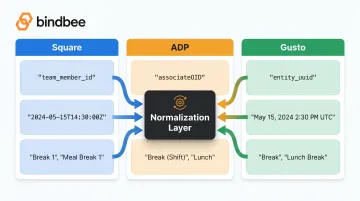
Timecard / TimeEntry: the primary object. Contains shift start/end time, team member ID, location ID, break array, and wage snapshot. Field names for the same concept differ across platforms: start_at (Square), startDateTime (ADP), shift_started_at (Gusto). Any integration pulling from multiple sources needs a normalization layer.
Break object: nested within the timecard. Includes break start/end times and paid/unpaid status. Square uses a breaks[] array with rich objects; ADP represents breaks via entryTypeCode categories. The two structures are incompatible without a mapping layer.
Wage/Rate object: embedded in the timecard at creation time. Square's wage object includes title, hourly_rate (in cents), and tip_eligible. This is a point-in-time snapshot: it captures the employee's rate at shift time, not a live reference. Capture this field at creation. Recalculating it later from a current wage table will produce wrong payroll numbers if rates have changed.
Getting the wage snapshot right matters for payroll accuracy. The same goes for WorkweekConfig, an object most integrations miss entirely. It defines the business week start day and time, which determines overtime calculation boundaries under FLSA. Square fires a labor.workweek_config.updated webhook when this changes. A misconfigured workweek is silent: overtime reporting looks fine until payroll actually runs.
How to Integrate a Time Tracking API: Step-by-Step
The five steps below cover the full integration sequence, from authentication through real-time sync. Follow them in order: skipping employee context resolution or timezone normalization creates data integrity issues that won't surface until payroll run time, by which point they're expensive to trace.
Step 1: Authenticate and Validate Access
Obtain and store credentials based on your auth pattern. For OAuth, implement token refresh logic before building any data layer, not after the fact. For client credentials flows with short expiry windows (ADP's one-hour tokens), refresh must be proactive, not reactive.
Validate with a test read call and confirm the response matches your expected schema. If the structure doesn't match, investigate before proceeding. Schema mismatches caught here save hours of debugging downstream.
Step 2: Fetch Employee and Contextual Data
Before creating time entries, resolve the identifiers that the destination system expects:
- Team member / employee IDs (format varies: UUID, alphanumeric, opaque string)
- Location IDs
- Job and wage assignments
Mismatched IDs between systems are the leading cause of orphaned timecard records. Build an explicit lookup step that maps source-system identifiers to destination-system identifiers, and store this mapping in your integration layer.
Step 3: Create and Sync Time Entries
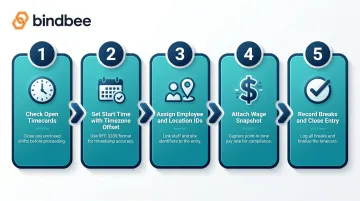
The timecard creation flow, in order:
- Check for open timecards. If the employee has an unclosed shift, close it before creating a new record
- Set start time with explicit timezone offset using RFC 3339 format:
2024-03-15T09:00:00-05:00 - Assign team member ID and location ID using the resolved identifiers from Step 2
- Attach wage data at creation time. This is the point-in-time snapshot
- Use update calls mid-shift to record breaks and close the entry with an end time
Never pass naive timestamps. If the source system stores local time without a UTC offset, apply the stored timezone reference for that location before transmitting.
Step 4: Validate and Reconcile Records
After creation, run three checks before marking the step complete:
- The entry is visible in the destination system
- Break durations and total worked hours calculate correctly
- Wage fields are populated as expected
Automated reconciliation, comparing source vs. destination record counts per pay period, should be part of your initial build. Silent data loss won't surface until a payroll discrepancy forces a manual audit.
Step 5: Implement Webhooks for Real-Time Updates
Polling introduces lag and burns API quota. Webhooks are the right model here. Configure handlers for:
- Clock-in (
labor.timecard.created) - Clock-out and edits (
labor.timecard.updated) - Deletions (
labor.timecard.deleted) - Break type changes and workweek config updates
Webhook payloads include a unique event_id. Use this for idempotent event handling. Check for existing records by external ID before inserting. Networks retry webhook deliveries; blind inserts create duplicate timecard entries.
For teams syncing time data across multiple HRIS or payroll platforms at once, Bindbee normalizes data models and handles webhook fan-out across 65+ systems through a single integration. Healthee cut integration deployment from 8–12 weeks to 24–48 hours after making the switch.
Common Integration Problems and How to Fix Them
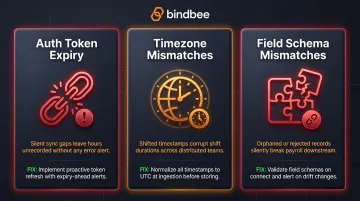
These three issues account for the majority of support escalations in time tracking integrations, and none of them throw obvious exceptions. They corrupt payroll data quietly, without warning.
Issue 1: Auth Token Expiry Causing Silent Sync Failures
Problem: Time entry syncs stop without a visible error. The OAuth access token has expired and refresh logic isn't working.
Why it happens: ADP tokens expire after one hour. If the integration only refreshes on 401 failure rather than proactively before expiry, the 401 response gets swallowed by insufficient error handling and the sync silently stops.
Fix:
- Check token expiry time before each API call, not only on failure
- Set up alerting for repeated 401 responses so the team is notified immediately
- Never discover missing records at payroll run time. Monitor auth health continuously
Issue 2: Timezone Mismatches Corrupting Shift Times
Problem: Timecards show incorrect shift durations or appear on the wrong calendar day, producing incorrect overtime calculations.
Root cause: The sending system stores timestamps in local time without a UTC offset. The receiving API expects RFC 3339 format with an explicit offset (e.g., 2024-03-15T09:00:00-05:00). When naive timestamps are passed, the API defaults to UTC and every timestamp shifts.
Fix:
- Always transmit timestamps with explicit UTC offsets
- Store a timezone reference per work location in your integration layer
- Test with locations in at least three different time zones before going live
Note: Gusto requires both a UTC timestamp and a separate time_zone string field for exactly this reason. UTC alone loses the local business context needed for compliance reporting.
Issue 3: Field Schema Mismatches Between Systems
Problem: Required fields fail validation on the destination platform because they were mapped to non-equivalent fields from the source.
Why it happens: Employee identifiers alone require mapping between team_member_id (Square), associateOID (ADP), and entity_uuid (Gusto). That's three different naming conventions and likely three different format patterns. Developers assume one-to-one field mapping without verifying against both schemas.
Fix:
- Build an explicit field mapping document before writing integration code
- Test with real data from both systems, not sample payloads
- Reject malformed entries at the validation layer. Don't forward bad data downstream
Pro Tips for Clean Time Tracking API Integrations
A few practices separate integrations that hold up in production from ones that quietly break at the worst possible moment:
Build for idempotency from day one. Webhook events arrive multiple times due to network retries. Use upsert logic with an external ID check. Never blind inserts. Square's Create Timecard endpoint accepts an
idempotency_keyparameter for exactly this reason.Treat pay period boundaries as required test cases. Most overtime and payroll bugs surface at workweek boundaries, not mid-week. Explicitly test timecards that span midnight, cross pay period cutoffs, and land exactly on the workweek boundary your
WorkweekConfigdefines.Version your field mappings alongside integration code. When an upstream API deprecates a field or changes a type, an undocumented mapping produces a silent failure. Keep a living mapping spec and subscribe to each API's changelog. If you're using a unified API layer like Bindbee, upstream versioning is handled internally. Breaking changes across all 65+ connected systems are absorbed without manual updates on your end.
Frequently Asked Questions
What is a time tracking API?
A time tracking API is a programmatic interface that allows applications to create, read, update, and delete employee time entry data, including shift start/end times, breaks, pay rates, and overtime records. It enables integration between time clock tools, HRIS platforms, and payroll systems without manual data transfer.
How do you track API response time?
Monitor latency on each API call using logging middleware, APM platforms, or built-in SDK instrumentation. Unusually slow responses on time tracking APIs typically indicate pagination issues, oversized payloads, or rate limit throttling.
What data does a time tracking API typically return?
Core fields include employee/team member ID, shift start and end timestamps, break start/end with paid/unpaid status, hourly wage at time of shift, job title, location ID, declared tips, and total worked minutes. Exact field names vary by platform. Field mapping is mandatory for multi-system integrations.
What authentication methods do time tracking APIs use?
Most modern platforms support OAuth 2.0 for user-authorized access and static API keys for server-to-server integrations. OAuth is generally preferred in production; token lifetimes range from one hour (ADP) to 30 days (Square).
How should timezone data be handled in a time tracking API integration?
Transmit all timestamps in RFC 3339 format with an explicit UTC offset (for example, 2024-03-15T09:00:00-05:00). Store a timezone reference per work location and apply it consistently at both creation and retrieval. Inconsistency here is a leading cause of incorrect shift duration and overtime calculation errors that can trigger IRS deposit penalties.