Introduction
Darwinbox API integration requires more groundwork than most HRIS connections. Before a single call succeeds, you need credentials provisioned by the Darwinbox team, the correct client subdomain, and a clear picture of which data fields are actually enabled on their masterapi — because many aren't active by default, and there's no self-serve way to check.
This guide is written for developers at HR Tech companies, Benefits Administration platforms, payroll tools, or any B2B product pulling structured employee data from a client's Darwinbox instance.
It covers everything from credentials and authentication through endpoint categories, write operations, webhooks, and the failure patterns that consume the most debugging time.
TL;DR
- Credentials are not self-serve: Darwinbox API requires a username, password, and API key. Get these from the client's Darwinbox Account Manager, or configure them via Darwinbox Studio if that module is enabled.
- All endpoints are subdomain-specific: Base URL pattern is
https://{{subdomain}}.darwinbox.in/— wrong subdomain = broken integration - Fields must be explicitly enabled: Fields like
department_name,cost_center_id, and others are off by default — each requires a formal enablement request to activate - Four primary API categories: Employee lifecycle, attendance/leave, payroll/CTC, and org master data
- A 200 OK is not a success signal: Write operations return both a
successarray and anerrorsarray; inspect both on every call.
What Is the Darwinbox API?
Darwinbox is a cloud-based HRMS platform serving 1,000+ enterprise customers and 3M+ employees across 130+ countries. Its API layer exposes the platform's core HR modules to external tools via RESTful endpoints authenticated with Basic Auth and an API key.
The Darwinbox Extensibility Suite supports 250+ APIs across RESTful and GraphQL interfaces — GraphQL is particularly useful when you need to fetch only specific employee fields rather than pulling full records on every call.
API Categories Available to Developers
| Category | What It Covers |
|---|---|
| Employee Lifecycle | Add, update, activate, deactivate employees |
| Attendance & Timesheets | Punch records, attendance reports |
| Leave Management | Leave transactions and balances |
| Payroll & CTC | Global CTC data, payroll processing |
| Org Master Data | Departments, locations, cost centers, designations |
| Recruitment | ATS data, job applications |
| Background Verification | Candidate verification workflows |
Worth noting for benefits and HR Tech builders: the Org Master Data and Employee Lifecycle categories carry the data most commonly needed for eligibility sync and census workflows.
Prerequisites for Darwinbox API Integration
Get these sorted before writing a line of code. Skipping this phase causes credential errors, missing fields, and permission failures that look like bugs but aren't.
Credentials
Darwinbox API authentication requires a username, password, and API key.
How you obtain them depends on the client's Darwinbox setup. Two paths:
- With Darwinbox Studio: Create a Studio User and configure API keys internally.
- Without Studio: Contact the client's Darwinbox Account Manager or representative directly.
When requesting credentials, ask for:
- API key
- Dataset key for active employees
- Dataset key for inactive employees (if your use case requires it)
Subdomain Configuration
Every endpoint is tied to a specific client subdomain: https://companyname.darwinbox.in/
Confirm the exact subdomain with the client's Darwinbox admin before building any endpoint references. A wrong subdomain produces connection failures that can look deceptively similar to auth errors — and send you debugging the wrong thing.
Field Enablement
This is the most commonly overlooked prerequisite. Darwinbox's masterapi does not expose all employee fields by default. Fields must be explicitly enabled by the Darwinbox team.
Request enablement for these fields upfront (based on ContactMonkey's integration guide):
department_name,department_codecost_center_id,cost_center_namedirect_manager_employee_iddate_of_joining,date_of_exit,date_of_activationemployee_status,employee_typecompany_email_id,personal_email_id,personal_mobile_nobusiness_unit,business_unit_codecurrent_address,current_city,current_countrypermanent_address,permanent_city,permanent_countrybase_office_location,work_area_code,office_statelatest_modified_timestamp
Submit this list in full at the start. Partial enablement requests cause partial data — and you'll burn time figuring out which fields are missing versus which ones don't exist.
Permission Scoping
When the API key is configured, specific module permissions must be granted inside Darwinbox. Scope these based on your use case before testing:
- Full employee sync: Select all available module permissions on the key.
- Read-only integrations: Limit permissions to the specific modules your integration reads from.
- Validation step: Confirm the permission set matches your use case — silent permission failures mid-integration are a real pattern.
How to Integrate with the Darwinbox API: Step-by-Step
Darwinbox API integration follows a defined sequence: authenticate, fetch org data, sync employee records, configure write operations if needed, set up webhooks for event-driven flows, then validate. Reordering these steps — particularly starting with write operations before validating read access — creates hard-to-isolate failures.
Authenticate Your API Requests
Darwinbox uses HTTP Basic Authentication on most endpoints. The mechanics:
- Combine
username:passwordinto a single string - Base64-encode that string
- Pass it in the
Authorizationheader:Authorization: Basic <encoded_string> - Pass the
api_keyseparately in the JSON request body — not the header
Example request body for the Employee Master API:
{
  "api_key": "your_api_key",
  "datasetKey": "your_dataset_key",
  "employee_ids": ["E001", "E002"]
}
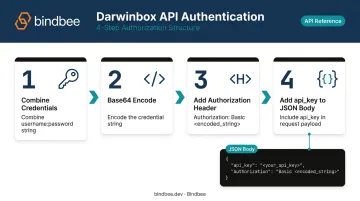
The api_key in the body and the Basic Auth credentials in the header are both required. Missing either one fails the request.
Darwinbox also supports OAuth 2.0 and a legacy Dynamic Key method, but Basic Auth + API key is the standard documented flow for most integration use cases.
Fetch Employee Data
Two primary read endpoints cover most scenarios:
- Full Load (
post_fetch_employee_data_full_load): Retrieves all employees in a single call. Best for initial data population. Responses include anemployee_dataarray with per-record objects. - Single/Multiple Employees (
post_fetch_employee_data_single_multiple_employees_full_load): Accepts an array ofemployee_idsin the request body. For targeted record refreshes, this avoids the overhead of a full dataset pull.
For ongoing sync, the latest_modified_timestamp field (once enabled on masterapi) lets you identify recently changed records. For endpoints like Fetch Leave Transactions and Fetch Attendance Report, use date-range parameters to limit response size rather than pulling everything on every run.
Write Operations: Add, Update, and Deactivate Employees
Three core write operations cover the employee lifecycle:
Add Pending Employee (
post_add_pending_employee): Creates a new record. Mandatory fields:Firstname,Lastname,Email,Date of Joining,Date of Birth,Employee Type,Designation Code,Office Location Work Area Code, andGender. Missing any mandatory field causes a per-record error, not a request-level failure.Update Employee Record (
post_update_employee_record): Modifies an existing record. The identifier isEmailorEmployee ID.Deactivate Active Employee (
post_deactivate_active_employee): Offboards employees. Mandatory fields:employee_id,deactivate_type(set toterminated),deactivate_reason,date_of_resignation, anddate_of_exit.
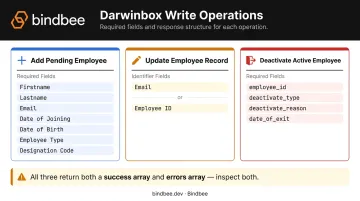
Critical: All three operations return both a success array and an errors array in the response body. A 200 OK response means the request was received. It does not mean all records processed successfully. Parse both arrays on every write call.
Set Up Webhooks for Real-Time Event Sync
For event-driven flows (such as syncing a hired candidate from Greenhouse to Darwinbox as a pending employee), Darwinbox uses the Studio API Builder.
Configuration steps:
- Create a custom webhook endpoint URL in Darwinbox Studio API Builder
- Configure the webhook with a secret key, username, password, and custom API key in HTTP headers
- Set the
custom-api-keyheader value using the key from the Darwinbox Studio Module's API Keys section - Define the trigger event type (such as "Candidate has been hired")
The Studio URL pattern follows: https://{{sub-domain}}.darwinbox.com/studioapibuilder/green-v1.0/house
Post-Integration Validation
Test every endpoint against known employee records and verify the employee_data array matches expected field values. For write operations, cross-check both the success list and error list. For webhooks, trigger a test event and confirm the payload arrives at the configured endpoint with correct headers.
Per-record error messages in the response JSON are your actual source of truth — HTTP status codes alone won't surface data-level failures.
Common Darwinbox API Integration Issues and Fixes
Most failures fall into three patterns. Knowing them upfront saves hours.
Authentication Failure on Every Request
API calls return 401 Unauthorized or connection errors despite seemingly correct credentials.
Likely causes:
- Basic Auth credentials are not Base64-encoded
- The
api_keyis placed in the request header instead of the JSON body - The subdomain in the base URL doesn't match the client's actual Darwinbox instance
Fix:
- Verify the exact subdomain with the client's Darwinbox admin
- Confirm Basic Auth is passed as a Base64-encoded
username:passwordin theAuthorizationheader - Check that
api_keyis in the JSON request body, not the header
Missing or Empty Fields in Employee Response
The API returns employee records, but many expected fields (department_name, manager ID, address fields) are null or absent.
Likely cause: Required fields haven't been enabled on the client's masterapi configuration. This is a server-side setting controlled by the Darwinbox team — not something you can fix in your code.
Fix: Compile your full field list and submit a formal enablement request to the client's Darwinbox Account Manager. Account for turnaround time before proceeding with data mapping.
Write Operations Return 200 But Records Not Created
Add or update calls return HTTP 200 with no obvious error, but employee records don't appear in Darwinbox.
Likely causes:
- Per-record errors exist in the
errorsarray that aren't being inspected - Mandatory fields (like
Designation CodeorOffice Location Work Area Code) are missing - The API key lacks write permissions for that module
Fix: Parse the errors array in every write response. Validate all mandatory fields before submitting. Confirm write permissions are enabled on the API key for the relevant module.
Pro Tips for Effective Darwinbox API Integration
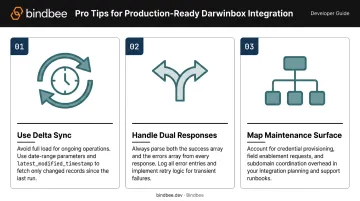
Three patterns separate integrations that hold up in production from ones that don't:
- Use delta sync, not full load, for ongoing operations. The Full Load endpoint retrieves every employee record on each call — expensive at scale. Use date-range parameters on attendance and leave endpoints, and rely on
latest_modified_timestamp(once enabled) to filter changed records. - Build error handling around the dual-response structure. Every bulk write returns both a success list and an errors list in the same response body. Process both arrays, log error entries with their employee identifiers, and implement retry logic for transient failures. Treating a 200 as a clean success is the most common source of silent data loss.
- Map out the maintenance surface before committing to native integration. Credential provisioning, field enablement requests, and subdomain configurations each require coordination across multiple parties. When a product needs to support Darwinbox alongside many other HRIS systems, that overhead compounds fast.
For teams where HRIS integration is infrastructure rather than a core differentiator, a unified API is worth comparing directly against native build costs. Bindbee normalizes employment data from 60+ HRIS and payroll systems through a single connection, handling credential workflows, rate limiting, and provider-specific response quirks so your engineering team doesn't have to.
Frequently Asked Questions
What is Darwinbox used for?
Darwinbox is an enterprise HRIS platform covering HR management, payroll, performance, recruitment, attendance, and employee engagement. Companies across 130+ countries use it to manage the full employee lifecycle — onboarding, payroll, performance, and offboarding.
Is Darwinbox cloud-based?
Yes. Darwinbox is a fully cloud-based, SaaS-delivered platform hosted on AWS and Azure. All API endpoints are accessible via the client's unique subdomain — no on-premise infrastructure is required.
Is Darwinbox an Indian company?
Darwinbox was founded in Hyderabad, India and remains headquartered there. It serves enterprise customers globally across Asia-Pacific, the Middle East, and beyond.
What authentication method does the Darwinbox API use?
Darwinbox uses HTTP Basic Authentication — a Base64-encoded username:password string in the Authorization header — combined with an api_key in the JSON request body. Both credentials are provisioned through the client's Darwinbox account and require Darwinbox Studio access to obtain.
What data can I sync using the Darwinbox API?
The main data categories available via the Darwinbox API include:
- Employee profile data (read and write)
- Attendance and timesheets
- Leave transactions
- Payroll and CTC data
- Organizational master data (departments, locations, designations)
- Background verification workflows
How long does a Darwinbox API integration typically take?
Timeline varies based on credential provisioning speed, field enablement turnaround, and integration complexity. Native integrations typically take several weeks when accounting for all coordination steps. Teams using a unified API layer like Bindbee can cut that to under a day — versus the 4-8 weeks a native build typically requires.