
The reality is more nuanced. According to HR.com's 2024 research, 91% of organizations report that lack of useful HR tech integration impacts their business operations, and 35% say their HR tools lack effective integration entirely. The demand for unified APIs is real. But so are the trade-offs (schema compression, vendor dependency, data freshness constraints) that teams often discover only after committing.
This guide covers what unified API platforms actually do well, where they fall short, how they compare to iPaaS and native integrations, and what to evaluate before you sign a contract.
Key Takeaways
- A unified API normalizes multiple third-party systems into a single API contract: you build once and deploy across all supported integrations.
- Key benefits: faster time to market, automatic data normalization, zero integration maintenance burden.
- Key limitations: schema compression loses vendor-specific fields, and polling-based sync means data isn't always real-time.
- Vendor lock-in is a real risk. Switching unified API providers later carries meaningful migration cost.
- Choosing the right platform comes down to your domain (HR, benefits, payroll), compliance requirements, and how deeply your product needs to integrate.
What Is a Unified API Platform?
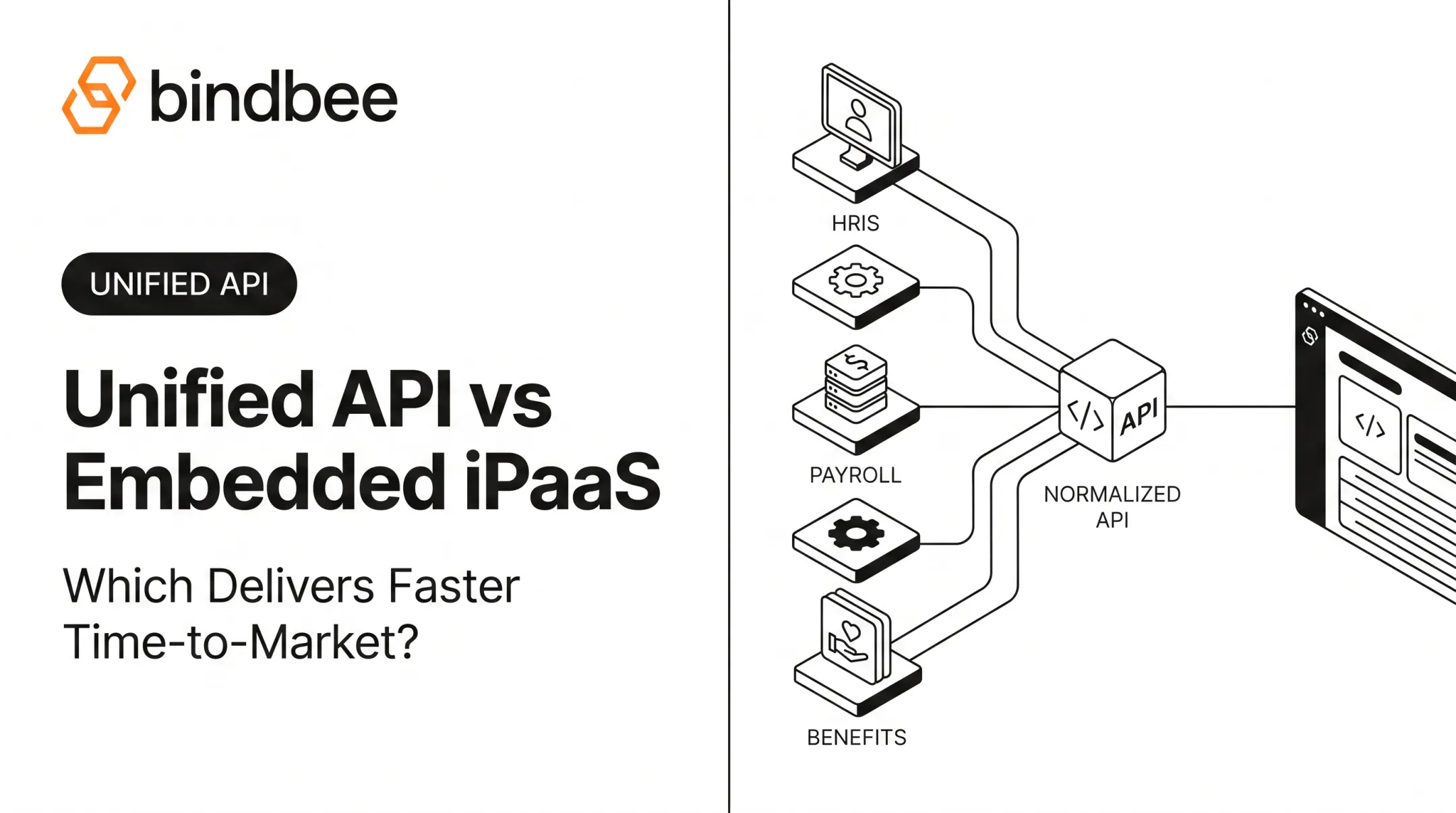
A unified API platform is an abstraction layer that normalizes multiple third-party APIs (think 10+ HRIS systems, payroll platforms, benefits carriers) into a single, consistent API contract. Developers build one integration and get normalized data back from any supported provider.
A commonly cited definition: "A single interface that connects your application to multiple APIs in the same software category through one standardized endpoint. You authenticate once, write your integration code once, and get normalized data back from any provider."
How Data Normalization Actually Works
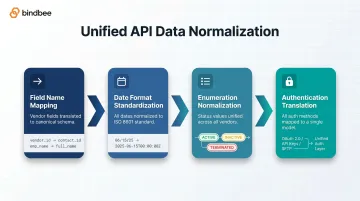
The core mechanism is schema translation. When you call a unified API for employee data, the platform:
- Maps vendor-specific field names to canonical equivalents (e.g., Workday's
Workerobject →Employee) - Standardizes date formats to ISO 8601 across all providers
- Normalizes enumerated values like employment status (
ACTIVE,INACTIVE,TERMINATED) - Translates authentication flows (OAuth 2.0, API keys, SFTP) into a single auth model
Raw source data is typically retained for edge cases where the normalized schema isn't sufficient. More on that in the limitations section.
Why It Matters for HR Tech and Benefits Platforms
68% of organizations manage between 2 and 7 distinct paid HR technology solutions, with 30% using five or more. For a benefits platform or HR Tech product, that fragmentation means your customers each run different HRIS systems. You need to connect to all of them.
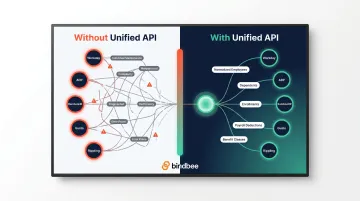
The contrast is stark:
- Without a unified API: Build separate connectors for Workday, ADP, BambooHR, Gusto, Rippling, and dozens more, each with its own auth flow, schema quirks, and maintenance burden
- With a unified API: One data model covers employees, dependents, enrollments, payroll deductions, and benefit classes. Faster employer onboarding. Consistent eligibility syncing, regardless of which system your customer runs.
Bindbee, for example, covers 15 unified data models across 60+ HRIS, payroll, ATS, and benefits systems. That includes three purpose-built benefits models (Employee Benefits, Employer Benefits, and Dependent Benefits) that generic HR APIs typically flatten or miss entirely.
The Key Benefits of Using a Unified API Platform
Faster Time to Market
Building a native API integration from scratch isn't a simple task. A single provider requires handling OAuth flows, token refresh cycles, pagination logic, rate limiting, field mapping, error normalization, and documentation tracking. The hours accumulate fast.
The Postman 2025 State of the API Report (surveying 5,700+ developers) found that 69% of developers spend 10 or more hours per week on API-related tasks, with 26% spending more than 20 hours weekly. That's before counting the ongoing maintenance burden.
Unified APIs compress the per-integration build from weeks to hours by pre-solving the authentication, field mapping, and error handling layers. Bindbee's customers report going live in under one day for initial integrations, adding subsequent integrations without meaningful additional development effort, since the same endpoints and data models apply across all 60+ supported systems.
Automatic Data Normalization
Inconsistent schemas are a consistent source of errors in downstream analytics and eligibility systems. One HRIS formats employment status as full-time; another uses FT; a third uses a numeric code. Without normalization, every data consumer needs to handle these variations individually.
A unified API enforces a consistent schema across all providers:
- Standardized field names and data types
- Uniform date formats (ISO 8601)
- Consistent enumeration values for employment status, coverage tier, relationship type
- Normalized currency and compensation representations
This eliminates custom ETL logic per provider and reduces the silent data errors that contaminate analytics pipelines and eligibility decisions.
Zero-Maintenance Integration Management
API maintenance is unpredictable by design. Providers deprecate versions, modify authentication flows, and update field schemas, often without adequate notice. Postman's 2025 data shows only 26% of organizations use semantic versioning despite 60% claiming to version their APIs.
Unified API platforms handle upstream changes for you. When a provider updates their API, the platform's engineering team handles the migration. Customer integrations keep working without code changes.
Supporting features typically include:
- Built-in webhooks for life events (new hires, terminations, dependent changes)
- Automated error detection and retry logic
- Sync status dashboards with searchable logs
- Proactive alerts for sync failures
Bindbee explicitly takes ownership of maintaining integrations when upstream API changes occur, including authentication flow changes and schema modifications, so customer engineering teams never get pulled into vendor-specific firefighting.
Broader Market Reach Without Engineering Overhead
Every unsupported integration is a deal you can't close. A prospect on Paylocity walks away if your platform only connects to BambooHR and Gusto.
Unified APIs change this math. Supporting 30 additional HRIS systems doesn't require 30 additional engineering projects. It's covered by the platform's existing connectors. Sales teams can commit to integration coverage during enterprise deals without creating downstream engineering bottlenecks.
The business impact scales quickly. Phin, an employee gifting platform running on Bindbee, achieved $115,000+ annual savings in development costs and a 94% improvement in time-to-value for customers after eliminating custom-per-HRIS integration work.
Built-in Compliance and Security Infrastructure
For any platform handling employee data, benefits enrollments, or dependent information, compliance isn't optional and building it from scratch is expensive.
Reputable unified API platforms hold relevant certifications as part of their core offering:
- SOC 2 Type II, operating effectiveness of security controls over time
- ISO 27001, information security management
- HIPAA, required for any platform processing protected health information as a data sub-processor (per HHS Business Associate Agreement requirements)
- GDPR, for platforms with EU data subjects
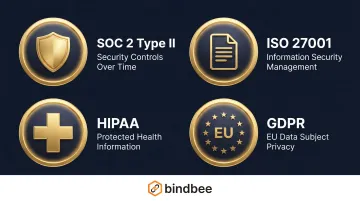
Bindbee holds SOC 2 Type II, ISO 27001, HIPAA compliance, and GDPR-ready status, with multi-region data residency across US, EU, and APAC. That coverage matters for benefits platforms managing sensitive dependent data, coverage elections, and health enrollment information across jurisdictions.
The Real Limitations and Cons to Consider
Lowest-Common-Denominator Schema Risk
To normalize across dozens of providers, unified APIs converge on the intersection of what every supported system has in common. Fields that only exist in some systems get dropped or flattened.
A well-documented example: Workday's native Worker object contains roughly 17,000 tokens via the SOAP API. In a typical unified employee schema, this compresses to approximately 600 tokens, losing structured fields like compensation_grade, nested objects, and custom configurations.
Before committing to a vendor, verify:
- Does the platform support custom field passthrough?
- Can you access vendor-specific fields alongside the normalized model?
- Is raw source data accessible for edge cases?
Bindbee handles this via an include_custom_fields=true parameter that surfaces vendor-specific fields in a dedicated custom_fields object alongside the normalized schema, so you get consistency without sacrificing access to platform-specific data.
Data Freshness and Real-Time Limitations
Most unified APIs operate on polling-based sync intervals rather than true real-time. For back-office HR and benefits data, this is usually acceptable. For user-facing features that depend on immediate state changes, it's a real constraint.
Sync model considerations for HR Tech:
- New hire creation, termination, and dependent changes often need prompt processing to avoid coverage gaps
- Benefits enrollment effective dates are time-sensitive. Delays can affect carrier submissions
- COBRA qualifying event detection has federal notice deadlines (14–44 days)
Bindbee's sync frequency ranges from 24-hour intervals on base plans to configurable intervals on Enterprise, with webhook notifications available on Pro and Enterprise tiers for life events. Manual syncs can be triggered on demand.
This covers most HR and benefits use cases, though teams building features requiring sub-minute data freshness should evaluate whether a dedicated event-streaming approach is needed.
Vendor Lock-In and Dependency Risk
Building on a unified API creates a concentrated dependency. An outage, pricing change, or vendor shutdown affects all downstream integrations simultaneously, not just one.
Before signing, confirm:
- Review data export and portability policies before signing
- Verify SLA track records and uptime history
- Understand deprecation practices and communication timelines
- Assess whether integration logic is portable if you need to migrate
Added Cost Layer at Scale
Unified API platforms typically price per active customer connection or by usage tier. Costs scale as your customer base grows, which is predictable, but worth modeling before you commit.
The relevant comparison is fully-loaded engineering cost: development, QA, authentication management, schema drift handling, version migrations, monitoring, and on-call response. US software development rates run $90–$160 per hour according to FullStack Labs' 2025 pricing guide.
A single integration with ongoing maintenance adds up fast at those rates.
Bindbee uses a flat-fee-per-connection model with no API call volume charges, which makes cost projection straightforward. Use Bindbee's ROI calculator to model your specific scenario.
Coverage Gaps and Roadmap Dependency
No unified API covers every system. If a key integration your customer needs isn't on the supported list, you're waiting on the vendor's roadmap or building it yourself anyway.
What to evaluate:
- Does the platform cover the specific HRIS, payroll, and benefits systems your target customers actually use?
- Does it support legacy systems with SFTP-based or file-based exports, not just REST APIs?
- Can the vendor build custom integrations for systems not yet in the catalog?
Bindbee's SFTP-to-API bridge handles legacy systems that only export flat files (CSV, XML, and fixed-width formats), normalizing them into the same JSON schema as REST API integrations. For systems outside the standard catalog, Bindbee builds custom integrations on demand within a 7–10 day cycle.
Unified API vs. Alternatives: iPaaS, Native APIs, and More
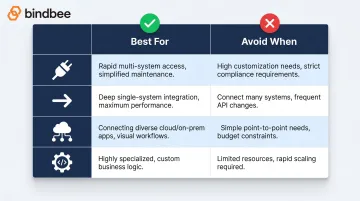
Decision Framework
| Approach | Best For | Avoid When |
|---|---|---|
| Unified API | Supporting 3+ integrations quickly; compliance matters; integration isn't your core product | You need extreme depth in 1–2 highly specialized systems |
| Native/Direct API | Mission-critical systems where depth and specificity are non-negotiable | You need to scale across many providers |
| iPaaS | Internal workflow automation; business process orchestration for IT/ops teams | Building customer-facing product integrations |
| In-house layer | Integration is your core differentiator; maximum flexibility required | You want to ship fast without dedicated integration engineering |
Unified API vs. Native Integrations
Native integrations offer maximum control and depth, ideal for one or two mission-critical systems. They don't scale. Each new provider requires full engineering investment: authentication, pagination, error handling, field mapping, and ongoing maintenance. That cost adds up fast. A hybrid approach often makes the most practical sense: use a unified API for breadth, build native for the one system where depth is non-negotiable.
Unified API vs. iPaaS
This is a common point of confusion. They're different tools for different buyers.
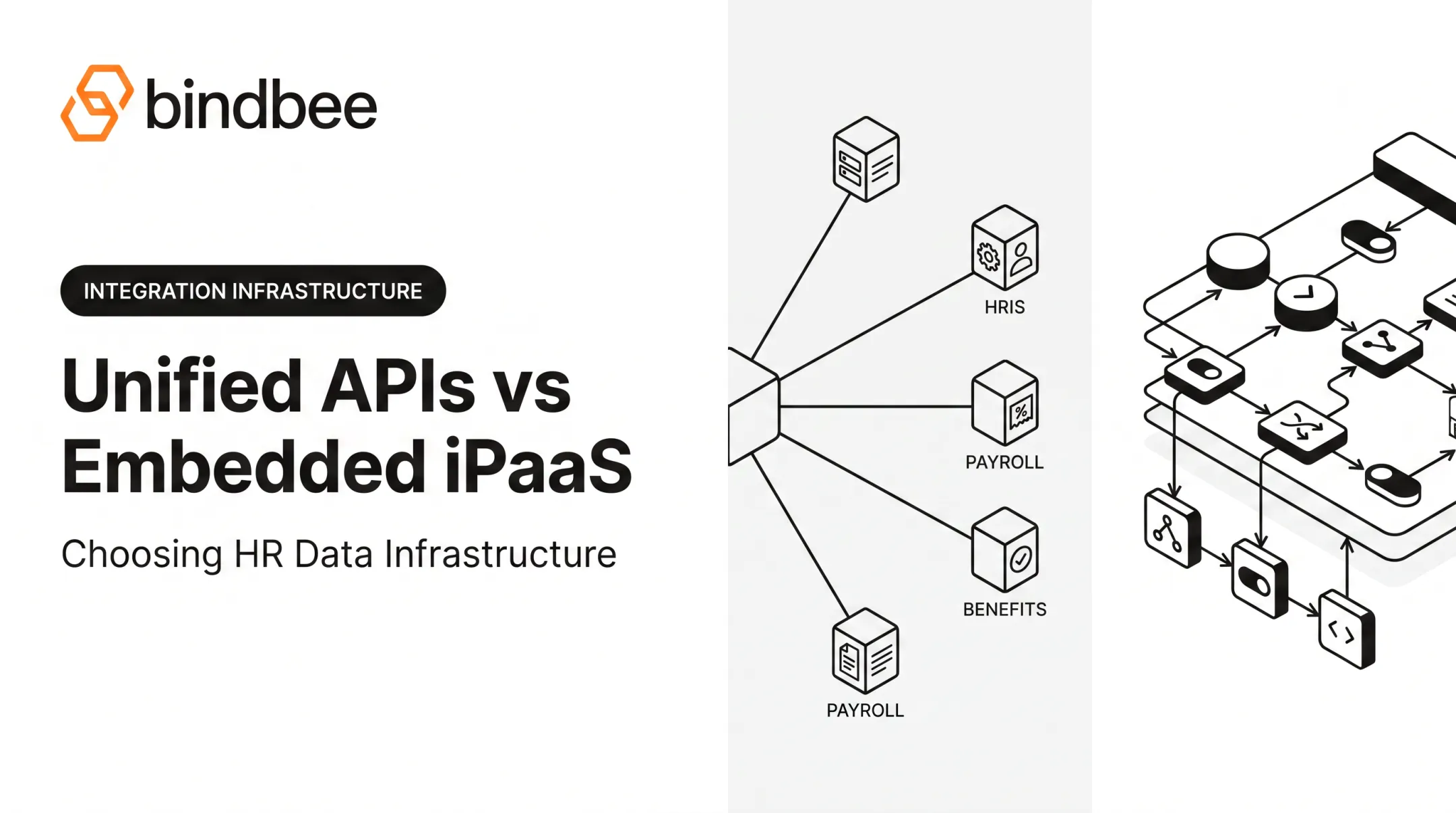
iPaaS (Workato, MuleSoft, Zapier) is workflow automation infrastructure: event-driven orchestration for internal business processes, typically operated by IT or operations teams. It's powerful for automating internal data flows between systems your organization controls.
Unified APIs are developer-first infrastructure for building customer-facing product integrations. The goal isn't workflow automation. It's a normalized data access layer that your product embeds. Different builders, different use cases, and they can be complementary.
Unified API vs. Building an In-House Integration Layer
Building your own normalizers, sync jobs, and connectors gives you maximum flexibility. It also consumes significant engineering capacity that could go toward core product development.
The calculation comes down to opportunity cost: every sprint spent on integration plumbing is a sprint not spent on product differentiation. Unless the integration layer itself is your product, buying typically wins on total cost and time-to-market once you're supporting more than two or three systems. The right choice depends on where integration sits in your product strategy: infrastructure you build on, or infrastructure you own.
How to Choose the Right Unified API for Your Use Case
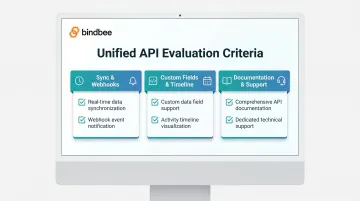
Not every unified API is built for your specific domain. The right evaluation comes down to three areas: coverage depth, compliance posture, and developer experience. Here's what to check in each.
Coverage Depth in Your Domain
Breadth of integrations matters less than relevance to your actual customer base. For HR Tech and benefits administration, verify the platform has:
- Deep coverage of the specific HRIS, payroll, and benefits systems your customers actually use
- Legacy system support (SFTP-to-API bridges for carriers and older HRIS platforms)
- Benefits-specific data models, not generic HR fields adapted for benefits
Compliance and Data Security Credentials
For platforms handling employee data, dependent information, or benefits enrollment, verify:
- SOC 2 Type II certification (operating effectiveness, not just design)
- ISO 27001 for information security management
- HIPAA compliance and willingness to sign BAAs (required for benefits data)
- GDPR readiness for international data subjects
- Multi-region data residency options if you operate across geographies
Sync Quality and Developer Experience
Key evaluation criteria before committing:
- Sync frequency options (what's available on your plan tier, and whether on-demand syncs can be triggered)
- Webhook support for life events (new hires, terminations, dependent changes, enrollment updates)
- Custom field passthrough (whether vendor-specific fields are accessible alongside the normalized schema)
- Implementation timeline (ask for a reference customer's time-to-live, then verify against your own proof-of-concept)
- SDK and documentation quality: can your engineers evaluate it independently without a sales call?
- Support model (dedicated technical support availability when production issues occur)
Frequently Asked Questions
What is a unified API platform?
A unified API platform is a single API layer that normalizes data from multiple third-party systems (such as HRIS, payroll, and benefits platforms) into one consistent data model, handling authentication, field mapping, and schema normalization across all supported providers. Developers build one integration instead of many.
What is the difference between unified API and iPaaS?
iPaaS tools like Workato or MuleSoft are designed for internal workflow automation and business process orchestration, typically used by IT or operations teams. Unified APIs are developer-first infrastructure for building customer-facing product integrations at scale, providing a normalized data access layer rather than workflow automation logic.
How long does it take to integrate a unified API platform?
Setup varies by vendor, but well-designed platforms can be integrated in hours to under one day, compared to the 4–8 weeks typically required for a single native API integration built from scratch. Adding subsequent integrations through a unified API takes no additional development time, since the same endpoints work across all supported systems.
What are the security risks of using a unified API?
A unified API becomes a data sub-processor for your customers' sensitive data. Verify the vendor holds SOC 2 Type II, ISO 27001, and HIPAA certifications, offers data processing agreements and BAAs, and has documented incident response practices. Ask vendors for their most recent audit reports, not just certification logos.
Is a unified API the same as an API aggregator?
"API aggregator" and "unified API" are used interchangeably in most contexts, though they're not identical. "Unified API" specifically implies a normalized, canonical data model with consistent developer tooling across all providers, going deeper than simple pass-through aggregation.
When should I build integrations in-house instead of using a unified API?
Build in-house when you need maximum depth for one or two highly specialized systems, when the integration layer itself is your core product differentiator, or when a required provider isn't covered by any unified API platform in your domain.