

11 Best Practices for External API Integrations
Summarise the blog with AI
For most HR tech and benefits platforms, external integrations quickly become a bottleneck. Your team ships a new feature, but customers ask the familiar question: “Does it integrate with our HRIS or payroll system?”
Building these connections internally may seem manageable, but each external API integration can take weeks to develop, test, and maintain. Vendor APIs change, rate limits break data syncs, and small errors turn into product issues. Engineers end up maintaining integrations instead of shipping features.
A better approach is to treat external API integrations as a structured system rather than a quick feature build. When you standardize authentication, error handling, monitoring, and version control, integrations become predictable and easier to maintain. With the API management market projected to reach USD 22.11 billion by 2031, efficient integration practices are more crucial than ever.
Teams that follow clear integration practices reduce outages, protect sensitive data, and keep their product roadmap on track. This guide walks you through practical, engineering-focused best practices for integrating external APIs to keep your platform secure, reliable, and maintainable.
Key Takeaways:
- External API integrations connect your platform with third-party systems, automating workflows and supporting business processes effectively.
- Clear data mapping, secure authentication, rate limiting, and version control are essential for reliable, maintainable integrations.
- Error handling, monitoring, data validation, and automated syncing keep integrations resilient and reduce operational issues.
- Scalability, retry mechanisms, and thorough documentation ensure integrations continue performing as your platform and traffic grow.
- Common challenges include vendor API changes, inconsistent data models, downtime, security risks, and ongoing maintenance overhead.
What is External API Integration and Why It Matters?
External API integration allows one application to communicate with another system outside its infrastructure. Instead of building every feature internally, your platform connects with third-party services through APIs to exchange data and trigger actions automatically.
In practical terms, external APIs act as bridges between different software platforms.
For example:
- HR software may pull employee data from payroll platforms.
- Benefits tools sync eligibility data from HRIS systems.
- Learning platforms import employee rosters automatically.
- Finance platforms integrate with accounting systems.
Here’s why it matters:
- Connect systems efficiently: APIs act as bridges between platforms like HR tools, CRMs, payroll systems, and logistics services.
- Automates workflows: Integrations reduce manual work by syncing data between systems in real time.
- Support business workflows: Smooth integrations ensure processes like payroll, benefits enrollment, and customer management run without disruption.
- Influences adoption and sales: B2B buyers often choose platforms based on integration capabilities with existing tools.
- Maintain scalability and reliability: Proper integration design keeps your systems working even when API providers update their services.
When you treat integrations as a strategic capability instead of a quick feature, your platform becomes easier to scale, maintain, and expand.

Also Read: What is a Unified API?
11 Best Practices for External API Integrations
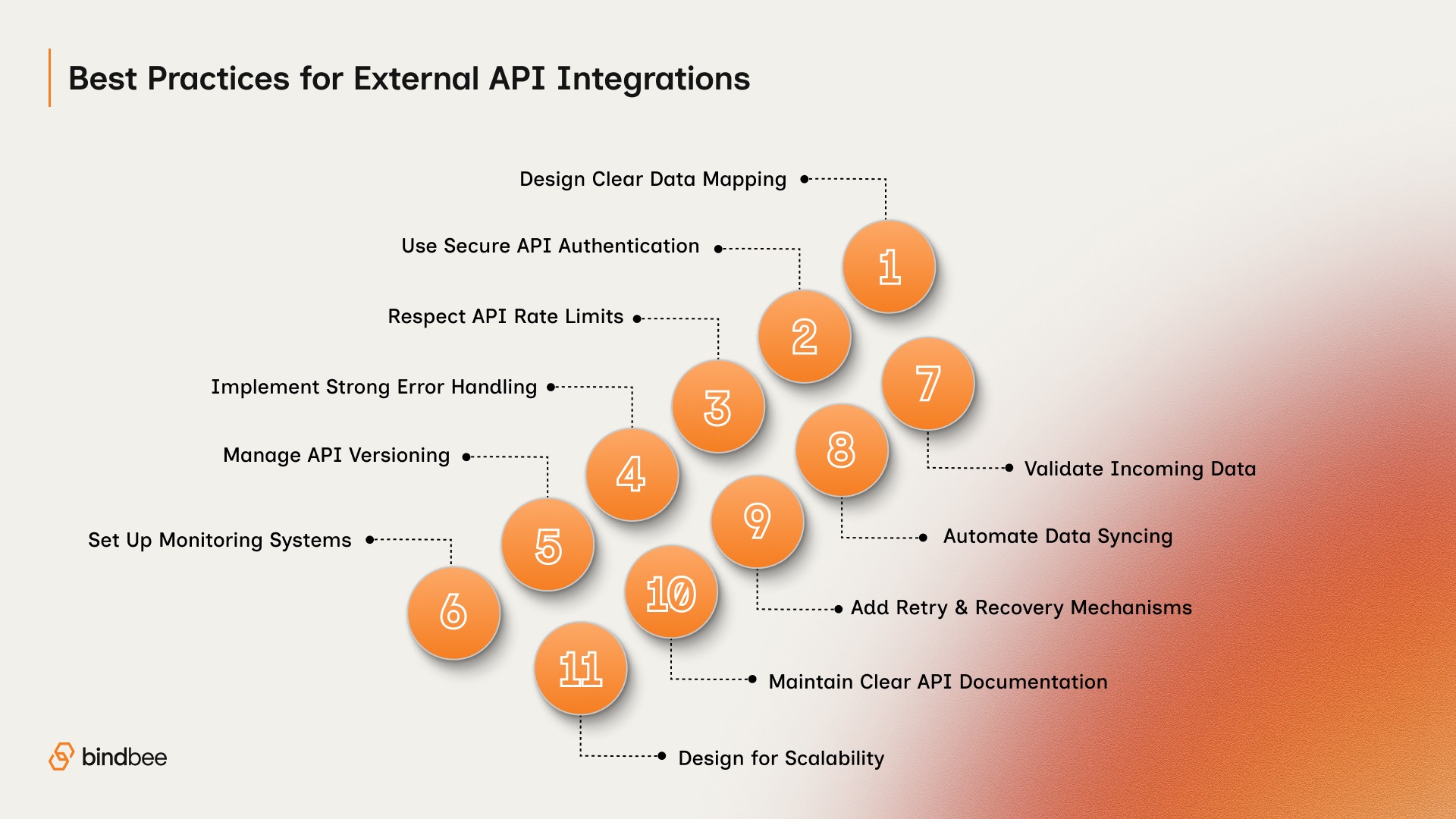
External API integrations succeed when they are built with long-term reliability in mind. The goal is not just to connect systems once, but to maintain consistent data exchange even as APIs evolve and traffic increases.
Below are the key best practices that help engineering teams build integrations that remain stable, secure, and scalable over time.
1. Design for Clear Data Mapping
APIs often expose data in formats that differ from your system. Designing clear mappings between your internal models and the external API helps you maintain consistent, accurate data flow.
Key points to follow:
- Define field-to-field mappings before integration
- Use standardized data types and formats
- Handle optional or missing fields explicitly
Clear mapping reduces errors and makes future maintenance easier.
2. Use Secure Authentication and Authorization
Security should be the first priority when connecting to external APIs. Most modern APIs use OAuth 2.0, API keys, or token-based authentication.
Ensure that your integration process includes:
- Secure token storage
- Token refresh mechanisms
- Role-based access control
- Encrypted data transmission using HTTPS
Avoid hard-coding credentials in your application. Instead, store secrets in secure configuration systems or environment variables.
3. Respect Rate Limits and Throttling
External APIs set limits to prevent abuse or downtime. Ignoring these limits can interrupt your data flow and affect users.
To handle this properly:
- Implement request throttling in your integration
- Queue requests when limits are reached
- Monitor API usage and peak traffic patterns
Proper handling helps maintain smooth operations even under heavy usage.
4. Implement Reliable Error Handling
Failures are inevitable in real-world integrations. Your system should anticipate errors without causing downtime or corrupting data.
Include mechanisms for:
- Retry logic for temporary failures
- Exponential backoff to avoid overwhelming APIs
- Clear logging of errors for rapid troubleshooting
- Fallbacks for partial failures
Strong error handling helps keep your product resilient even when external systems fail.
5. Use Versioning to Manage API Changes
External API providers frequently release new versions. These updates may introduce changes to data structures, endpoints, or authentication methods.
To prevent sudden integration failures:
- Track API version updates
- Maintain compatibility with older versions when possible
- Test new versions in staging environments before deploying them
Version control helps maintain continuous integration without unexpected disruptions.
6. Build Monitoring and Observability Systems
Without monitoring, issues may go unnoticed until they affect your users. Observability helps you detect failures early and maintain uptime.
Set up:
- Dashboards tracking response times, error rates, and failed requests
- Real-time alerts for critical failures
- Logs with contextual information for debugging
Monitoring gives your engineering team visibility and control over integrations.
7. Validate Data Before Processing
External systems may send incomplete or unexpected data. Without validation, these issues can corrupt your internal records.
Before processing API responses:
- Check required fields
- Validate data formats
- Confirm schema compatibility
Strong validation helps prevent downstream errors in your application.
8. Automate Data Syncing and Scheduling
Manual data transfers are error-prone and slow. Automating data syncing helps ensure your product always has accurate information.
Implement:
- Scheduled syncs for high-volume updates
- Incremental data updates instead of full reloads
- Conflict detection and resolution for overlapping data
Automation reduces operational burden and keeps data consistent.
9. Create Retry and Recovery Mechanisms
APIs can fail due to network issues or rate limits. Retry mechanisms help make sure temporary failures don’t block your workflows.
Include:
- Automatic retries with backoff
- Queues for delayed or failed requests
- Alerts for repeated failures requiring manual review
This approach keeps integrations resilient and reliable.
10. Maintain Clear API Documentation
External API integrations often outlive the original engineers who built them. Without documentation, maintaining them becomes difficult.
Document:
- Authentication processes
- Endpoint usage
- Data mappings
- Error handling logic
Clear documentation makes troubleshooting and onboarding easier for future teams.
11. Design for Scalability
As your user base grows, integrations must handle increasing traffic without slowing your product.
Plan for:
- Horizontal scaling of integration services
- Distributed processing of high-volume requests
- Optimized data processing and caching
- Load testing before deployment
Scalable design helps integrations handle growth without slowing down.
Also Read: Third-Party Integration Guide: Setup, APIs & Best Practices
Key Challenges in External API Integration

Even with good practices, external API integrations remain complex. Most teams encounter recurring challenges when managing multiple third-party connections.
Common challenges include:
- Vendor API Changes: Third-party APIs frequently update endpoints, fields, and authentication rules, which can break integrations if not monitored.
- Inconsistent Data Models: Different systems represent similar data in varying ways, requiring careful mapping to prevent errors or data loss.
- Reliability and Downtime: External APIs are outside your control; vendor downtime can disrupt workflows and impact your users.
- Security and Compliance Risks: Integrations often handle sensitive data, and weak authentication or unencrypted transmission can create vulnerabilities.
- Integration Maintenance Complexity: Supporting multiple third-party APIs requires monitoring vendor updates, schema changes, and authentication rules.
Understanding these challenges helps you design systems that anticipate them rather than react to them.

How Bindbee Helps Simplify External API Integrations?
Managing multiple external API integrations internally can drain engineering resources and slow product innovation. Bindbee addresses these challenges by providing a unified API solution designed specifically for HR Tech and benefits platforms. Here’s how it helps:
- Single integration for 65+ systems: Connect once to Bindbee’s API and instantly access HRIS, payroll, ATS, and benefits platforms, eliminating months of individual integration work.
- Prebuilt data models: Bindbee standardizes 17 HR objects per system, including employee roster, PTO, compensation, dependents, and payroll deductions, so your application gets consistent, reliable data.
- Automated monitoring and error handling: Real-time monitoring, retry mechanisms, and proactive alerts ensure data flows smoothly, even when vendor APIs change or experience downtime.
- Compliance-ready infrastructure: Bindbee handles SOC 2, HIPAA, and GDPR-ready standards, giving you peace of mind for U.S.-specific employee and benefits data.
- Faster onboarding and time-to-value: Integration delays often slow down customer onboarding and sales cycles. With Bindbee, one customer reduced onboarding time by 85%, helping teams move from integration to activation significantly faster.
- Ongoing maintenance handled by Bindbee: No need for your engineering team to track changes across dozens of APIs, Bindbee updates and maintains integrations as vendor systems evolve.
- Unified schema for simplified development: Applications interact with a consistent API layer rather than multiple vendor-specific formats, reducing code complexity and potential for errors.
- Support for trials and demos: Bindbee’s demo-led and trial approach ensures teams can test integrations confidently before purchase, helping close deals faster without technical bottlenecks.
By handling these integration complexities, Bindbee allows your team to focus on core product development, scale faster, and deliver enterprise-ready reliability.
Conclusion
External API integrations are essential for modern SaaS products, but they require careful planning. Security controls, rate-limit handling, monitoring, and version management all play a role in building reliable integrations. When these practices are implemented correctly, integrations become stable and scalable rather than a constant engineering burden.
If you want to accelerate time-to-value and reduce maintenance overhead for HR and benefits integrations, a unified, vertically focused platform like Bindbee removes a large portion of the integration burden.
Book a demo to see how Bindbee can help you connect with dozens of HR platforms through a single integration.
FAQs
1. What are the key security measures for external API integrations?
Use API keys or OAuth for authentication, enforce role-based access, validate all inputs, monitor usage with rate limiting, encrypt sensitive data in transit and at rest, and regularly audit endpoints to prevent unauthorized access and data breaches.
2. Why is using HTTPS essential for API communications?
HTTPS encrypts data exchanged between client and server, protecting sensitive information from interception or tampering. It also ensures data integrity and authenticity, builds trust with users, and is a standard requirement for most modern API platforms and compliance frameworks.
3. How to design modular code for easy API swaps?
Abstract API interactions into separate service layers or classes, define clear interfaces, and avoid hardcoding endpoints. This allows switching providers or updating API versions with minimal changes to the core application logic, reducing downtime and maintenance complexity.
4. What role do webhooks play in API integrations?
Webhooks enable real-time event-driven communication by sending notifications from one system to another. They reduce the need for constant polling, improve responsiveness, and automate workflows, making integrations more efficient and reducing system load.
5. How to implement retry logic with exponential backoff?
Retry failed API requests with increasing delays between attempts, doubling the wait time after each failure up to a maximum threshold. This approach prevents overwhelming servers, accommodates temporary outages, and improves the reliability of integrations without causing unnecessary traffic spikes.