


API Integration Best Practices and Examples

Summarise the blog with AI
If you build HR, benefits, or workforce software, integrations are rarely a small task. Your customers expect your product to connect with systems like ADP Workforce Now or Workday from day one.
Each new integration can take weeks of engineering time, and ongoing updates often break existing connections. In fact, Akamai's State of the Internet (SOTI) report found that web application and API attacks rose 49% between Q1 2023 and Q1 2024, underscoring the need for secure, resilient integrations.
This is where strong API integration best practices make a difference. When you standardize authentication, data models, monitoring, and version control from the start, integrations become far easier to manage at scale. With the right approach, you can reduce maintenance overhead, improve system reliability, and help your product scale as customer demand grows.
This guide explores how API integrations work, the components that enable them, and the strategies teams use to build secure, scalable integrations.
At a Glance:
- API integrations connect systems to automate workflows, improve data accuracy, and support smoother operations.
- Successful integrations rely on well-defined endpoints, strong security, data mapping, error handling, and monitoring.
- Different integration types, point-to-point, middleware, unified, and event-driven, serve varied scalability and workflow needs.
- Following best practices like scalable design, versioning, standardized data models, strong error handling, and thorough documentation provides reliable integrations.
- Structured implementation, ongoing monitoring, and unified platforms simplify integration management and reduce maintenance challenges.
What is API Integration and Why It Matters?
API integration refers to connecting two or more software systems so they can exchange data automatically. APIs act as the communication layer that allows platforms to request, send, and update information between systems.
In practice, this means your application can retrieve employee data from an HR system, send payroll updates to a benefits platform, or synchronize customer information between a CRM and marketing tool.
Here’s why it matters:
- Automation of workflows: Integrations automatically move data between systems, reducing manual tasks and minimizing operational delays.
- Improved data accuracy: When systems sync directly through APIs, you reduce the risk of human error and maintain consistent data across platforms.
- Better product adoption: Customers prefer tools that integrate with their existing systems, making integrations critical for SaaS growth.
- Faster decision-making: Real-time data synchronization ensures teams always work with the most current information.
- Operational efficiency: Integrations eliminate repetitive processes, allowing teams to focus on higher-value work.
- Scalability for growing platforms: As your product expands, integrations help connect new tools and systems without disrupting existing workflows.
Core Components of a Successful API Integration
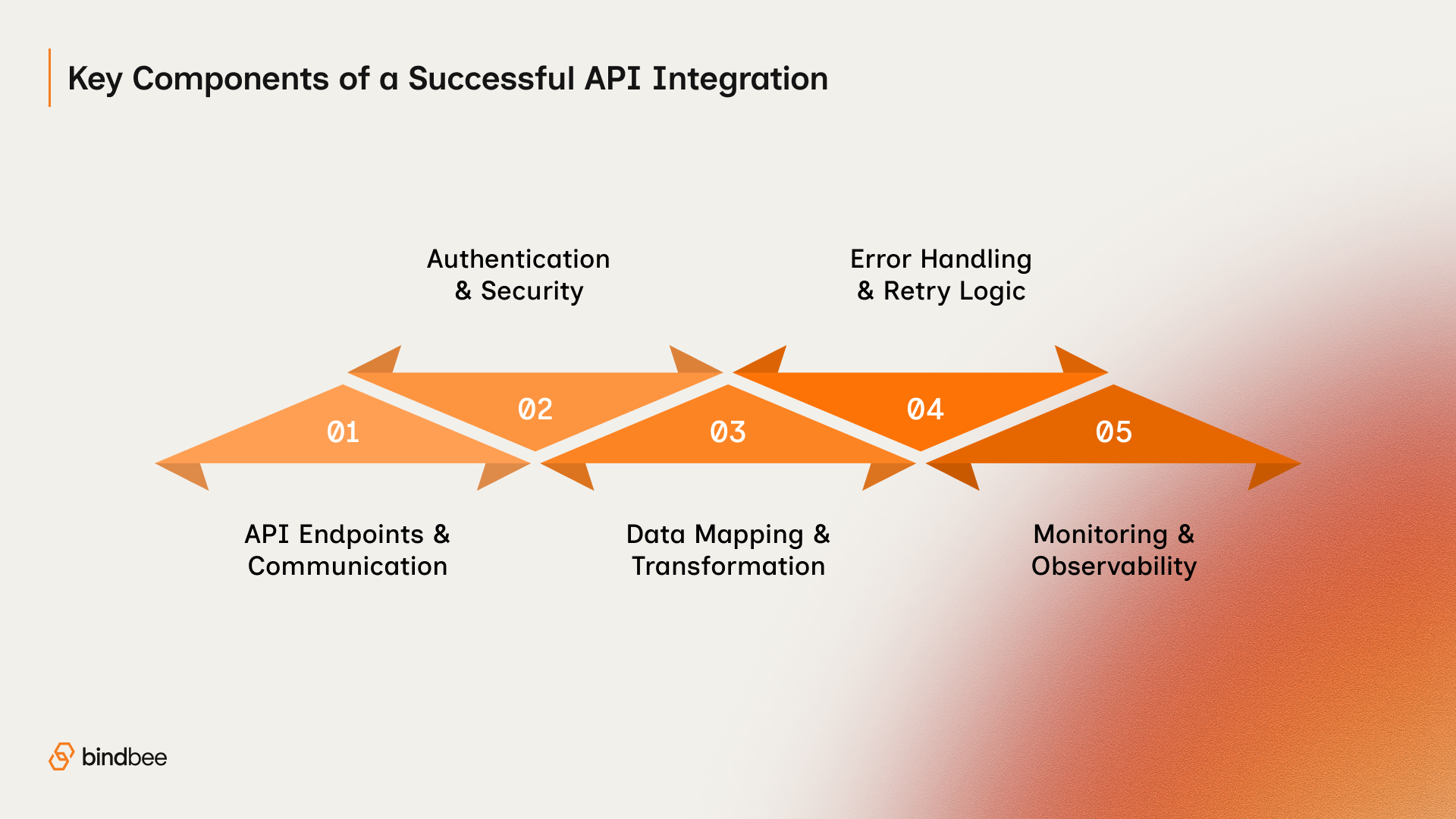
A successful integration requires more than simply connecting endpoints. It involves several technical components working together to ensure reliable communication between systems.
- API Endpoints and Communication: Clearly defined endpoints determine how applications request and exchange data. Consistent endpoint structures make integrations easier for you to implement and maintain.
- Authentication and Security: Authentication ensures that only authorized systems access the API. Methods such as API keys or token-based authentication help protect your sensitive data and prevent unauthorized requests.
- Data Mapping and Transformation: Different platforms often store data in different formats. Data mapping aligns fields between systems so information such as employee IDs, records, or transaction transfers is transferred correctly across your systems.
- Error Handling and Retry Logic: Network failures and temporary outages are common in integrations. Error handling and retry mechanisms help your systems recover automatically without losing data.
- Monitoring and Observability: Monitoring tools track API performance, request volume, and error rates. This visibility helps you spot issues early and keep your integrations reliable.
Understanding these components helps you build integrations that scale and stay maintainable as your systems grow.

Also Read: Top 5 API Advantages for Business Growth and Efficiency
Types of API Integrations and When to Use Them
Not all API integrations are built the same way. Different integration architectures serve different purposes depending on system complexity, scalability requirements, and data flow patterns.
Knowing these integration models helps you choose the approach that works best for your product as it grows.
1. Point-to-Point Integrations
Point-to-point integrations connect two systems directly through their APIs. Each integration is built for the platforms you’re connecting to, so every new system you add needs its own custom connection.
This approach can work when your product only needs a few integrations. However, the complexity increases quickly as more systems are added. Each new connection adds more integrations for you to maintain, monitor, and update whenever APIs change.
Best for: Small systems or early-stage products with only a few integrations.
2. Middleware Integrations
With middleware integrations, you add a layer between your systems. Instead of connecting every platform directly, each system communicates through the middleware, which handles routing, transformation, and orchestration of data.
This centralized layer makes it easier for you to manage integrations and reduces the number of direct connections you need. Middleware platforms often provide additional capabilities such as workflow automation, monitoring, and error handling, helping you manage larger systems more smoothly.
Best for: Organizations managing multiple integrations that require centralized control and monitoring.
3. Unified API Integrations
Unified APIs provide a single standardized interface that connects to multiple external systems. Instead of building separate integrations for each platform, you integrate once with the unified API and get access to many services.
This model makes it easier to maintain your integrations and saves your development team time. It also standardizes data models across systems, so you can build scalable integrations more simply. Platforms like Bindbee use this approach to connect applications with numerous HR, payroll, and benefits systems through one API.
Best for: SaaS platforms that need to support integrations with multiple third-party systems.
4. Event-Driven Integrations
Event-driven integrations trigger actions when specific events occur within a system. For example, when a new employee is added to an HR system, an event can automatically update payroll, benefits, and training platforms.
This model lets your systems sync in real time. Instead of relying on scheduled updates or manual data transfers, your systems react instantly when changes happen, making operations more accurate and reliable.
Best for: Real-time workflows that require immediate updates across multiple systems.
API Integration Best Practices for Scalable and Secure Systems

Developing integrations without clear standards often leads to unstable systems. Following API integration best practices helps you build integrations that stay secure, scalable, and maintainable.
1. Design APIs with Scalability in Mind
Your integration may start with a small number of clients or limited API traffic. Over time, usage grows as more clients connect their systems and automation expands. If the integration architecture cannot scale, performance problems start to appear.
Designing APIs for scalability helps your integration continue working smoothly even as traffic grows.
Key approaches include:
- Efficient endpoints: Only return the data that the client actually needs.
- Pagination: Split large datasets into manageable segments.
- Caching frequently requested data: Reduce repetitive API calls.
- Asynchronous processing: Allow systems to process heavy operations in the background.
For example, instead of returning an entire employee database in one request, a scalable API retrieves records in batches. This keeps systems responsive even as organizations grow.
When scalability is built into your integration architecture, your platform can support larger customers without major infrastructure changes.
2. Use Strong Authentication and Security Protocols
API integrations often exchange sensitive information such as employee data, payroll records, or financial transactions. Without proper authentication and encryption, these integrations could expose confidential data.
Strong security protocols protect your systems and help only authorized applications access the API.
Security best practices include:
- Token-based authentication: Use OAuth or similar secure methods instead of static credentials.
- Encrypted communication: Ensure all requests use HTTPS.
- Access control permissions: Restrict what each application can access.
- Credential rotation: Update API keys periodically to prevent unauthorized access.
For instance, a benefits platform integrating with a payroll system must ensure that only approved applications can retrieve employee compensation data.
Following these security practices protects both your infrastructure and your customers’ data.
3. Standardize Data Models
Different systems often represent the same information in different formats. Without standardization, your integrations constantly translate between inconsistent data structures.
Standardizing data models simplifies your integration work and reduces errors when exchanging information between platforms.
Important practices include:
- Unified schemas for common objects such as employees or departments.
- Consistent field naming conventions.
- Data transformation layers to reconcile system differences.
- Validation rules to ensure incoming data matches expected formats.
For example, one HR system may label a field as employee_id, while another uses workerID. Without standardized mapping, integrations may misinterpret or duplicate records.
Creating unified data models simplifies integrations and reduces the complexity of supporting multiple platforms.
4. Implement Rate Limiting and Throttling
APIs must protect themselves from excessive traffic. Without limits, a sudden surge in requests can slow systems down or cause service disruptions.
Rate limiting and throttling control how frequently applications can access an API.
Typical controls include:
- Maximum requests per minute or hour.
- Automatic throttling when request limits are exceeded.
- Priority access for critical operations.
- Response headers that inform clients about their remaining quota.
For example, an API might allow 1,000 requests per minute for a client application. If the application exceeds this threshold, the system temporarily slows or blocks additional requests.
Implementing these controls helps your API stay stable even under heavy usage.
5. Use Versioning to Maintain Compatibility
APIs evolve as new features and capabilities are added. Without versioning, these updates can break existing integrations and disrupt workflows.
Versioning allows teams to introduce improvements while keeping older integrations functional.
Common versioning practices include:
- Version identifiers in endpoints, such as /v1/ or /v2/.
- Backward compatibility to support existing integrations.
- Clear deprecation timelines before removing older versions.
- Detailed change documentation explaining updates.
For example, if a new field is added to an employee record, a new API version can support the change without affecting existing integrations.
Version control helps integrations stay stable as your platform changes.
6. Build Robust Error Handling
Failures are inevitable in distributed systems. Network issues, API downtime, or invalid data can interrupt integrations. Without proper error handling, these failures can cause data loss or workflow disruptions.
Reliable error handling helps your integrations recover quickly and provides useful diagnostic information.
Important practices include:
- Clear and descriptive error messages.
- Automatic retry mechanisms for temporary failures.
- Structured error codes to categorize problems.
- Fallback workflows when the primary request fails.
For example, if a payroll system temporarily rejects a request, retry logic can automatically attempt the request again after a short delay.
This approach prevents data loss and keeps integrations running smoothly.
7. Maintain Comprehensive Documentation
Documentation directly affects how easily developers can integrate with an API. Poor documentation leads to confusion, development delays, and increased support requests.
Clear documentation helps your developers understand how the API works and implement integrations quickly and accurately.
Strong documentation typically includes:
- Detailed endpoint descriptions.
- Authentication and authorization instructions.
- Sample API requests and responses.
- Error code explanations.
- Implementation guides for common workflows.
For example, developers integrating with an HR platform should be able to quickly understand how to retrieve employee records or update benefits data.
Accurate documentation shortens development cycles and improves the developer experience.
8. Implement Monitoring and Logging
Even well-built integrations require continuous visibility once they are deployed. Monitoring and logging systems track performance metrics and identify issues before they affect users.
Operational visibility allows engineering teams to maintain reliable integrations over time.
Common monitoring practices include:
- Tracking API response times and request volumes.
- Monitoring error rates and failure patterns.
- Setting alerts for unusual activity or downtime.
- Logging requests and responses for debugging.
For instance, if an API suddenly begins returning a high number of authentication errors, monitoring alerts allow teams to investigate immediately.
With continuous monitoring, your integrations stay reliable, and you can resolve issues quickly.

Also Read: Top 10 API Integration Companies for 2026 & How to Pick the Right One
These practices help engineering teams maintain reliable integrations across large and complex software ecosystems.
Step-by-Step Process for Implementing API Integrations
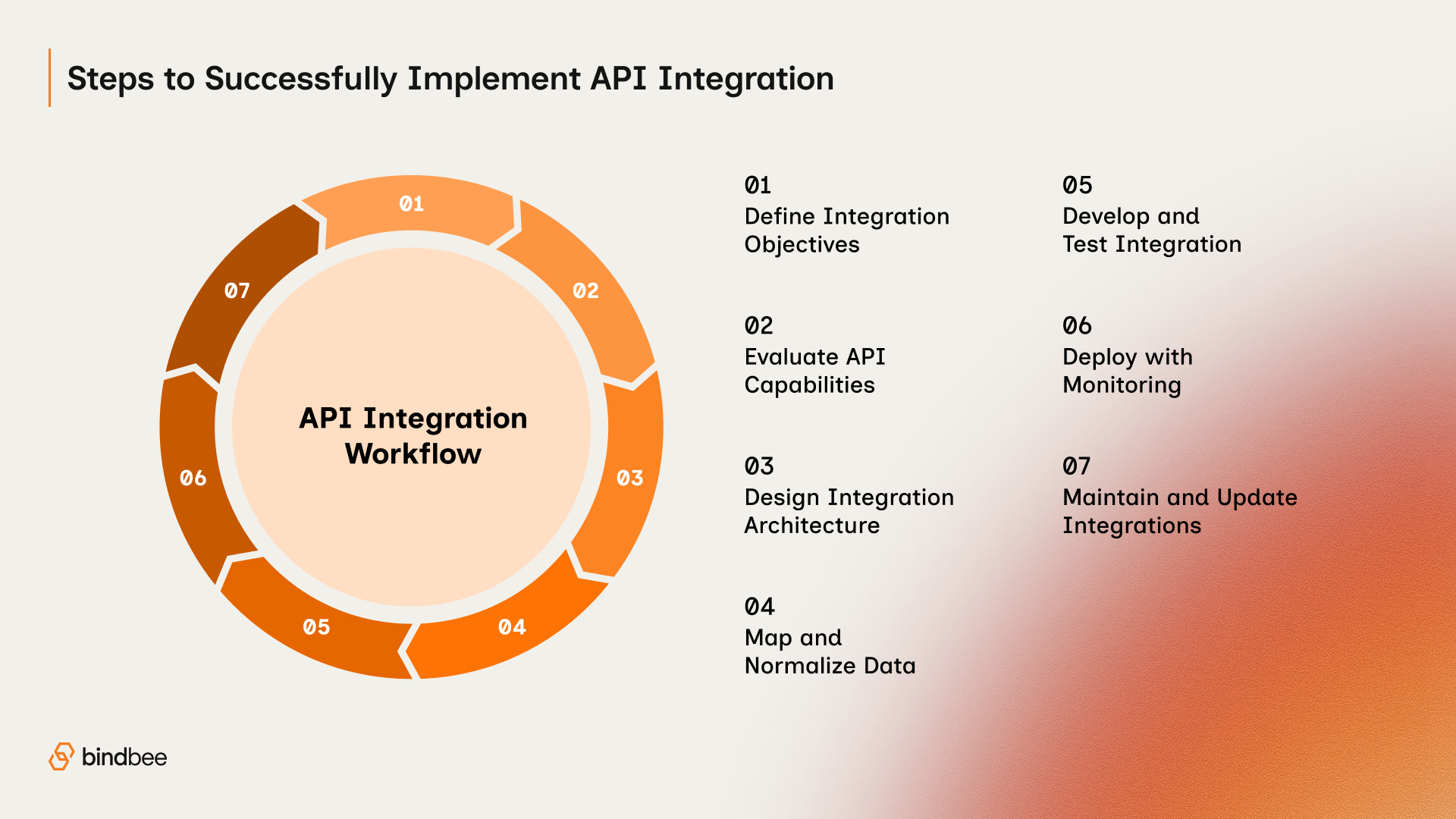
Even with strong technical infrastructure, API integrations require careful planning and execution. Following a structured implementation process reduces errors and improves long-term stability.
- Define integration objectives: Start by identifying which systems need to communicate and what data should move between them. Clear goals help your team design the integration around actual workflows instead of assumptions.
- Evaluate the target API capabilities: Review the API’s documentation, authentication methods, rate limits, and available endpoints. Understanding these constraints early helps you prevent unexpected problems during development.
- Design the integration architecture: Decide whether a direct integration, middleware layer, or unified API approach fits your system best. The architecture should support growth and reduce long-term maintenance challenges.
- Map and normalize data structures: Different systems store information in different formats. Creating consistent mappings keeps employee records, payroll details, or account data accurate across platforms.
- Develop and test the integration: Implement authentication, request handling, and error management while testing different scenarios. Make sure your system can handle API failures, timeouts, and rate limits effectively.
- Deploy with monitoring in place: Once the integration is ready for production, use monitoring tools to track request success rates, response times, and failures. This visibility lets you detect issues quickly.
- Maintain and update integrations continuously: APIs evolve, and integrations must adapt to version updates and structural changes. Regular checks and updates help your integrations stay reliable over time.
These steps guide engineering teams through the full lifecycle of an integration project.
Common Challenges in API Integrations
Even with best practices, API integrations present several challenges. Recognizing these challenges helps your teams prepare mitigation strategies early in the development process.
- API Changes and Version Updates: Third-party APIs frequently evolve. Endpoints, parameters, or authentication methods may change, which can disrupt your integrations if you don’t manage versions and monitor updates.
- Data Inconsistencies Across Systems: Different platforms store similar data in different formats. Without proper normalization and mapping, integrations may create duplicate records or inaccurate data.
- Performance Limitations and Rate Limits: Many APIs restrict the number of requests allowed within a time window. If your integrations exceed these limits, requests may fail or slow down critical operations.
- Error Handling and Downtime: Network interruptions or temporary service outages can disrupt integrations. Without retry logic and error tracking, you risk missing or incomplete data transfers.
- Ongoing Maintenance Overhead: Building integrations is only the first step. Monitoring, updating endpoints, fixing bugs, and adapting to API changes can consume a significant amount of your engineering resources over time.
How Bindbee Simplifies API Integrations for SaaS Platforms
Many SaaS companies spend months building integrations and even more time maintaining them. This is where unified API platforms provide significant advantages.
Bindbee helps software companies simplify complex HR and payroll integrations through a unified API. Instead of building dozens of integrations individually, teams connect once and access multiple systems through a standardized interface.
Here’s how we can assist you:
- One API to connect with 102+ systems at once: Bindbee’s unified API lets you integrate once and instantly gain compatibility with dozens of HRIS, payroll, ATS, and benefits platforms without vendor‑specific builds or ongoing connector maintenance.
- Consistent, standardized data models: All employee records, payroll data, PTO balances, compensation, and custom fields are normalized into a single schema, so your product isn’t left juggling different formats from different vendors.
- Real‑time syncs with webhooks: Data flows instantly through Bindbee’s event‑driven architecture, keeping changes up‑to‑date and eliminating the need for constant polling or manual checks.
- Faster customer onboarding: Bindbee’s “magic link” authorization and embedded UI components let your customers connect their HR systems quickly without technical support, dramatically improving onboarding conversion rates.
- Reduced engineering overhead: Your team no longer spends weeks building each individual integration; what used to take months can now go live in days, freeing engineers to work on strategic product features instead of maintenance.
- Integrated monitoring and dashboards: Bindbee’s centralized logs, alerts, and observability tools provide visibility into sync statuses, failures, and data flow without the need to build custom monitoring layers.
- Enterprise‑grade security and compliance: Built‑in SOC 2, GDPR, HIPAA, and ISO 27001 protections safeguard sensitive data across all integrations, helping you satisfy compliance requirements without additional effort.
- Scales from startups to enterprise: Whether you’re a fast‑growing HR Tech startup or a mid‑market benefits provider, Bindbee’s infrastructure scales with your user base and integration needs without fracturing into bespoke connector logic.
By removing the complexity of building and maintaining integrations, Bindbee allows product teams to focus on delivering new features instead of maintaining connectivity infrastructure.
Conclusion
API integrations are essential for modern software platforms. They allow applications to exchange data, automate workflows, and create seamless digital experiences across systems. Following proven API integration best practices helps teams build integrations that are reliable, scalable, and secure. Strong authentication, clear documentation, version control, and continuous monitoring all play a critical role in maintaining stable integrations.
As organizations rely on more interconnected systems, managing integrations efficiently becomes a strategic advantage. Platforms like Bindbee help companies simplify processes by providing a unified API for HR and payroll systems.
Book a demo today to see how Bindbee can help your team build reliable integrations faster and scale your platform without the integration maintenance headache.
FAQs
1. What are the best authentication methods for API integrations?
The most secure API authentication methods include OAuth 2.0, API keys, JWT (JSON Web Tokens), and mutual TLS. OAuth 2.0 is preferred for user-based access, while API keys or JWTs work well for server-to-server communication. Always use HTTPS to protect credentials.
2. What are common API versioning methods, such as URL path or headers?
API versioning ensures backward compatibility. Common methods include URL path versioning (e.g., /v1/resource), query parameter versioning (e.g., ?version=1), and header versioning (e.g., Accept: application/vnd.example.v1+json). Choice depends on API design, client flexibility, and maintainability.
3. What tools are best for testing API integrations?
Popular tools for API testing include Postman, Insomnia, Swagger UI, and automated frameworks like RestAssured or JUnit. These allow request simulation, response validation, and debugging, helping ensure APIs function correctly across environments and versions.
4. When to use OAuth 2.0 versus basic authentication in APIs?
Use OAuth 2.0 for secure, token-based, user-specific access with granular permissions, especially for third-party integrations. Basic authentication is simpler, using username and password, suitable only for internal, low-risk scenarios over HTTPS.
5. What is the role of correlation IDs in debugging API failures?
Correlation IDs are unique identifiers assigned to API requests. They help trace and link logs across multiple services, making it easier to debug failures, track request flow, and monitor performance in distributed or microservices-based architectures.


.jpg)




